

Latest Version
Version
7.1.1
7.1.1
Update
September 22, 2026
September 22, 2026
Developer
Panecraft, Inc.
Panecraft, Inc.
Categories
Tools
Tools
Platforms
Android
Android
Downloads
0
0
License
Free
Free
Package Name
jp.takke.videocutter
jp.takke.videocutter
Report
Report a Problem
Report a Problem
More About Video Cut & Merge - Fast LVC
What is Lossless Video Cutter (LVC)?
Lossless Video Cutter (LVC) is an app that lets you
cut, trim, and merge videos quickly without quality loss.
Perfect for removing unwanted parts, extracting clips, or joining multiple videos into one
— all without re-encoding.
Main Features
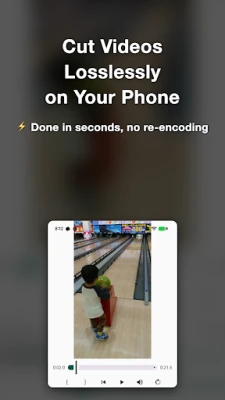
- Lossless cutting: Trim or split videos while keeping the original quality
- Multi-Cut mode: Remove multiple unwanted segments and join the rest into one video
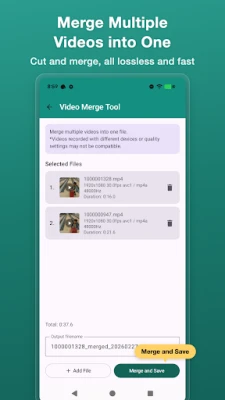
- Lossless merging: Join multiple videos into one without quality loss
- Ultra-fast processing: No re-encoding, minimal waiting time
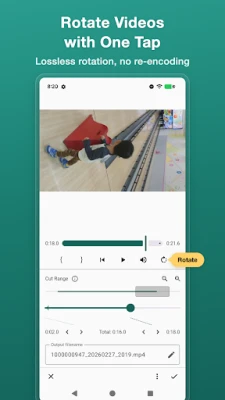
- Video rotation: Rotate videos in 90-degree increments while editing
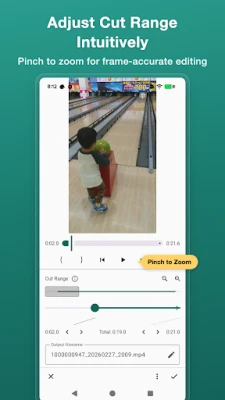
- Simple operation: Just select the range and cut, with progress display for peace of mind
- Custom file names: Choose your preferred output file name pattern
- Easy sharing: Instantly share to X (formerly Twitter), LINE, Instagram, and more
Why is it so fast?
The app processes videos based on keyframes (typically every 0.5–1 second),
allowing precise, lossless cutting and merging without re-compression.
This makes it much faster than typical video editors.
Recommended Workflow
- Use LVC to remove unwanted parts → Then add music or text with another editing app
- Quickly cut videos after shooting and share them directly on social media
- Combine separately recorded clips into a single video
- Merge multiple scenes to create a highlight reel
Supported Formats
Supports common video formats such as MP4 recorded on smartphones.
* Video merging works with videos of the same format (codec, resolution, frame rate).
Lossless = No quality loss.
Recommended for anyone who wants to edit videos quickly while keeping them clean and sharp.
cut, trim, and merge videos quickly without quality loss.
Perfect for removing unwanted parts, extracting clips, or joining multiple videos into one
— all without re-encoding.
Main Features
- Lossless cutting: Trim or split videos while keeping the original quality
- Multi-Cut mode: Remove multiple unwanted segments and join the rest into one video
- Lossless merging: Join multiple videos into one without quality loss
- Ultra-fast processing: No re-encoding, minimal waiting time
- Video rotation: Rotate videos in 90-degree increments while editing
- Simple operation: Just select the range and cut, with progress display for peace of mind
- Custom file names: Choose your preferred output file name pattern
- Easy sharing: Instantly share to X (formerly Twitter), LINE, Instagram, and more
Why is it so fast?
The app processes videos based on keyframes (typically every 0.5–1 second),
allowing precise, lossless cutting and merging without re-compression.
This makes it much faster than typical video editors.
Recommended Workflow
- Use LVC to remove unwanted parts → Then add music or text with another editing app
- Quickly cut videos after shooting and share them directly on social media
- Combine separately recorded clips into a single video
- Merge multiple scenes to create a highlight reel
Supported Formats
Supports common video formats such as MP4 recorded on smartphones.
* Video merging works with videos of the same format (codec, resolution, frame rate).
Lossless = No quality loss.
Recommended for anyone who wants to edit videos quickly while keeping them clean and sharp.
Rate the App
Add Comment & Review
User Reviews
Based on 0 reviews
No reviews added yet.
Comments will not be approved to be posted if they are SPAM, abusive, off-topic, use profanity, contain a personal attack, or promote hate of any kind.















More »

Popular Apps

phpFoxPHPFOX LLC

Moon Chai StoryOlha Dobel

World War Heroes — WW2 PvP FPSAzur Interactive Games Limited

Govee LiteGovee

Viking Clan: RagnarokKano Games

Build World AdventureExplore city in cube world

Vikings: War of ClansPlarium LLC

AvSeaAvionics Electronics Geeks!

Asphalt 9: LegendsGameloft SE

Dawn of Zombies: Survival GameRoyal Ark
More »
Editor's Choice

Grim Soul: Dark Survival RPGBrickworks Games Ltd

Craft of Survival - Gladiators101XP LIMITED

Last Shelter: SurvivalLong Tech Network Limited
Dawn of Zombies: Survival GameRoyal Ark

Merge Survival : WastelandStickyHands Inc.

AoD Vikings: Valhalla GameRoboBot Studio
Viking Clan: RagnarokKano Games
Vikings: War of ClansPlarium LLC
Asphalt 9: LegendsGameloft SE

Modern Tanks: War Tank GamesXDEVS LTD