
Latest Version
Update
August 21, 2026
August 21, 2026
Developer
AZ Screen Recorder
AZ Screen Recorder
Categories
Video Players
Video Players
Platforms
Android
Android
Downloads
2
2
License
Free
Free
Package Name
video.compressor.compress.video.size
video.compressor.compress.video.size
Report
Report a Problem
Report a Problem
More About Video Compressor: Reduce Size
Compress videos to a smaller file or a target size in MB. Keep great visual quality with no watermark, no length limit, and private offline processing.
AZ Compressor is a focused video compressor and video size reducer for sharing large videos and freeing phone storage. Choose a quality preset or enter the file size you need, preview the result, and let compression continue in the background.
RELIABLE VIDEO COMPRESSION
✔ No watermark on any output — free or Pro
✔ No length limit for long videos
✔ An output integrity check catches incomplete or silently truncated files
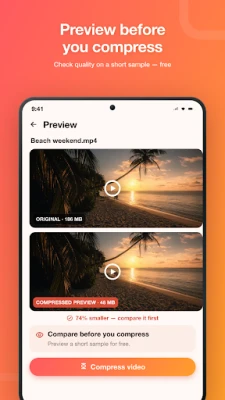
✔ Free preview before compression
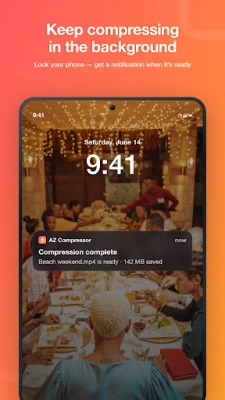
✔ Background compression continues with the screen off
✔ Offline processing — your videos stay on your device
REDUCE VIDEO FILE SIZE YOUR WAY
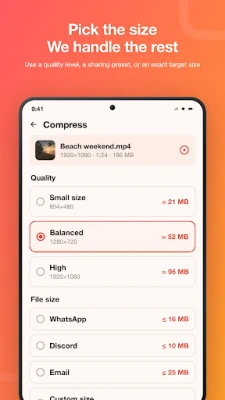
• Compress video to a target size in MB for email and chat attachment limits
• Use simple quality presets for a smaller file with great visual quality
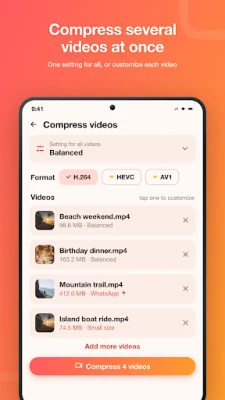
• Batch compress multiple videos in one queue
• See the estimated output size before starting
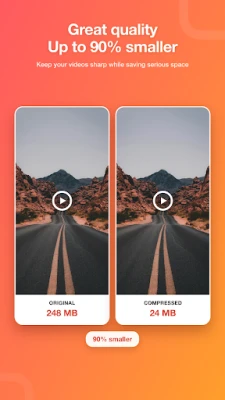
• Compare the original and compressed video after processing
• See how much storage space you saved
SHARE LARGE VIDEOS MORE EASILY
Make videos smaller for WhatsApp, Telegram, Messenger, Discord, or email. Upload compressed videos faster to Instagram, TikTok, and YouTube, or reduce video size to free storage without deleting your memories.
COMPATIBLE BY DEFAULT
By default, videos are saved as MP4 with H.264 video and AAC audio for broad compatibility across phones, computers, TVs, and sharing apps.
ADVANCED OPTIONS
• H.264 and HEVC target-size modes use two-pass encoding for dependable size control
• Optional HEVC (H.265) and AV1 modes can create smaller files but may not play everywhere
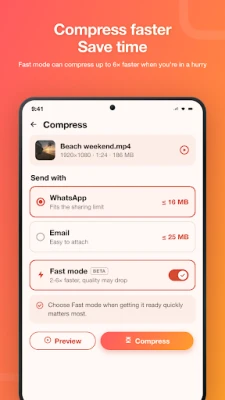
• Fast mode uses hardware-accelerated compression when speed matters most
• Adjust resolution, quality, codec, and audio
• Compress MP4, MKV, MOV, WEBM, 3GP, and other common inputs
• Process 4K, 60fps, and HDR videos
A clean video compressor with honest controls, complete output, no watermark, and no predatory restrictions. Download AZ Compressor and reduce your first video size.
WhatsApp, Telegram, Messenger, Discord, Instagram, TikTok, and YouTube are trademarks of their respective owners. This app is not affiliated with or endorsed by them.
RELIABLE VIDEO COMPRESSION
✔ No watermark on any output — free or Pro
✔ No length limit for long videos
✔ An output integrity check catches incomplete or silently truncated files
✔ Free preview before compression
✔ Background compression continues with the screen off
✔ Offline processing — your videos stay on your device
REDUCE VIDEO FILE SIZE YOUR WAY
• Compress video to a target size in MB for email and chat attachment limits
• Use simple quality presets for a smaller file with great visual quality
• Batch compress multiple videos in one queue
• See the estimated output size before starting
• Compare the original and compressed video after processing
• See how much storage space you saved
SHARE LARGE VIDEOS MORE EASILY
Make videos smaller for WhatsApp, Telegram, Messenger, Discord, or email. Upload compressed videos faster to Instagram, TikTok, and YouTube, or reduce video size to free storage without deleting your memories.
COMPATIBLE BY DEFAULT
By default, videos are saved as MP4 with H.264 video and AAC audio for broad compatibility across phones, computers, TVs, and sharing apps.
ADVANCED OPTIONS
• H.264 and HEVC target-size modes use two-pass encoding for dependable size control
• Optional HEVC (H.265) and AV1 modes can create smaller files but may not play everywhere
• Fast mode uses hardware-accelerated compression when speed matters most
• Adjust resolution, quality, codec, and audio
• Compress MP4, MKV, MOV, WEBM, 3GP, and other common inputs
• Process 4K, 60fps, and HDR videos
A clean video compressor with honest controls, complete output, no watermark, and no predatory restrictions. Download AZ Compressor and reduce your first video size.
WhatsApp, Telegram, Messenger, Discord, Instagram, TikTok, and YouTube are trademarks of their respective owners. This app is not affiliated with or endorsed by them.
Rate the App
Add Comment & Review
User Reviews
Based on 0 reviews
No reviews added yet.
Comments will not be approved to be posted if they are SPAM, abusive, off-topic, use profanity, contain a personal attack, or promote hate of any kind.















More »

Popular Apps

phpFoxPHPFOX LLC

Moon Chai StoryOlha Dobel

World War Heroes — WW2 PvP FPSAzur Interactive Games Limited

Govee LiteGovee

AvSeaAvionics Electronics Geeks!

Viking Clan: RagnarokKano Games

Vikings: War of ClansPlarium LLC

Build World AdventureExplore city in cube world

Asphalt 9: LegendsGameloft SE

Dawn of Zombies: Survival GameRoyal Ark
More »
Editor's Choice

Grim Soul: Dark Survival RPGBrickworks Games Ltd

Craft of Survival - Gladiators101XP LIMITED

Last Shelter: SurvivalLong Tech Network Limited
Dawn of Zombies: Survival GameRoyal Ark

Merge Survival : WastelandStickyHands Inc.

AoD Vikings: Valhalla GameRoboBot Studio
Viking Clan: RagnarokKano Games
Vikings: War of ClansPlarium LLC
Asphalt 9: LegendsGameloft SE

Modern Tanks: War Tank GamesXDEVS LTD