

Latest Version
Version
1.3.1
1.3.1
Update
October 11, 2026
October 11, 2026
Developer
LLTech
LLTech
Categories
Video Players
Video Players
Platforms
Android
Android
Downloads
0
0
License
Free
Free
Package Name
com.aicareles.vexo
com.aicareles.vexo
Report
Report a Problem
Report a Problem
More About Vexo: AI Video Subtitle Editor
🎬 ADD SUBTITLES TO VIDEO AUTOMATICALLY — 100% OFFLINE, NO
UPLOAD NEEDED
Vexo is an AI-powered video editor that adds subtitles to
your video in one
tap. Auto captions, subtitle translation, and a full toolkit
of editing
tools — all processed on your device, so your videos never
leave your phone.
Generate subtitles automatically, translate captions into
multiple
languages, trim and cut video, compress large files, convert
video to MP3,
and create content for TikTok, YouTube Shorts, and Instagram
Reels.
✨ AI SUBTITLES & AUTO CAPTIONS
The fastest way to add subtitles to video — no typing
required.
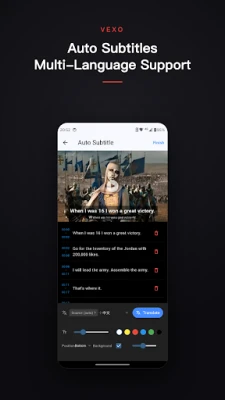
• Auto-generate subtitles from video audio with on-device AI
• Add captions to video in one tap
• Translate subtitles into 10+ languages
• Subtitle editor: change text, font, size, color and style
• Burn captions directly into your video
• Export subtitle files (SRT) for any player
• Perfect captions for TikTok, YouTube Shorts, Instagram
Reels
• Improve accessibility with automatic subtitles
🎥 VIDEO EDITOR & CUTTER
All the editing tools you need in one video editor:
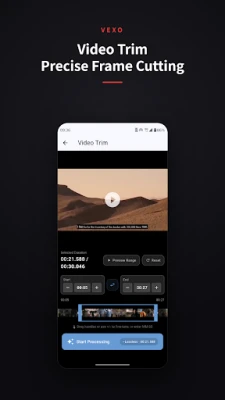
• Video trimmer — cut videos precisely to the moment
• Video cutter & splitter — split videos into multiple clips
• Merge videos into one file
• Crop video with custom aspect ratios (16:9, 9:16, 1:1)
• Resize video for TikTok, Instagram, YouTube
• Change video cover thumbnail
• Video speed control — slow motion & fast motion
• Add background music to video
• Video to GIF maker
🚀 VIDEO COMPRESSOR — REDUCE VIDEO SIZE
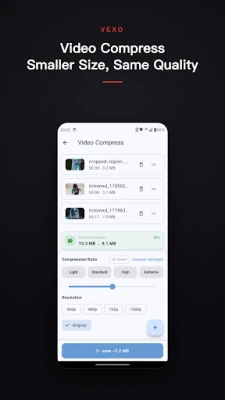
• Compress video up to 90% smaller
• Keep high quality after compression
• Shrink file size for WhatsApp, Instagram, Facebook and
email
• Batch compress multiple videos
• Choose output quality and resolution
• HD and 4K video compression
🔄 VIDEO CONVERTER & VIDEO TO MP3
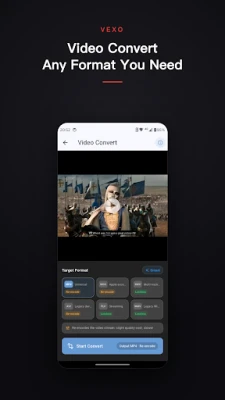
Convert video to MP3 and between all popular formats.
• Video to MP3 converter — extract audio from video in
seconds
• Convert video to audio: MP3, AAC, WAV
• Convert video to MP4, MOV, AVI, MKV, WEBM and more
• MOV to MP4, MKV to MP4 conversion
• Extract audio tracks from any video
• Maintain original quality
🎨 MORE VIDEO TOOLS
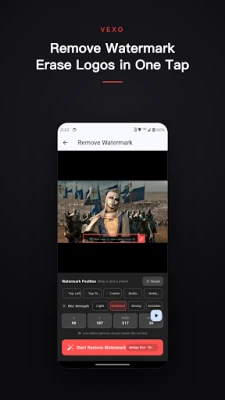
• Watermark remover for video
• Video to GIF maker
• Audio extractor
• Silence remover — auto-cut silent parts
• Video sticker maker
• Batch processing
🌎 MADE FOR CONTENT CREATORS
✓ TikTok creators adding subtitles & captions
✓ YouTube Shorts and Instagram Reels editors
✓ Video bloggers and vloggers
✓ Social media marketers resizing video
✓ Online teachers adding captions to lessons
✓ Anyone who needs a fast video compressor or converter
💎 WHY CHOOSE VEXO?
✓ AI subtitle generator that works offline
✓ Subtitle translation built in
✓ No upload — privacy-focused, on-device processing
✓ Fast video processing with high-quality export
✓ Supports MP4, MOV, AVI, MKV, WEBM and more
⭐ GO PREMIUM
Unlock the full video toolkit:
• Unlimited AI subtitles & translation
• Batch processing
• HD & 4K export
• Advanced editing features
• Priority support
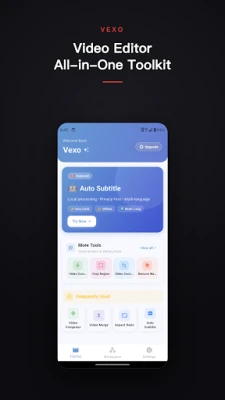
📱 YOUR ALL-IN-ONE VIDEO TOOLKIT
From auto captions to video compression, Vexo combines AI
subtitle
technology with essential video editing tools.
Download Vexo and add subtitles to your first video today!
📩 Questions or feedback? Contact us: [email protected]
Vexo is an AI-powered video editor that adds subtitles to
your video in one
tap. Auto captions, subtitle translation, and a full toolkit
of editing
tools — all processed on your device, so your videos never
leave your phone.
Generate subtitles automatically, translate captions into
multiple
languages, trim and cut video, compress large files, convert
video to MP3,
and create content for TikTok, YouTube Shorts, and Instagram
Reels.
✨ AI SUBTITLES & AUTO CAPTIONS
The fastest way to add subtitles to video — no typing
required.
• Auto-generate subtitles from video audio with on-device AI
• Add captions to video in one tap
• Translate subtitles into 10+ languages
• Subtitle editor: change text, font, size, color and style
• Burn captions directly into your video
• Export subtitle files (SRT) for any player
• Perfect captions for TikTok, YouTube Shorts, Instagram
Reels
• Improve accessibility with automatic subtitles
🎥 VIDEO EDITOR & CUTTER
All the editing tools you need in one video editor:
• Video trimmer — cut videos precisely to the moment
• Video cutter & splitter — split videos into multiple clips
• Merge videos into one file
• Crop video with custom aspect ratios (16:9, 9:16, 1:1)
• Resize video for TikTok, Instagram, YouTube
• Change video cover thumbnail
• Video speed control — slow motion & fast motion
• Add background music to video
• Video to GIF maker
🚀 VIDEO COMPRESSOR — REDUCE VIDEO SIZE
• Compress video up to 90% smaller
• Keep high quality after compression
• Shrink file size for WhatsApp, Instagram, Facebook and
• Batch compress multiple videos
• Choose output quality and resolution
• HD and 4K video compression
🔄 VIDEO CONVERTER & VIDEO TO MP3
Convert video to MP3 and between all popular formats.
• Video to MP3 converter — extract audio from video in
seconds
• Convert video to audio: MP3, AAC, WAV
• Convert video to MP4, MOV, AVI, MKV, WEBM and more
• MOV to MP4, MKV to MP4 conversion
• Extract audio tracks from any video
• Maintain original quality
🎨 MORE VIDEO TOOLS
• Watermark remover for video
• Video to GIF maker
• Audio extractor
• Silence remover — auto-cut silent parts
• Video sticker maker
• Batch processing
🌎 MADE FOR CONTENT CREATORS
✓ TikTok creators adding subtitles & captions
✓ YouTube Shorts and Instagram Reels editors
✓ Video bloggers and vloggers
✓ Social media marketers resizing video
✓ Online teachers adding captions to lessons
✓ Anyone who needs a fast video compressor or converter
💎 WHY CHOOSE VEXO?
✓ AI subtitle generator that works offline
✓ Subtitle translation built in
✓ No upload — privacy-focused, on-device processing
✓ Fast video processing with high-quality export
✓ Supports MP4, MOV, AVI, MKV, WEBM and more
⭐ GO PREMIUM
Unlock the full video toolkit:
• Unlimited AI subtitles & translation
• Batch processing
• HD & 4K export
• Advanced editing features
• Priority support
📱 YOUR ALL-IN-ONE VIDEO TOOLKIT
From auto captions to video compression, Vexo combines AI
subtitle
technology with essential video editing tools.
Download Vexo and add subtitles to your first video today!
📩 Questions or feedback? Contact us: [email protected]
Rate the App
Add Comment & Review
User Reviews
Based on 0 reviews
No reviews added yet.
Comments will not be approved to be posted if they are SPAM, abusive, off-topic, use profanity, contain a personal attack, or promote hate of any kind.















More »

Popular Apps

phpFoxPHPFOX LLC

Moon Chai StoryOlha Dobel

World War Heroes — WW2 PvP FPSAzur Interactive Games Limited

Govee LiteGovee

AvSeaAvionics Electronics Geeks!

Viking Clan: RagnarokKano Games

Vikings: War of ClansPlarium LLC

Build World AdventureExplore city in cube world

Asphalt 9: LegendsGameloft SE

Dawn of Zombies: Survival GameRoyal Ark
More »
Editor's Choice

Grim Soul: Dark Survival RPGBrickworks Games Ltd

Craft of Survival - Gladiators101XP LIMITED

Last Shelter: SurvivalLong Tech Network Limited
Dawn of Zombies: Survival GameRoyal Ark

Merge Survival : WastelandStickyHands Inc.

AoD Vikings: Valhalla GameRoboBot Studio
Viking Clan: RagnarokKano Games
Vikings: War of ClansPlarium LLC
Asphalt 9: LegendsGameloft SE

Modern Tanks: War Tank GamesXDEVS LTD