


Latest Version
Update
May 31, 2026
May 31, 2026
Developer
NAX Tech
NAX Tech
Categories
Tools
Tools
Platforms
Android
Android
Downloads
0
0
License
$15.00
$15.00
Package Name
com.nax.calphotovault
com.nax.calphotovault
Report
Report a Problem
Report a Problem
More About Vault: Calculator Photo Hider
🔒 Calculator Vault — Hide Photos, Videos & Files Behind a Real Calculator
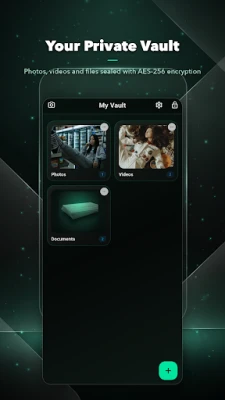
Calculator Vault is a secret photo vault and file hider disguised as a fully working calculator. Hide photos, hide videos, lock documents and secure private notes behind a calculator nobody will suspect. Just enter your PIN to unlock your hidden vault — to everyone else, it's only a calculator.
Protect your private files with AES-256 encryption, all stored locally on your device. No cloud, no tracking, no internet permission required.
✨ KEY FEATURES
🎭 6 App Disguises (NEW)
Choose how your vault looks on your home screen. Each disguise is a genuinely working app with its own hidden unlock gesture:
• Calculator — a real, fully functional calculator
• Weather — swipeable city pages with photo backdrops
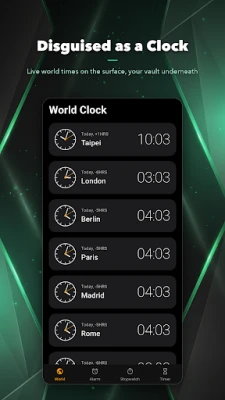
• Clock — World Clock, Alarm, Stopwatch & Timer
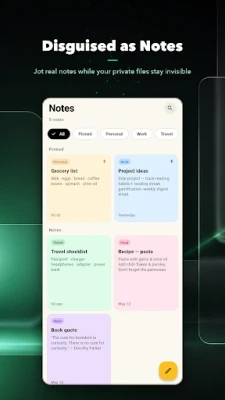
• Notes — create, edit, search, pin & delete notes
• Compass — real magnetometer compass (no location needed)
• Converter — live currency conversion
Nobody will suspect any of them is a secret vault.
🔐 Advanced Security
• AES-256 encryption for all hidden files
• Secure PIN protection (4–8 digits)
• Biometric unlock (fingerprint / face)
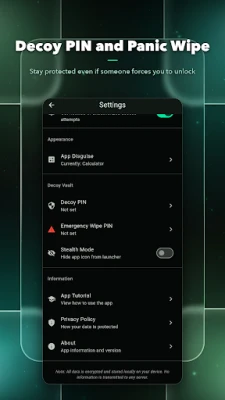
• Intruder selfie capture on failed attempts
• Auto-lock when the app goes to background
• Screenshot protection inside the vault
📁 Hide & Organize Files
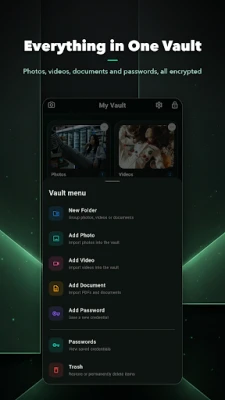
• Hide photos, videos and documents
• Create custom folders with cover images
• Secure notes for passwords & private info
• Easy import from gallery
• Delete originals automatically after import
🌍 11 Languages (NEW)
English, Thai, German, Spanish, French, Italian, Japanese, Korean, Simplified Chinese, Traditional Chinese and Portuguese — every screen fully translated.
🎨 Beautiful Dark Theme (NEW)
A new emerald-on-black glassmorphism design, now the default. Switch between Light, Dark or System theme anytime in Settings.
🛡️ WHY CALCULATOR VAULT?
Privacy First
All files are encrypted with AES-256 and stored locally. No cloud storage, no data collection, no internet permission.
Hidden in Plain Sight
Use the calculator (or any disguise) normally in public. Enter your secret PIN to reveal the hidden vault. Real calculations work just like a regular calculator app.
Complete Protection
Failed unlock attempts are logged with intruder photos. Set alarms and auto-lock for maximum security.
💡 HOW IT WORKS
1. Download and open the app
2. Set your secret PIN (4–8 digits)
3. Pick your disguise (Calculator, Weather, Clock & more)
4. Enable biometric unlock (optional)
5. Use the disguise normally in public
6. Enter your PIN to access your hidden vault
7. Import and organize your private files
📝 PERFECT FOR HIDING
• Private photos and selfies
• Confidential documents
• Passwords and bank information
• Personal videos
• Sensitive work files
• Anything you want to keep private
⭐ ALL FEATURES FREE
• Unlimited file storage
• Unlimited folders
• All file types supported
• No subscription, no in-app purchases
• Completely free
📱 REQUIREMENTS
• Android 5.0 or higher
• Biometric hardware (optional)
• Camera for intruder selfie (optional)
⚠️ IMPORTANT
• Remember your PIN — there is no recovery option
• Keep the app installed to access your files
• Back up important files before uninstalling
🌟 Download Calculator Vault today — the smartest photo vault and file hider disguised as a calculator. Hide photos, hide videos and keep your private files safe.
Calculator Vault is a secret photo vault and file hider disguised as a fully working calculator. Hide photos, hide videos, lock documents and secure private notes behind a calculator nobody will suspect. Just enter your PIN to unlock your hidden vault — to everyone else, it's only a calculator.
Protect your private files with AES-256 encryption, all stored locally on your device. No cloud, no tracking, no internet permission required.
✨ KEY FEATURES
🎭 6 App Disguises (NEW)
Choose how your vault looks on your home screen. Each disguise is a genuinely working app with its own hidden unlock gesture:
• Calculator — a real, fully functional calculator
• Weather — swipeable city pages with photo backdrops
• Clock — World Clock, Alarm, Stopwatch & Timer
• Notes — create, edit, search, pin & delete notes
• Compass — real magnetometer compass (no location needed)
• Converter — live currency conversion
Nobody will suspect any of them is a secret vault.
🔐 Advanced Security
• AES-256 encryption for all hidden files
• Secure PIN protection (4–8 digits)
• Biometric unlock (fingerprint / face)
• Intruder selfie capture on failed attempts
• Auto-lock when the app goes to background
• Screenshot protection inside the vault
📁 Hide & Organize Files
• Hide photos, videos and documents
• Create custom folders with cover images
• Secure notes for passwords & private info
• Easy import from gallery
• Delete originals automatically after import
🌍 11 Languages (NEW)
English, Thai, German, Spanish, French, Italian, Japanese, Korean, Simplified Chinese, Traditional Chinese and Portuguese — every screen fully translated.
🎨 Beautiful Dark Theme (NEW)
A new emerald-on-black glassmorphism design, now the default. Switch between Light, Dark or System theme anytime in Settings.
🛡️ WHY CALCULATOR VAULT?
Privacy First
All files are encrypted with AES-256 and stored locally. No cloud storage, no data collection, no internet permission.
Hidden in Plain Sight
Use the calculator (or any disguise) normally in public. Enter your secret PIN to reveal the hidden vault. Real calculations work just like a regular calculator app.
Complete Protection
Failed unlock attempts are logged with intruder photos. Set alarms and auto-lock for maximum security.
💡 HOW IT WORKS
1. Download and open the app
2. Set your secret PIN (4–8 digits)
3. Pick your disguise (Calculator, Weather, Clock & more)
4. Enable biometric unlock (optional)
5. Use the disguise normally in public
6. Enter your PIN to access your hidden vault
7. Import and organize your private files
📝 PERFECT FOR HIDING
• Private photos and selfies
• Confidential documents
• Passwords and bank information
• Personal videos
• Sensitive work files
• Anything you want to keep private
⭐ ALL FEATURES FREE
• Unlimited file storage
• Unlimited folders
• All file types supported
• No subscription, no in-app purchases
• Completely free
📱 REQUIREMENTS
• Android 5.0 or higher
• Biometric hardware (optional)
• Camera for intruder selfie (optional)
⚠️ IMPORTANT
• Remember your PIN — there is no recovery option
• Keep the app installed to access your files
• Back up important files before uninstalling
🌟 Download Calculator Vault today — the smartest photo vault and file hider disguised as a calculator. Hide photos, hide videos and keep your private files safe.
Rate the App
Add Comment & Review
User Reviews
Based on 0 reviews
No reviews added yet.
Comments will not be approved to be posted if they are SPAM, abusive, off-topic, use profanity, contain a personal attack, or promote hate of any kind.














More »

Popular Apps

phpFoxPHPFOX LLC

Moon Chai StoryOlha Dobel

World War Heroes — WW2 PvP FPSAzur Interactive Games Limited

Govee LiteGovee

Build World AdventureExplore city in cube world

Viking Clan: RagnarokKano Games

Vikings: War of ClansPlarium LLC

Asphalt 9: LegendsGameloft SE

Submarine Car Diving SimulatorSwim with dolphins & penguins

Dawn of Zombies: Survival GameRoyal Ark
More »
Editor's Choice

Grim Soul: Dark Survival RPGBrickworks Games Ltd

Craft of Survival - Gladiators101XP LIMITED

Last Shelter: SurvivalLong Tech Network Limited
Dawn of Zombies: Survival GameRoyal Ark

Merge Survival : WastelandStickyHands Inc.

AoD Vikings: Valhalla GameRoboBot Studio
Viking Clan: RagnarokKano Games
Vikings: War of ClansPlarium LLC
Asphalt 9: LegendsGameloft SE

Modern Tanks: War Tank GamesXDEVS LTD