
Latest Version
Update
July 24, 2026
July 24, 2026
Developer
Daily Life office and Home Tools
Daily Life office and Home Tools
Categories
Tools
Tools
Platforms
Android
Android
Downloads
0
0
License
Free
Free
Package Name
com.software.update.phone.updateallapps
com.software.update.phone.updateallapps
Report
Report a Problem
Report a Problem
More About Update All Apps Software
Update All Apps Software for Android 📱 Keep Your Apps Up-to-Date with Ease!
Update All Apps Software – Software Update & App Manager helps you scan, manage, and optimize your Android device with smart software update tools. Easily check app update status for installed apps(apps and games) and system apps, manage unused apps, and keep all apps updated with the latest updates available on the Play Store to improve overall phone performance. Simply open the app, go to the scan option, and view the list of available updates.
Core Features for Software Update - Update All Apps Software:
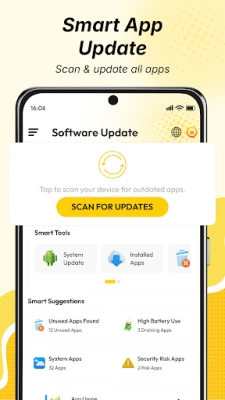
📲 App & System Updates
Scan your device for pending updates of installed apps(apps and games) and system apps, and redirect to Play Store to update apps manually.
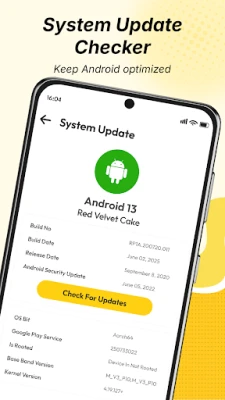
🔍 Android System Update Info
View Android system version and update details to keep your device up to date.
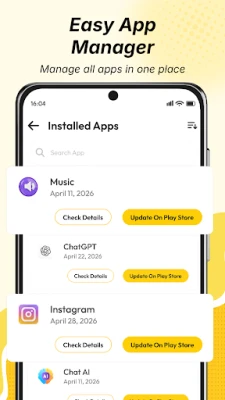
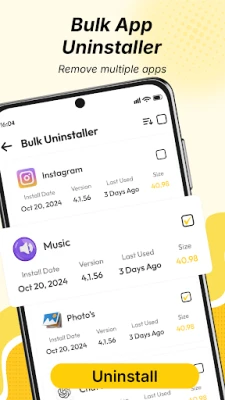
⚙️ Bulk Uninstaller & App Manager
Uninstall multiple apps at once and manage installed apps easily.
(Note: System apps cannot be removed.)
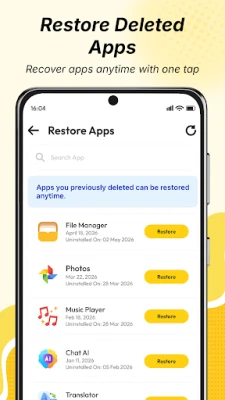
🔄 Restore Apps
Restore previously uninstalled apps or games quickly when needed.
📊 Device & Battery Info
Check battery health, storage usage, and full device information.
🧹 Unused Apps Detector
Find apps you don’t use and remove them to free up storage.
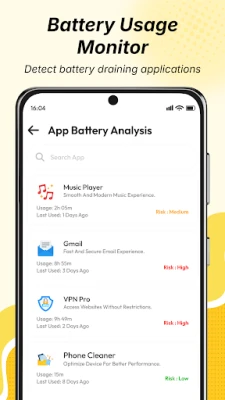
🔋 High Battery Usage Apps
Identify apps that consume more battery and optimize performance.
⚠️ Security Risk Apps Detection
Detect apps that may impact device security or performance.
⏱️ App Usage & Screen Time Tracker
Monitor how much time you spend on each app and improve productivity.
How Does the Update All Apps Software App Work?
✅ Install the app and allow permissions
✅ Scan your device for updates
✅ View system + installed app updates
✅ Update apps manually from Play Store
✅ Manage unused apps and optimize phone
- No personal data is shared externally
Boost Your Phone Performance
📱 Keep all apps updated
🧹 Remove unused apps
🔋 Save battery usage
🚀 Improve overall performance
Download Update All Apps Software to scan updates, manage apps, and improve your device performance.
Disclaimer
Software Update – Update All Apps Software does not automatically update apps. All updates are done manually via Google Play Store or device settings.
This app uses FOREGROUND_SERVICE_SPECIAL_USE to monitor app install and uninstall events (PACKAGE_ADDED, PACKAGE_REMOVED) for tracking changes in installed apps, even in the background.
Core Features for Software Update - Update All Apps Software:
📲 App & System Updates
Scan your device for pending updates of installed apps(apps and games) and system apps, and redirect to Play Store to update apps manually.
🔍 Android System Update Info
View Android system version and update details to keep your device up to date.
⚙️ Bulk Uninstaller & App Manager
Uninstall multiple apps at once and manage installed apps easily.
(Note: System apps cannot be removed.)
🔄 Restore Apps
Restore previously uninstalled apps or games quickly when needed.
📊 Device & Battery Info
Check battery health, storage usage, and full device information.
🧹 Unused Apps Detector
Find apps you don’t use and remove them to free up storage.
🔋 High Battery Usage Apps
Identify apps that consume more battery and optimize performance.
⚠️ Security Risk Apps Detection
Detect apps that may impact device security or performance.
⏱️ App Usage & Screen Time Tracker
Monitor how much time you spend on each app and improve productivity.
How Does the Update All Apps Software App Work?
✅ Install the app and allow permissions
✅ Scan your device for updates
✅ View system + installed app updates
✅ Update apps manually from Play Store
✅ Manage unused apps and optimize phone
- No personal data is shared externally
Boost Your Phone Performance
📱 Keep all apps updated
🧹 Remove unused apps
🔋 Save battery usage
🚀 Improve overall performance
Download Update All Apps Software to scan updates, manage apps, and improve your device performance.
Disclaimer
Software Update – Update All Apps Software does not automatically update apps. All updates are done manually via Google Play Store or device settings.
This app uses FOREGROUND_SERVICE_SPECIAL_USE to monitor app install and uninstall events (PACKAGE_ADDED, PACKAGE_REMOVED) for tracking changes in installed apps, even in the background.
Rate the App
Add Comment & Review
User Reviews
Based on 0 reviews
No reviews added yet.
Comments will not be approved to be posted if they are SPAM, abusive, off-topic, use profanity, contain a personal attack, or promote hate of any kind.










More »

Popular Apps

phpFoxPHPFOX LLC

Moon Chai StoryOlha Dobel

World War Heroes — WW2 PvP FPSAzur Interactive Games Limited

Govee LiteGovee

Build World AdventureExplore city in cube world

Viking Clan: RagnarokKano Games

Vikings: War of ClansPlarium LLC

Asphalt 9: LegendsGameloft SE

Submarine Car Diving SimulatorSwim with dolphins & penguins

Dawn of Zombies: Survival GameRoyal Ark
More »
Editor's Choice

Grim Soul: Dark Survival RPGBrickworks Games Ltd

Craft of Survival - Gladiators101XP LIMITED

Last Shelter: SurvivalLong Tech Network Limited
Dawn of Zombies: Survival GameRoyal Ark

Merge Survival : WastelandStickyHands Inc.

AoD Vikings: Valhalla GameRoboBot Studio
Viking Clan: RagnarokKano Games
Vikings: War of ClansPlarium LLC
Asphalt 9: LegendsGameloft SE

Modern Tanks: War Tank GamesXDEVS LTD