


Latest Version
Update
June 10, 2026
June 10, 2026
Developer
Shining Pic
Shining Pic
Categories
Photography
Photography
Platforms
Android
Android
Downloads
0
0
License
Free
Free
Package Name
com.treeframe.treephotofriendfamily
com.treeframe.treephotofriendfamily
Report
Report a Problem
Report a Problem
More About Tree Photo Collage Multiple Ph
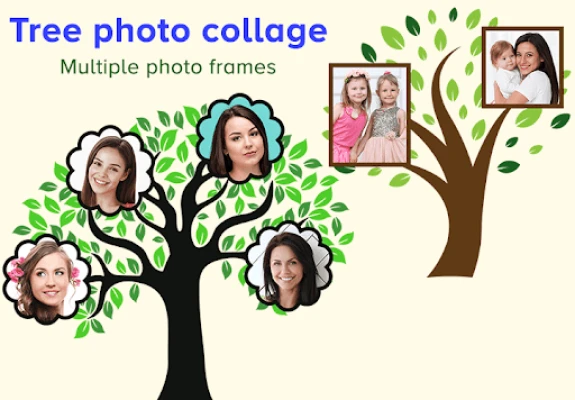
Want to create a photo collage with your family or friends? Just add your photos in the app, and your photo collage will get ready in a few clicks.
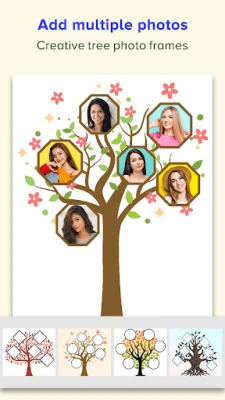
Here there are different tree photo frames, and your family or friends photos will get added to the branches of the tree.
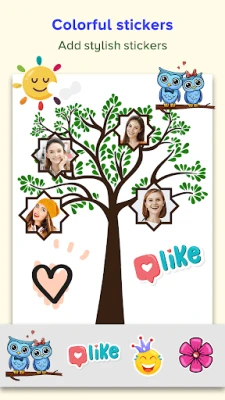
You can add up to eight photos to a tree photo frame, and you can also add text and stickers to it.
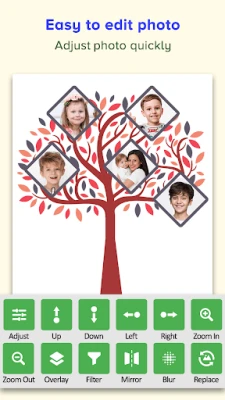
Tree Photo Collage has various photo editing options like:
◼️ Adjust:
- Here, you can adjust the photo’s brightness, contrast, hue, tone, and warmth.
◼️ Overlay:
- Here, you can add gradient effects to your photos.
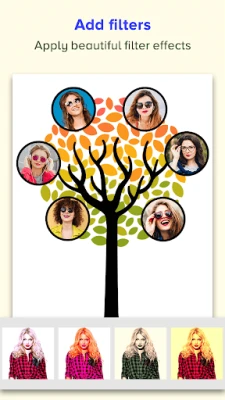
◼️ Filter:
- Using a filter, you can give a different color shade to your photo.
◼️ Mirror:
- Here, you will find different types of 2D and 3D mirror effects.
◼️ Blur:
- Here, you can blur your photo, and here there are various types of shape blur effects.
Steps to make photo collage:
Step 1: Click on the Tree Frames button.
Step 2: Select photos of your family members or friends that you want to add to college.
Step 3: Select a tree photo frame.
Step 4: Add text and stickers.
Step 5: Click on a photo to adjust its position and to edit it.
Step 6: Click on the tick icon to save your photo collage.
Create your family and friends photo collage with the Tree Photo Collage app.
You can add up to eight photos to a tree photo frame, and you can also add text and stickers to it.
Tree Photo Collage has various photo editing options like:
◼️ Adjust:
- Here, you can adjust the photo’s brightness, contrast, hue, tone, and warmth.
◼️ Overlay:
- Here, you can add gradient effects to your photos.
◼️ Filter:
- Using a filter, you can give a different color shade to your photo.
◼️ Mirror:
- Here, you will find different types of 2D and 3D mirror effects.
◼️ Blur:
- Here, you can blur your photo, and here there are various types of shape blur effects.
Steps to make photo collage:
Step 1: Click on the Tree Frames button.
Step 2: Select photos of your family members or friends that you want to add to college.
Step 3: Select a tree photo frame.
Step 4: Add text and stickers.
Step 5: Click on a photo to adjust its position and to edit it.
Step 6: Click on the tick icon to save your photo collage.
Create your family and friends photo collage with the Tree Photo Collage app.
Rate the App
Add Comment & Review
User Reviews
Based on 0 reviews
No reviews added yet.
Comments will not be approved to be posted if they are SPAM, abusive, off-topic, use profanity, contain a personal attack, or promote hate of any kind.














More »

Popular Apps

phpFoxPHPFOX LLC

Moon Chai StoryOlha Dobel

World War Heroes — WW2 PvP FPSAzur Interactive Games Limited

Govee LiteGovee

Viking Clan: RagnarokKano Games

Build World AdventureExplore city in cube world

Vikings: War of ClansPlarium LLC

AvSeaAvionics Electronics Geeks!

Asphalt 9: LegendsGameloft SE

Dawn of Zombies: Survival GameRoyal Ark
More »
Editor's Choice

Grim Soul: Dark Survival RPGBrickworks Games Ltd

Craft of Survival - Gladiators101XP LIMITED

Last Shelter: SurvivalLong Tech Network Limited
Dawn of Zombies: Survival GameRoyal Ark

Merge Survival : WastelandStickyHands Inc.

AoD Vikings: Valhalla GameRoboBot Studio
Viking Clan: RagnarokKano Games
Vikings: War of ClansPlarium LLC
Asphalt 9: LegendsGameloft SE

Modern Tanks: War Tank GamesXDEVS LTD