

Latest Version
Update
August 12, 2026
August 12, 2026
Developer
Disrpt Labs
Disrpt Labs
Categories
Tools
Tools
Platforms
Android
Android
Downloads
0
0
License
Free
Free
Package Name
io.disrpt.lock
io.disrpt.lock
Report
Report a Problem
Report a Problem
More About Touch Lock: Block Touch Screen
Four presses of the volume keys and the touchscreen stops responding. The video keeps playing, the music keeps going, the map stays exactly where it was.
Taps, swipes and on-screen buttons no longer reach the app underneath. Nothing that was already running is interrupted, and nothing changes until you unlock it yourself.
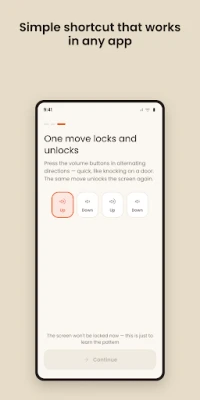
LOCK AND UNLOCK: VOLUME UP, DOWN, UP, DOWN
The same four presses do both, so there is nothing to memorize — and no button on the screen for a child to find.
WHILE THE LOCK IS ON — AND BACK TO NORMAL AS SOON AS YOU UNLOCK
✔ Taps, swipes, pinches and drags don't reach the app underneath
✔ The notification shade won't pull down
✔ The back gesture does nothing
✔ Volume and playback are left alone on purpose
Unlock and the phone behaves exactly as before. Nothing on the device is changed or switched off.
YOU CAN ALWAYS UNLOCK IT
The volume sequence always works, and you practice it once before you ever lock anything. If something does go wrong, restarting the phone clears the lock every time. There is no way to be shut out of your own phone.
WHAT PEOPLE USE IT FOR
👶 Handing the phone to a child without losing your place
📺 Kids' videos with no pausing, no swiping away, no tapping an ad
🎧 Music or a podcast with the phone in your pocket
🍳 A recipe on the counter, hands wet or covered in flour
🗺 Navigation in a mount, safe from bumps and knees
🧼 Wiping the screen clean without opening anything
🧤 Gloves, rain or shaky hands — anything that causes phantom taps
📱 A screen with ghost touch that taps by itself
NO NEED TO OPEN THE APP FIRST
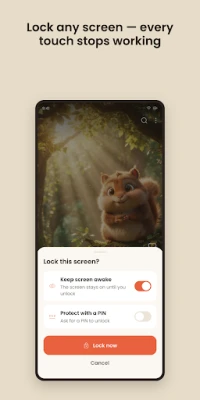
Stay in whatever you are already using: do the volume sequence, tap "Lock now", done.
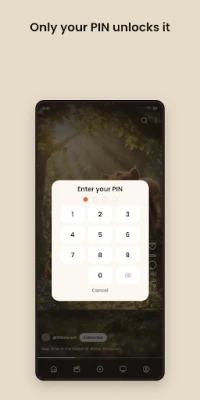
A PIN, IF SOMEONE IS WATCHING
Add a 4-digit PIN if the sequence could be copied from where someone is sitting. It is off by default, and since a restart still clears the lock, forgetting it can never trap you.
KEEP THE SCREEN AWAKE
Optional: stop the screen going dark in the middle of a video, without changing your system settings.
WHY THE ACCESSIBILITY PERMISSION
Only an Accessibility service can cover the whole screen on Android, notification shade and navigation buttons included. It is used for exactly three things:
• Covering the screen, so taps and swipes do nothing
• Watching the volume keys, so you can lock and unlock without the screen
• Keeping the lock on the app you handed over
It never reads what is on your screen, never records what you type, and carries no advertising ID.
NO CATCHES
No ads. No in-app purchases. No account. No time limit.
BEING HONEST ABOUT THE LIMITS
• This is a touch lock, not your device lock screen, not an app locker and not a screen-time tool.
• Android lets no app block the swipe-up home gesture. Touch Lock brings the locked app straight back to the front instead, still playing.
• The power button can't be blocked either; Android keeps that one for itself.
• Works on any phone or tablet — Samsung, Xiaomi, Pixel, OPPO, realme. No root needed.
Touch lock, screen lock, touch blocker, block touch screen, child lock, baby lock, kid mode, pocket mode — whatever you call it, this is the app that makes the screen stop responding until you say otherwise.
LOCK AND UNLOCK: VOLUME UP, DOWN, UP, DOWN
The same four presses do both, so there is nothing to memorize — and no button on the screen for a child to find.
WHILE THE LOCK IS ON — AND BACK TO NORMAL AS SOON AS YOU UNLOCK
✔ Taps, swipes, pinches and drags don't reach the app underneath
✔ The notification shade won't pull down
✔ The back gesture does nothing
✔ Volume and playback are left alone on purpose
Unlock and the phone behaves exactly as before. Nothing on the device is changed or switched off.
YOU CAN ALWAYS UNLOCK IT
The volume sequence always works, and you practice it once before you ever lock anything. If something does go wrong, restarting the phone clears the lock every time. There is no way to be shut out of your own phone.
WHAT PEOPLE USE IT FOR
👶 Handing the phone to a child without losing your place
📺 Kids' videos with no pausing, no swiping away, no tapping an ad
🎧 Music or a podcast with the phone in your pocket
🍳 A recipe on the counter, hands wet or covered in flour
🗺 Navigation in a mount, safe from bumps and knees
🧼 Wiping the screen clean without opening anything
🧤 Gloves, rain or shaky hands — anything that causes phantom taps
📱 A screen with ghost touch that taps by itself
NO NEED TO OPEN THE APP FIRST
Stay in whatever you are already using: do the volume sequence, tap "Lock now", done.
A PIN, IF SOMEONE IS WATCHING
Add a 4-digit PIN if the sequence could be copied from where someone is sitting. It is off by default, and since a restart still clears the lock, forgetting it can never trap you.
KEEP THE SCREEN AWAKE
Optional: stop the screen going dark in the middle of a video, without changing your system settings.
WHY THE ACCESSIBILITY PERMISSION
Only an Accessibility service can cover the whole screen on Android, notification shade and navigation buttons included. It is used for exactly three things:
• Covering the screen, so taps and swipes do nothing
• Watching the volume keys, so you can lock and unlock without the screen
• Keeping the lock on the app you handed over
It never reads what is on your screen, never records what you type, and carries no advertising ID.
NO CATCHES
No ads. No in-app purchases. No account. No time limit.
BEING HONEST ABOUT THE LIMITS
• This is a touch lock, not your device lock screen, not an app locker and not a screen-time tool.
• Android lets no app block the swipe-up home gesture. Touch Lock brings the locked app straight back to the front instead, still playing.
• The power button can't be blocked either; Android keeps that one for itself.
• Works on any phone or tablet — Samsung, Xiaomi, Pixel, OPPO, realme. No root needed.
Touch lock, screen lock, touch blocker, block touch screen, child lock, baby lock, kid mode, pocket mode — whatever you call it, this is the app that makes the screen stop responding until you say otherwise.
Rate the App
Add Comment & Review
User Reviews
Based on 0 reviews
No reviews added yet.
Comments will not be approved to be posted if they are SPAM, abusive, off-topic, use profanity, contain a personal attack, or promote hate of any kind.












More »

Popular Apps

phpFoxPHPFOX LLC

Moon Chai StoryOlha Dobel

World War Heroes — WW2 PvP FPSAzur Interactive Games Limited

Govee LiteGovee

Build World AdventureExplore city in cube world

Viking Clan: RagnarokKano Games

Vikings: War of ClansPlarium LLC

Asphalt 9: LegendsGameloft SE

Submarine Car Diving SimulatorSwim with dolphins & penguins

Dawn of Zombies: Survival GameRoyal Ark
More »
Editor's Choice

Grim Soul: Dark Survival RPGBrickworks Games Ltd

Craft of Survival - Gladiators101XP LIMITED

Last Shelter: SurvivalLong Tech Network Limited
Dawn of Zombies: Survival GameRoyal Ark

Merge Survival : WastelandStickyHands Inc.

AoD Vikings: Valhalla GameRoboBot Studio
Viking Clan: RagnarokKano Games
Vikings: War of ClansPlarium LLC
Asphalt 9: LegendsGameloft SE

Modern Tanks: War Tank GamesXDEVS LTD