

Latest Version
Update
February 04, 2026
February 04, 2026
Developer
Visa Inc
Visa Inc
Categories
Finance
Finance
Platforms
Android
Android
Downloads
0
0
License
Free
Free
Package Name
com.visa.kic.app.kernel
com.visa.kic.app.kernel
Report
Report a Problem
Report a Problem
More About Tap to Pay Ready
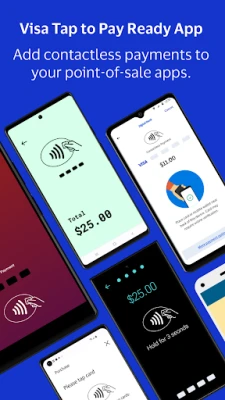
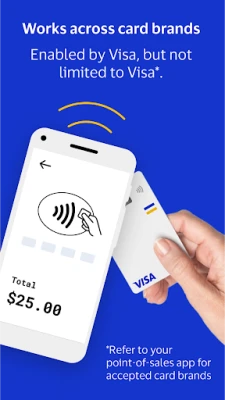
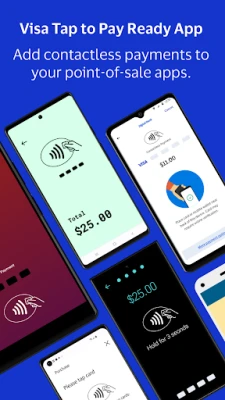
Visa's Tap to Pay Ready App is a companion app that should be downloaded only if you are prompted to do so by your primary point-of-sale app. It will work with your compatible payment app to allow you to accept contactless payments on your Android device.
Please note Tap to Pay Ready is not a standalone point-of-sale app so you cannot interact with it. Reach out to your pre-existing payment acceptance app to see if you are eligible to use Tap to Pay Ready to power contactless payments on your device.
For eligible users, once you’ve downloaded Tap to Pay Ready, you can:
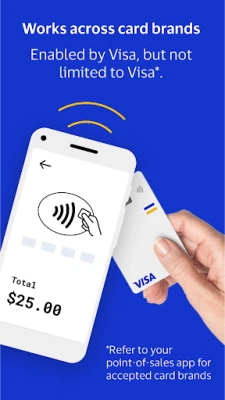
- Accept contactless payments from any card brand your point-of-sale app takes
- Offer customers a secure and convenient way to pay
- Take touch-free payments without additional hardware or technical setup
HOW IT WORKS
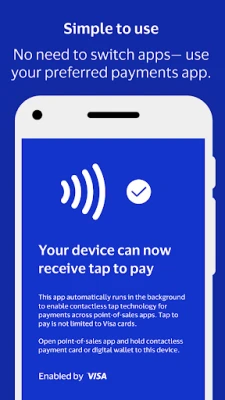
Visa’s Tap to Pay Ready works with your point-of-sale app so you can take contactless payments on your Android. You won’t have to open or switch to Tap to Pay Ready to take a payment.
Start the checkout process using your preferred point-of-sale app
When your customer is ready to pay, ask them to tap an accepted contactless card or mobile wallet to your Android device
Tap to Pay Ready opens automatically to accept the contactless payment, then closes until the next contactless transaction
USING TAP TO PAY READY
Tap to Pay Ready is developed and controlled by Visa, Inc. and is fully secure, as certified by these PCI standards. You should have received instructions for your point-of-sale app to download Tap to Pay Ready.
While using Tap to Pay Ready, keep these things in mind:
Your phone needs a stable internet connection to process payments
Customers paying with a contactless card should tap the Contactless Indicator on their card to the back of your Android device
Customers paying with a mobile wallet or smartwatch should hold their device to the back of your device to capture their payment properly
Keep auto-updates on to avoid interruptions while taking a payment
Please note Tap to Pay Ready is not a standalone point-of-sale app so you cannot interact with it. Reach out to your pre-existing payment acceptance app to see if you are eligible to use Tap to Pay Ready to power contactless payments on your device.
For eligible users, once you’ve downloaded Tap to Pay Ready, you can:
- Accept contactless payments from any card brand your point-of-sale app takes
- Offer customers a secure and convenient way to pay
- Take touch-free payments without additional hardware or technical setup
HOW IT WORKS
Visa’s Tap to Pay Ready works with your point-of-sale app so you can take contactless payments on your Android. You won’t have to open or switch to Tap to Pay Ready to take a payment.
Start the checkout process using your preferred point-of-sale app
When your customer is ready to pay, ask them to tap an accepted contactless card or mobile wallet to your Android device
Tap to Pay Ready opens automatically to accept the contactless payment, then closes until the next contactless transaction
USING TAP TO PAY READY
Tap to Pay Ready is developed and controlled by Visa, Inc. and is fully secure, as certified by these PCI standards. You should have received instructions for your point-of-sale app to download Tap to Pay Ready.
While using Tap to Pay Ready, keep these things in mind:
Your phone needs a stable internet connection to process payments
Customers paying with a contactless card should tap the Contactless Indicator on their card to the back of your Android device
Customers paying with a mobile wallet or smartwatch should hold their device to the back of your device to capture their payment properly
Keep auto-updates on to avoid interruptions while taking a payment
Rate the App
Add Comment & Review
User Reviews
Based on 0 reviews
No reviews added yet.
Comments will not be approved to be posted if they are SPAM, abusive, off-topic, use profanity, contain a personal attack, or promote hate of any kind.














More »

Popular Apps

phpFoxPHPFOX LLC

Moon Chai StoryOlha Dobel

World War Heroes — WW2 PvP FPSAzur Interactive Games Limited

Govee LiteGovee

Viking Clan: RagnarokKano Games

Build World AdventureExplore city in cube world

Vikings: War of ClansPlarium LLC

AvSeaAvionics Electronics Geeks!

Asphalt 9: LegendsGameloft SE

Dawn of Zombies: Survival GameRoyal Ark
More »
Editor's Choice

Grim Soul: Dark Survival RPGBrickworks Games Ltd

Craft of Survival - Gladiators101XP LIMITED

Last Shelter: SurvivalLong Tech Network Limited
Dawn of Zombies: Survival GameRoyal Ark

Merge Survival : WastelandStickyHands Inc.

AoD Vikings: Valhalla GameRoboBot Studio
Viking Clan: RagnarokKano Games
Vikings: War of ClansPlarium LLC
Asphalt 9: LegendsGameloft SE

Modern Tanks: War Tank GamesXDEVS LTD