

Latest Version
Update
October 06, 2026
October 06, 2026
Developer
M-Applications
M-Applications
Categories
Tools
Tools
Platforms
Android
Android
Downloads
0
0
License
Free
Free
Package Name
net.mapps.mgallery
net.mapps.mgallery
Report
Report a Problem
Report a Problem
More About SyncGallery: Cloud Backup
Back up photos and videos to your own storage, save device space and keep private media protected. SyncGallery is an Android photo gallery with cloud backup, folder sync, a file manager and an encrypted photo vault in one app.
YOUR PHOTOS. YOUR STORAGE. YOUR RULES.
Choose what to back up, where it goes and how changes are handled. Use ready-made setups or create your own sync rules.
- Back up your camera folder, other folders or selected files.
- Use upload-only backup or two-way folder sync.
- Schedule automatic backup with network and battery preferences.
- Decide how edits and deletions affect device and remote copies.
- Send files once with Quick Upload or Android's Share menu.
- Include photos, videos, XMP sidecars or other file types using filename patterns.
CONNECT YOUR CLOUD OR NAS
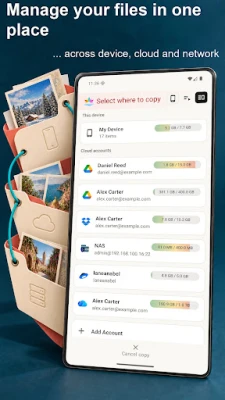
Use Google Drive, Microsoft OneDrive, Dropbox, pCloud, Yandex Disk or Nextcloud. Connect to compatible NAS and network storage through SMB 2/3, FTP, FTPS, SFTP or WebDAV.
Use your own accounts and storage. Transferred files move directly between your device and the destination you choose. SyncGallery does not relay or store those files on its own servers.
SAVE SPACE WITH PHOTO AND VIDEO COMPRESSION
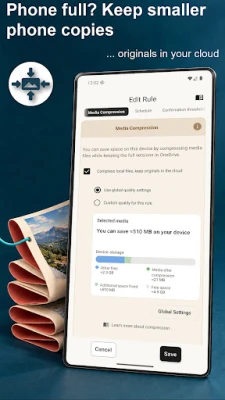
Keep smaller local copies while full-quality originals remain in connected storage. Compression works with supported JPEG photos and MP4 videos after a sync rule verifies the remote original. Choose quality settings and restore originals when you need them, while the connected original remains available. Keep a separate backup of important originals.
PROTECT PRIVATE PHOTOS AND VIDEOS
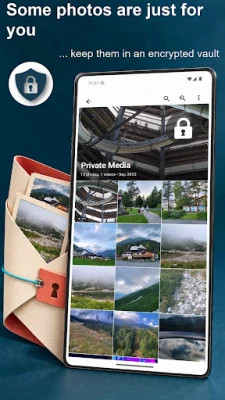
Create a Protected vault to encrypt personal media with a passphrase and recovery key. Optional vault sync keeps Protected files encrypted in your connected cloud storage too. Hidden vaults offer hiding without encryption.
You can also lock access to the app with your fingerprint, face or device screen lock. Background sync continues while the app is locked.
REVIEW CHANGES BEFORE SYNC
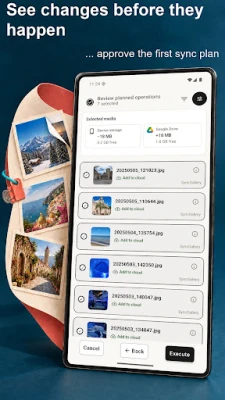
Check planned uploads, downloads and deletions before the first sync. After approval, your rules can run automatically. Conflicts and large batches of changes can pause for review.
Follow per-file transfer progress and review completed, skipped or failed operations. Transfer history records activity; it does not store previous file versions.
A FILE MANAGER FOR DEVICE AND CLOUD
Browse device storage, SD cards, cloud accounts and network folders in the built-in File Explorer. Copy, move, rename and delete files without switching apps. On wider screens, use two panels to keep source and destination in view.
ORGANIZE, EDIT AND SHARE
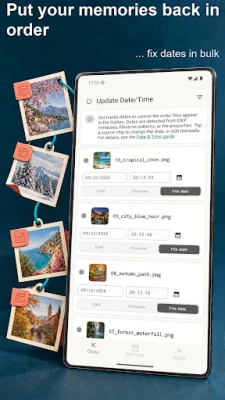
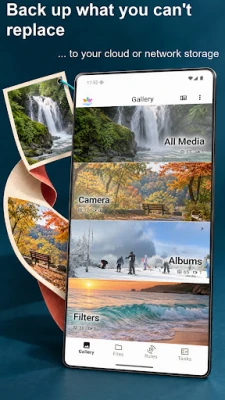
Enjoy a photo and video gallery with albums, groups and sync status badges. Crop, rotate, adjust and annotate photos, use background editing tools, and trim videos. Correct photo and video dates to put memories back in order.
Share selected files or connect a shared folder for an ongoing collection. Folder sharing options depend on the storage provider.
PERMISSIONS AND PLANS
All Files Access lets SyncGallery manage and sync the device and SD card folders you choose, including files outside Android's media library and related files such as XMP sidecars.
Free download with optional paid plans. Compression and vault sync require Premium or higher. Cloud storage is provided by the accounts you connect.
Choose what to back up, where it goes and how changes are handled. Use ready-made setups or create your own sync rules.
- Back up your camera folder, other folders or selected files.
- Use upload-only backup or two-way folder sync.
- Schedule automatic backup with network and battery preferences.
- Decide how edits and deletions affect device and remote copies.
- Send files once with Quick Upload or Android's Share menu.
- Include photos, videos, XMP sidecars or other file types using filename patterns.
CONNECT YOUR CLOUD OR NAS
Use Google Drive, Microsoft OneDrive, Dropbox, pCloud, Yandex Disk or Nextcloud. Connect to compatible NAS and network storage through SMB 2/3, FTP, FTPS, SFTP or WebDAV.
Use your own accounts and storage. Transferred files move directly between your device and the destination you choose. SyncGallery does not relay or store those files on its own servers.
SAVE SPACE WITH PHOTO AND VIDEO COMPRESSION
Keep smaller local copies while full-quality originals remain in connected storage. Compression works with supported JPEG photos and MP4 videos after a sync rule verifies the remote original. Choose quality settings and restore originals when you need them, while the connected original remains available. Keep a separate backup of important originals.
PROTECT PRIVATE PHOTOS AND VIDEOS
Create a Protected vault to encrypt personal media with a passphrase and recovery key. Optional vault sync keeps Protected files encrypted in your connected cloud storage too. Hidden vaults offer hiding without encryption.
You can also lock access to the app with your fingerprint, face or device screen lock. Background sync continues while the app is locked.
REVIEW CHANGES BEFORE SYNC
Check planned uploads, downloads and deletions before the first sync. After approval, your rules can run automatically. Conflicts and large batches of changes can pause for review.
Follow per-file transfer progress and review completed, skipped or failed operations. Transfer history records activity; it does not store previous file versions.
A FILE MANAGER FOR DEVICE AND CLOUD
Browse device storage, SD cards, cloud accounts and network folders in the built-in File Explorer. Copy, move, rename and delete files without switching apps. On wider screens, use two panels to keep source and destination in view.
ORGANIZE, EDIT AND SHARE
Enjoy a photo and video gallery with albums, groups and sync status badges. Crop, rotate, adjust and annotate photos, use background editing tools, and trim videos. Correct photo and video dates to put memories back in order.
Share selected files or connect a shared folder for an ongoing collection. Folder sharing options depend on the storage provider.
PERMISSIONS AND PLANS
All Files Access lets SyncGallery manage and sync the device and SD card folders you choose, including files outside Android's media library and related files such as XMP sidecars.
Free download with optional paid plans. Compression and vault sync require Premium or higher. Cloud storage is provided by the accounts you connect.
Rate the App
Add Comment & Review
User Reviews
Based on 0 reviews
No reviews added yet.
Comments will not be approved to be posted if they are SPAM, abusive, off-topic, use profanity, contain a personal attack, or promote hate of any kind.













More »

Popular Apps

phpFoxPHPFOX LLC

Moon Chai StoryOlha Dobel

World War Heroes — WW2 PvP FPSAzur Interactive Games Limited

Govee LiteGovee

Viking Clan: RagnarokKano Games

Build World AdventureExplore city in cube world

Vikings: War of ClansPlarium LLC

AvSeaAvionics Electronics Geeks!

Asphalt 9: LegendsGameloft SE

Dawn of Zombies: Survival GameRoyal Ark
More »
Editor's Choice

Grim Soul: Dark Survival RPGBrickworks Games Ltd

Craft of Survival - Gladiators101XP LIMITED

Last Shelter: SurvivalLong Tech Network Limited
Dawn of Zombies: Survival GameRoyal Ark

Merge Survival : WastelandStickyHands Inc.

AoD Vikings: Valhalla GameRoboBot Studio
Viking Clan: RagnarokKano Games
Vikings: War of ClansPlarium LLC
Asphalt 9: LegendsGameloft SE

Modern Tanks: War Tank GamesXDEVS LTD