Latest Version
Update
November 10, 2026
November 10, 2026
Developer
Taras Pavliuchyn
Taras Pavliuchyn
Categories
Lifestyle
Lifestyle
Platforms
Android
Android
Downloads
0
0
License
$5.99
$5.99
Package Name
com.ptar.stitchgarden
com.ptar.stitchgarden
Report
Report a Problem
Report a Problem
More About Stitch Garden: Cross Stitch
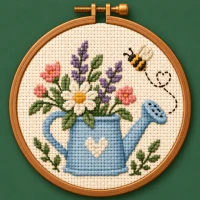
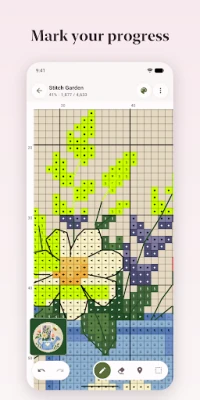
Turn your cross stitch chart into a working companion. Highlight a thread color, mark completed stitches and see your progress grow.
Open Pattern Maker (.xsd), Open Cross Stitch (.oxs), PCStitch (.pat) and PDF charts exported from design software, including symbol-only and black-and-white prints. Support for image-based PDFs is limited. Scans and photos of paper charts aren’t supported. A sample chart is included, so you can explore the app as soon as you open it.
STITCH WITH EASE
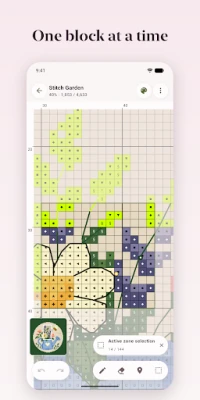
• Tap or drag to mark completed stitches. Erase marks, undo and redo.
• Mark all remaining stitches of one color with a single tap.
• Highlight a symbol to find its stitches across the chart, and lock the color to prevent accidental changes.
• See stitch counts for each run along rows, columns or both — without counting squares on the screen.
• Keep track of parked needles so you know where to return.
• Select a rectangular or freehand work region to focus on part of the chart.
• Navigate large charts with the navigator and rulers.
• Mark the chart’s center and the center of every block of ten.
• Use the app in any of eleven languages.
ORGANIZE YOUR CHARTS
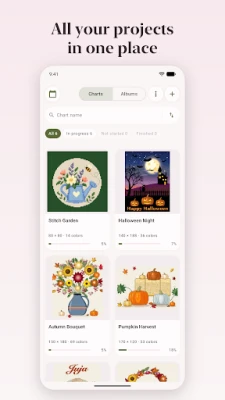
• Gather charts into albums — by designer, season or what’s next.
• Keep a chart in several albums at once; nothing disappears from your library.
• Search, filter and sort charts within each album.
YOUR CHART, YOUR WAY
• Hide layers you don’t need: symbols, full stitches, half stitches, quarters, backstitch, French knots, beads or marked progress. Each chart remembers its own settings.
• Rotate the chart in quarter turns to match how you position your canvas.
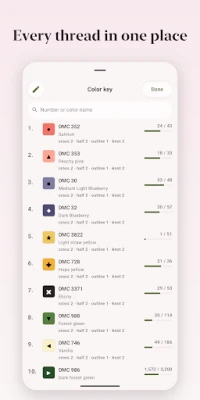
• Customize the symbols in your color key.
• See each stitch type on its own color-key tab and sort by stitch count.
• Adjust grid line thickness, and show or hide symbols.
• Choose the color used to highlight completed stitches.
• Track full and fractional stitches, backstitch, French knots and beads.
SEE YOUR PROGRESS
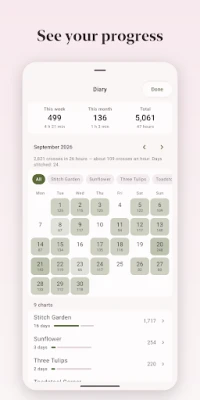
• Look back over your stitching days in a calendar, with a monthly breakdown by project.
• See weekly, monthly and total stitch counts, daily bests, streaks and stitching speed.
• Track your stitching sessions, with long pauses excluded.
• Get an estimated finish date based on your pace.
SET STITCHING GOALS
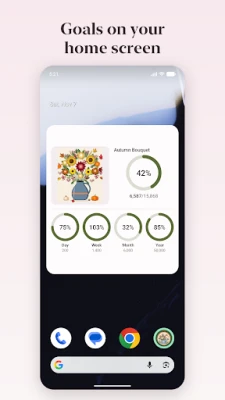
• Set daily, weekly, monthly or yearly goals across all charts.
• Progress rings show whether you’re on pace to meet each goal.
• Add home screen widgets for today’s goal, all goals or your current chart.
CAPTURE PHOTOS AND VIDEOS
• Save photos of your work with a record of your progress at the time.
• Create a video of your chart filling in or a slideshow of your progress photos.
• Show the chart alongside your photos and export a vertical video to share.
PLAN YOUR MATERIALS
• Estimate thread and bead quantities, including strand counts for each stitch type.
• Calculate fabric size from your fabric count and chosen margins.
• Add your own prices to estimate project costs.
• Build a shopping list that takes your existing thread stash into account.
• Use metric or imperial measurements.
CONTINUE ON ANOTHER DEVICE
• Export and import progress to continue on another device with the same chart.
• Sync your charts, progress, albums and goals between your Android devices through a private folder in your own Google Drive.
PDF compatibility and the stitch types imported depend on how the chart was created. Check image-based PDFs after importing.
One purchase. No subscription, ads or tracking. No separate account or registration required.
STITCH WITH EASE
• Tap or drag to mark completed stitches. Erase marks, undo and redo.
• Mark all remaining stitches of one color with a single tap.
• Highlight a symbol to find its stitches across the chart, and lock the color to prevent accidental changes.
• See stitch counts for each run along rows, columns or both — without counting squares on the screen.
• Keep track of parked needles so you know where to return.
• Select a rectangular or freehand work region to focus on part of the chart.
• Navigate large charts with the navigator and rulers.
• Mark the chart’s center and the center of every block of ten.
• Use the app in any of eleven languages.
ORGANIZE YOUR CHARTS
• Gather charts into albums — by designer, season or what’s next.
• Keep a chart in several albums at once; nothing disappears from your library.
• Search, filter and sort charts within each album.
YOUR CHART, YOUR WAY
• Hide layers you don’t need: symbols, full stitches, half stitches, quarters, backstitch, French knots, beads or marked progress. Each chart remembers its own settings.
• Rotate the chart in quarter turns to match how you position your canvas.
• Customize the symbols in your color key.
• See each stitch type on its own color-key tab and sort by stitch count.
• Adjust grid line thickness, and show or hide symbols.
• Choose the color used to highlight completed stitches.
• Track full and fractional stitches, backstitch, French knots and beads.
SEE YOUR PROGRESS
• Look back over your stitching days in a calendar, with a monthly breakdown by project.
• See weekly, monthly and total stitch counts, daily bests, streaks and stitching speed.
• Track your stitching sessions, with long pauses excluded.
• Get an estimated finish date based on your pace.
SET STITCHING GOALS
• Set daily, weekly, monthly or yearly goals across all charts.
• Progress rings show whether you’re on pace to meet each goal.
• Add home screen widgets for today’s goal, all goals or your current chart.
CAPTURE PHOTOS AND VIDEOS
• Save photos of your work with a record of your progress at the time.
• Create a video of your chart filling in or a slideshow of your progress photos.
• Show the chart alongside your photos and export a vertical video to share.
PLAN YOUR MATERIALS
• Estimate thread and bead quantities, including strand counts for each stitch type.
• Calculate fabric size from your fabric count and chosen margins.
• Add your own prices to estimate project costs.
• Build a shopping list that takes your existing thread stash into account.
• Use metric or imperial measurements.
CONTINUE ON ANOTHER DEVICE
• Export and import progress to continue on another device with the same chart.
• Sync your charts, progress, albums and goals between your Android devices through a private folder in your own Google Drive.
PDF compatibility and the stitch types imported depend on how the chart was created. Check image-based PDFs after importing.
One purchase. No subscription, ads or tracking. No separate account or registration required.
Rate the App
Add Comment & Review
User Reviews
Based on 0 reviews
No reviews added yet.
Comments will not be approved to be posted if they are SPAM, abusive, off-topic, use profanity, contain a personal attack, or promote hate of any kind.














More »

Popular Apps

phpFoxPHPFOX LLC

Moon Chai StoryOlha Dobel

World War Heroes — WW2 PvP FPSAzur Interactive Games Limited

Govee LiteGovee

AvSeaAvionics Electronics Geeks!
Viking Clan: RagnarokKano Games

Vikings: War of ClansPlarium LLC

Build World AdventureExplore city in cube world

Asphalt 9: LegendsGameloft SE

Dawn of Zombies: Survival GameRoyal Ark
More »
Editor's Choice

Grim Soul: Dark Survival RPGBrickworks Games Ltd

Craft of Survival - Gladiators101XP LIMITED

Last Shelter: SurvivalLong Tech Network Limited
Dawn of Zombies: Survival GameRoyal Ark

Merge Survival : WastelandStickyHands Inc.

AoD Vikings: Valhalla GameRoboBot Studio
Viking Clan: RagnarokKano Games
Vikings: War of ClansPlarium LLC
Asphalt 9: LegendsGameloft SE

Modern Tanks: War Tank GamesXDEVS LTD