

Latest Version
Update
November 28, 2026
Developer
Status Saver Sol
Categories
ART & Design
Platforms
Android
Downloads
0
License
Free
Package Name
com.studio.zm.stickermaker.wastickers
Report
Report a Problem
More About Sticker Maker - WASticker
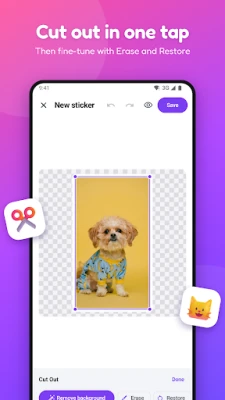
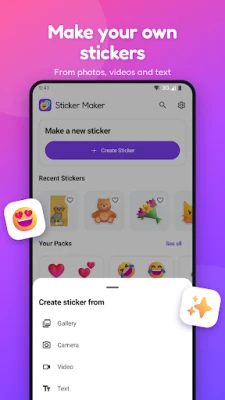
Turn any photo, video or text into a sticker and add it to WA in one tap. Sticker Maker is a simple, free sticker studio: cut out a face or a pet, add text and emoji, put it in a pack, and send it to your friends. You can also explore ready-made sticker packs for every mood and occasion.
HOW TO MAKE A STICKER
1. Tap + and pick a photo, take one with the camera, choose a video, or start with text
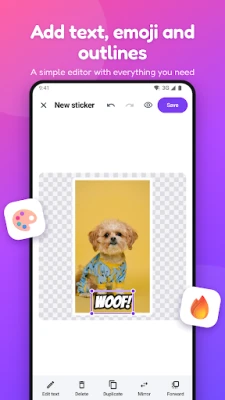
2. Cut out the part you want and add text, emoji or an outline
3. Save it to a pack
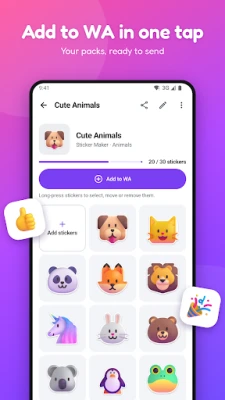
4. Tap "Add to WA" and start chatting with your own stickers
TOP FEATURES 🏆
• Make stickers from gallery photos, the camera, videos, text or any image file
• Automatic cut out: the background is removed for you
• Crop to a rounded square, a circle or a heart
• Animated stickers from your videos
• Works with WA and WA Business
• No account, no sign-up
A STICKER EDITOR THAT STAYS SIMPLE ✂️
• Add text with fun fonts, colors and styles
• Add emoji and decorations
• White or colored outline and shadow, like real die-cut stickers
• Draw and erase with your finger
• Filters and adjustments: brightness, contrast, saturation and more
• Add a second photo and arrange layers
• Undo, redo and a preview on light, dark and transparent backgrounds
• Unfinished stickers are kept, so you can continue later
YOUR STICKER PACKS 📦
• Create as many packs as you like and name them
• Choose your own creator name
• Reorder, rename, move and delete stickers
• Mark favorites and find any sticker with search
• Save a pack as a file to back it up or send it to a friend, and import it on a new phone
DISCOVER STICKERS 🔥
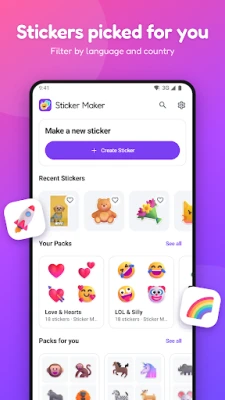
• Ready-made packs: love, funny, happy, sad, birthday, celebrations, animals, food and more
• "Packs for you" on Home, based on what you like
• Filter packs by language and country, so you only see stickers you can use
• Download a pack and add it to WA right away
• Share your own pack with other users
MADE FOR YOU 🎨
• Clean and easy to use
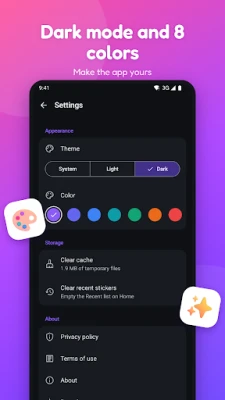
• Light and dark theme
• 8 colors to choose from
• Small app, works on older phones too
PRIVATE BY DESIGN 🔒
• Stickers you make are stored on your phone. Nobody else sees them unless you share them.
• The app asks for your photos, videos or camera only when you choose to use them.
After you add a pack, open a chat, tap the emoji button and go to the stickers tab to find your stickers.
Disclaimer: Sticker Maker is an independent app. It is not affiliated with, sponsored by or endorsed by any messaging app or its owner. Please use only images you have the right to use.
Questions or ideas? Write to [email protected]
Rate the App
Add Comment & Review
User Reviews
Based on 0 reviews
No reviews added yet.
Comments will not be approved to be posted if they are SPAM, abusive, off-topic, use profanity, contain a personal attack, or promote hate of any kind.













More »

Popular Apps
phpFoxPHPFOX LLC

Moon Chai StoryOlha Dobel

World War Heroes — WW2 PvP FPSAzur Interactive Games Limited

Govee LiteGovee

AvSeaAvionics Electronics Geeks!

Viking Clan: RagnarokKano Games

Vikings: War of ClansPlarium LLC

Build World AdventureExplore city in cube world

Asphalt 9: LegendsGameloft SE
Dawn of Zombies: Survival GameRoyal Ark
More »
Editor's Choice

Grim Soul: Dark Survival RPGBrickworks Games Ltd

Craft of Survival - Gladiators101XP LIMITED

Last Shelter: SurvivalLong Tech Network Limited
Dawn of Zombies: Survival GameRoyal Ark

Merge Survival : WastelandStickyHands Inc.

AoD Vikings: Valhalla GameRoboBot Studio
Viking Clan: RagnarokKano Games
Vikings: War of ClansPlarium LLC
Asphalt 9: LegendsGameloft SE

Modern Tanks: War Tank GamesXDEVS LTD