
Latest Version
Version
3.0.3
3.0.3
Update
July 05, 2026
July 05, 2026
Developer
STCodesApp
STCodesApp
Categories
Productivity
Productivity
Platforms
Android
Android
Downloads
0
0
License
Free
Free
Package Name
com.stcodesapp.speechtotext
com.stcodesapp.speechtotext
Report
Report a Problem
Report a Problem
More About Speech To Text | Voice To Text
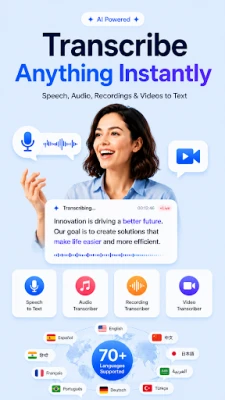
Speech To Text | Voice To Text is an AI-powered transcription app that helps you convert speech to text, voice to text, audio to text, and video to text quickly and easily. Use live speech recognition, import audio or video files, edit your transcript, and save or share the result in just a few steps.
Whether you are taking notes, transcribing a meeting, converting a lecture, saving an interview, or turning a voice recording into editable text, this speech to text app gives you a simple way to capture spoken content without typing everything manually.
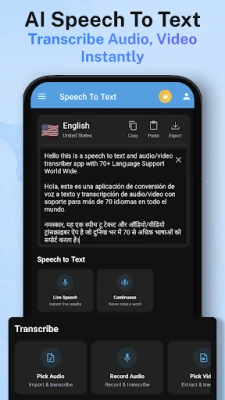
🎤 SPEECH TO TEXT
Tap the microphone and start speaking. The app uses speech recognition to convert your spoken words into editable text in real time. Use speech to text for notes, ideas, messages, documents, study material, and everyday dictation.
🗣️ VOICE TO TEXT & VOICE TYPING
Speak naturally and let the app turn voice to text. Voice typing helps you write faster, create notes, draft content, and capture ideas when manual typing is inconvenient.
🎧 AUDIO TO TEXT
Import an audio recording and transcribe audio to text. The AI audio transcriber can help convert voice recordings, lectures, interviews, meetings, presentations, podcasts, and personal recordings into readable transcripts.
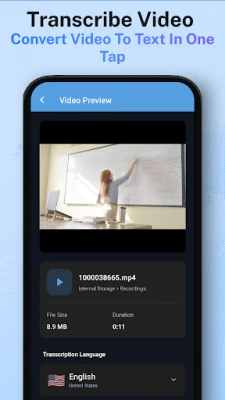
🎬 VIDEO TO TEXT
Select a video and convert spoken audio from the video into text. Video transcription is useful for creating notes, reviewing spoken content, and saving important information from recorded videos.
🤖 AI AUDIO TRANSCRIBER
Use the AI transcriber to generate clear, editable transcripts from live speech, audio, and video. Review the generated text, make corrections when needed, and use the transcript for work, study, content creation, or personal organization.
⚡ LIVE TRANSCRIPTION
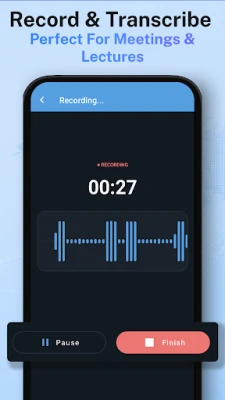
Create live transcriptions while you speak. See text appear on the screen and continue speaking for longer notes, discussions, classes, or ideas.
📝 MEETING, LECTURE & INTERVIEW TRANSCRIPTION
Use the app as a meeting transcriber, lecture transcriber, or interview transcriber. Convert conversations and spoken content into text for easier review, documentation, and note-taking.
🌍 60+ LANGUAGES
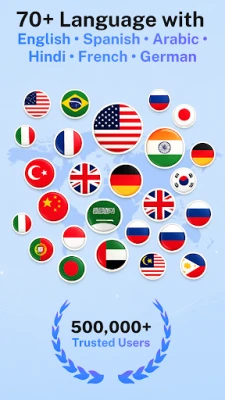
Convert speech to text in more than 60 supported languages. Choose the spoken language before starting transcription for better results.
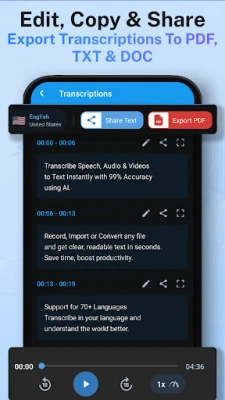
📄 EDIT, SAVE, EXPORT & SHARE
• Edit transcription results
• Copy text instantly
• Save transcripts as TXT
• Export transcripts as PDF
• Share text with other apps
• Access recent transcriptions
KEY FEATURES
• Speech to text converter
• Voice to text converter
• Audio to text transcription
• Video to text transcription
• AI audio transcriber
• Voice typing and dictation
• Live speech recognition
• Meeting notes and lecture notes
• Interview transcription
• Multi-language transcription
• PDF and TXT export
HOW TO USE
1. Choose live speech, audio, or video transcription.
2. Select the spoken language.
3. Speak or import a file.
4. Review and edit the generated text.
5. Save, copy, export, or share your transcript.
An active internet connection is required for speech recognition and transcription. Accuracy may vary depending on voice clarity, background noise, microphone quality, pronunciation, speaking speed, and the quality of the selected audio or video file. Always review important transcripts before using or sharing them.
Turn speech, voice, audio, and video into editable text with one simple AI transcription app.
🎤 SPEECH TO TEXT
Tap the microphone and start speaking. The app uses speech recognition to convert your spoken words into editable text in real time. Use speech to text for notes, ideas, messages, documents, study material, and everyday dictation.
🗣️ VOICE TO TEXT & VOICE TYPING
Speak naturally and let the app turn voice to text. Voice typing helps you write faster, create notes, draft content, and capture ideas when manual typing is inconvenient.
🎧 AUDIO TO TEXT
Import an audio recording and transcribe audio to text. The AI audio transcriber can help convert voice recordings, lectures, interviews, meetings, presentations, podcasts, and personal recordings into readable transcripts.
🎬 VIDEO TO TEXT
Select a video and convert spoken audio from the video into text. Video transcription is useful for creating notes, reviewing spoken content, and saving important information from recorded videos.
🤖 AI AUDIO TRANSCRIBER
Use the AI transcriber to generate clear, editable transcripts from live speech, audio, and video. Review the generated text, make corrections when needed, and use the transcript for work, study, content creation, or personal organization.
⚡ LIVE TRANSCRIPTION
Create live transcriptions while you speak. See text appear on the screen and continue speaking for longer notes, discussions, classes, or ideas.
📝 MEETING, LECTURE & INTERVIEW TRANSCRIPTION
Use the app as a meeting transcriber, lecture transcriber, or interview transcriber. Convert conversations and spoken content into text for easier review, documentation, and note-taking.
🌍 60+ LANGUAGES
Convert speech to text in more than 60 supported languages. Choose the spoken language before starting transcription for better results.
📄 EDIT, SAVE, EXPORT & SHARE
• Edit transcription results
• Copy text instantly
• Save transcripts as TXT
• Export transcripts as PDF
• Share text with other apps
• Access recent transcriptions
KEY FEATURES
• Speech to text converter
• Voice to text converter
• Audio to text transcription
• Video to text transcription
• AI audio transcriber
• Voice typing and dictation
• Live speech recognition
• Meeting notes and lecture notes
• Interview transcription
• Multi-language transcription
• PDF and TXT export
HOW TO USE
1. Choose live speech, audio, or video transcription.
2. Select the spoken language.
3. Speak or import a file.
4. Review and edit the generated text.
5. Save, copy, export, or share your transcript.
An active internet connection is required for speech recognition and transcription. Accuracy may vary depending on voice clarity, background noise, microphone quality, pronunciation, speaking speed, and the quality of the selected audio or video file. Always review important transcripts before using or sharing them.
Turn speech, voice, audio, and video into editable text with one simple AI transcription app.
Rate the App
Add Comment & Review
User Reviews
Based on 0 reviews
No reviews added yet.
Comments will not be approved to be posted if they are SPAM, abusive, off-topic, use profanity, contain a personal attack, or promote hate of any kind.








More »

Popular Apps

phpFoxPHPFOX LLC

Moon Chai StoryOlha Dobel

World War Heroes — WW2 PvP FPSAzur Interactive Games Limited

Govee LiteGovee

Viking Clan: RagnarokKano Games

Build World AdventureExplore city in cube world

Vikings: War of ClansPlarium LLC

Asphalt 9: LegendsGameloft SE

AvSeaAvionics Electronics Geeks!

Dawn of Zombies: Survival GameRoyal Ark
More »
Editor's Choice

Grim Soul: Dark Survival RPGBrickworks Games Ltd

Craft of Survival - Gladiators101XP LIMITED

Last Shelter: SurvivalLong Tech Network Limited
Dawn of Zombies: Survival GameRoyal Ark

Merge Survival : WastelandStickyHands Inc.

AoD Vikings: Valhalla GameRoboBot Studio
Viking Clan: RagnarokKano Games
Vikings: War of ClansPlarium LLC
Asphalt 9: LegendsGameloft SE

Modern Tanks: War Tank GamesXDEVS LTD