

Latest Version
Version
1.1.18
1.1.18
Update
March 25, 2026
March 25, 2026
Developer
Reehee Company, Inc.
Reehee Company, Inc.
Categories
Tools
Tools
Platforms
Android
Android
Downloads
1
1
License
Free
Free
Package Name
io.vtouch.spatial_touch
io.vtouch.spatial_touch
Report
Report a Problem
Report a Problem
More About Spatial Touch™ V2
🚀 What’s New in Spatial Touch™
Spatial Touch™ has been completely redesigned for a faster, smoother, and more intuitive experience.
1. New pinch gesture controls for easier and more natural interaction
2. Dramatically improved performance, stability, and responsiveness
3. Significantly reduced battery consumption and device heat
4. Expanded support for lower-end devices
5. Fully redesigned UI/UX for better usability
6. WebView mode — use Spatial Touch™ without accessibility permission
Control your phone without touching the screen!
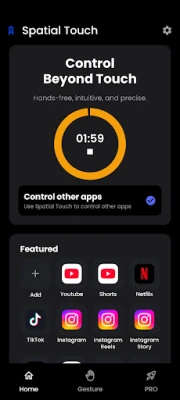
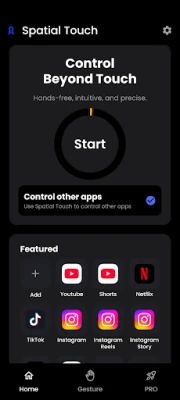
Spatial Touch™ is an on device AI application that allows you to control social media and video streaming services from a distance without touching the screen.
You can control YouTube, Tiktok, Instagram, Netflix, Disney Plus, and more. Whether you're leaning back watching a video, cooking with wet hands, or eating and want to keep your screen clean—Spatial Touch™ lets you control your phone effortlessly.
Download now and experience the future of touchless interaction.
📱 App Features and Benefits
1. Air Gestures: Control playback, volume, scrolling, navigation, and more—completely hands-free.
2. Remote Control: Operate your device comfortably from a distance in various environments and postures.
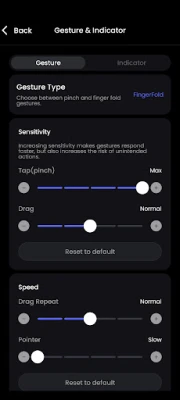
3. State of the art gesture recognition: Minimized false detections with adjustable gesture sensitivity for your preferred balance of ease and precision.
4. Privacy-Focused On-Device AI: All processing happens on your device. No images or videos are stored or transmitted.
5. WebView Mode (NEW): Use Spatial Touch™ on Youtube without granting accessibility permissions.
- Apps Supported
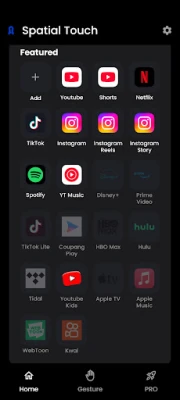
1. Social Media: Youtube, Instagram, Tiktok
2. Video Streaming Services: YouTube, Netflix, Disney+, Amazon Prime, Hulu, Coupang Play
3. Music Streaming Services: Spotify, Youtube music, Tidal
More apps coming soon.
- Key Gestures(Pinch/Finger Fold):
1. Tap: Play/Pause, Skip Ads, Next Video
2. Drag Left/Right: Fast Forward / Rewind
3. Drag Up/Down: Volume Control
4. Secondary Tap: Fullscreen toggle / Previous video / Comments
5. Secondary Drag: Scroll & navigation
6. Pointer (Pro): Cursor control and screen interaction
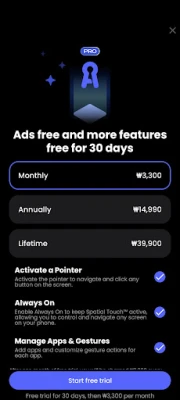
⭐ Upgrade to Pro Unlock the full power of Spatial Touch™.
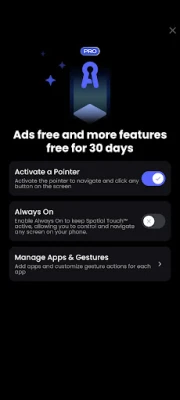
1. Pointer: Use a virtual cursor to tap and control any element on your screen
2. More Supported Apps: Access and control additional apps beyond the free version
3. Always-On: Keep Spatial Touch™ active without having to manually turn on
4. Ad-Free Experience: Enjoy a clean, distraction-free experience
- Minimum System Requirements
1. Snapdragon 7 series or above recommended
2. 4GB RAM or more
3. Android 8.0 (Oreo) or higher
4. Camera: 720p+ (1080p recommended)
Performance may vary by device.
- Permissions
1. Camera(Required): Gesture recognition (only active when needed)
2. Notifications(Required): Service updates and
3. Accessibility(Optional) : Used to control other apps and screen clicks.
Spatial Touch uses the Accessibility Service API to provide ‘Control other apps’ feature. This optional feature allows the user control 3rd party apps with Spatial Touch gestures.
We welcome your feedback!
[email protected]
1. New pinch gesture controls for easier and more natural interaction
2. Dramatically improved performance, stability, and responsiveness
3. Significantly reduced battery consumption and device heat
4. Expanded support for lower-end devices
5. Fully redesigned UI/UX for better usability
6. WebView mode — use Spatial Touch™ without accessibility permission
Control your phone without touching the screen!
Spatial Touch™ is an on device AI application that allows you to control social media and video streaming services from a distance without touching the screen.
You can control YouTube, Tiktok, Instagram, Netflix, Disney Plus, and more. Whether you're leaning back watching a video, cooking with wet hands, or eating and want to keep your screen clean—Spatial Touch™ lets you control your phone effortlessly.
Download now and experience the future of touchless interaction.
📱 App Features and Benefits
1. Air Gestures: Control playback, volume, scrolling, navigation, and more—completely hands-free.
2. Remote Control: Operate your device comfortably from a distance in various environments and postures.
3. State of the art gesture recognition: Minimized false detections with adjustable gesture sensitivity for your preferred balance of ease and precision.
4. Privacy-Focused On-Device AI: All processing happens on your device. No images or videos are stored or transmitted.
5. WebView Mode (NEW): Use Spatial Touch™ on Youtube without granting accessibility permissions.
- Apps Supported
1. Social Media: Youtube, Instagram, Tiktok
2. Video Streaming Services: YouTube, Netflix, Disney+, Amazon Prime, Hulu, Coupang Play
3. Music Streaming Services: Spotify, Youtube music, Tidal
More apps coming soon.
- Key Gestures(Pinch/Finger Fold):
1. Tap: Play/Pause, Skip Ads, Next Video
2. Drag Left/Right: Fast Forward / Rewind
3. Drag Up/Down: Volume Control
4. Secondary Tap: Fullscreen toggle / Previous video / Comments
5. Secondary Drag: Scroll & navigation
6. Pointer (Pro): Cursor control and screen interaction
⭐ Upgrade to Pro Unlock the full power of Spatial Touch™.
1. Pointer: Use a virtual cursor to tap and control any element on your screen
2. More Supported Apps: Access and control additional apps beyond the free version
3. Always-On: Keep Spatial Touch™ active without having to manually turn on
4. Ad-Free Experience: Enjoy a clean, distraction-free experience
- Minimum System Requirements
1. Snapdragon 7 series or above recommended
2. 4GB RAM or more
3. Android 8.0 (Oreo) or higher
4. Camera: 720p+ (1080p recommended)
Performance may vary by device.
- Permissions
1. Camera(Required): Gesture recognition (only active when needed)
2. Notifications(Required): Service updates and
3. Accessibility(Optional) : Used to control other apps and screen clicks.
Spatial Touch uses the Accessibility Service API to provide ‘Control other apps’ feature. This optional feature allows the user control 3rd party apps with Spatial Touch gestures.
We welcome your feedback!
[email protected]
Rate the App
Add Comment & Review
User Reviews
Based on 0 reviews
No reviews added yet.
Comments will not be approved to be posted if they are SPAM, abusive, off-topic, use profanity, contain a personal attack, or promote hate of any kind.









More »

Popular Apps

phpFoxPHPFOX LLC

Moon Chai StoryOlha Dobel

World War Heroes — WW2 PvP FPSAzur Interactive Games Limited

Govee LiteGovee

Build World AdventureExplore city in cube world

Viking Clan: RagnarokKano Games

Vikings: War of ClansPlarium LLC

Submarine Car Diving SimulatorSwim with dolphins & penguins

Asphalt 9: LegendsGameloft SE

Dawn of Zombies: Survival GameRoyal Ark
More »
Editor's Choice

Grim Soul: Dark Survival RPGBrickworks Games Ltd

Craft of Survival - Gladiators101XP LIMITED

Last Shelter: SurvivalLong Tech Network Limited
Dawn of Zombies: Survival GameRoyal Ark

Merge Survival : WastelandStickyHands Inc.

AoD Vikings: Valhalla GameRoboBot Studio
Viking Clan: RagnarokKano Games
Vikings: War of ClansPlarium LLC
Asphalt 9: LegendsGameloft SE

Modern Tanks: War Tank GamesXDEVS LTD