
Latest Version
Update
August 13, 2026
August 13, 2026
Developer
Boomerang Game Studio LTD
Boomerang Game Studio LTD
Categories
Personalization
Personalization
Platforms
Android
Android
Downloads
1
1
License
$1.49
$1.49
Package Name
com.spground.spaceplaygroundwallpaper
com.spground.spaceplaygroundwallpaper
Report
Report a Problem
Report a Problem
More About Space Live Wallpaper
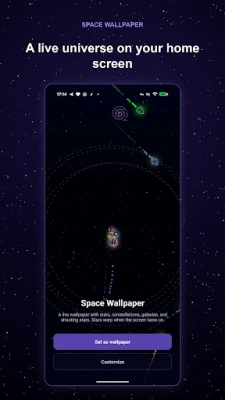
Space Live Wallpaper turns your home screen into a live, drifting star field —
with orbiting planets, spiral galaxies, shooting stars, and a warp-speed jump
every time you wake the phone.
It is built to be tuned, not just installed. Over 60 controls let you shape the
scene down to the star count, the gravity between planets, the length of a
shooting star's trail, and the exact colour of the glass overlay.
WHAT YOU CAN CHANGE
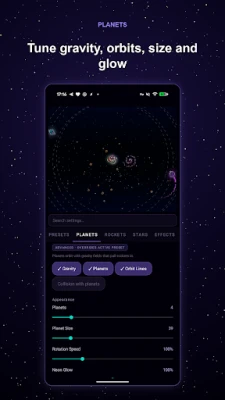
• Planets — count, size, gravity strength and radius, orbit collisions,
rotation speed, wobble, and neon glow
• Rockets — speed, spawn rate, size, debris count and spin, trail glow
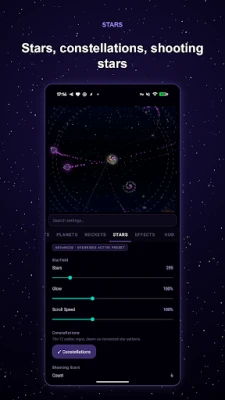
• Stars — density, glow, drift speed, constellations, shooting star count,
trail length and brightness, spiral galaxies
• Effects — glass overlay tint, dark scrim for icon readability, unlock warp
duration and intensity
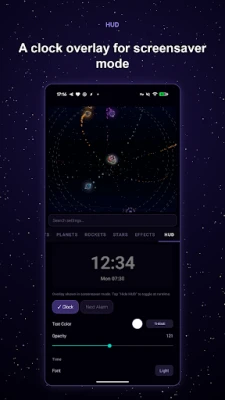
• HUD — an optional clock and next-alarm overlay for screensaver mode, with
its own font, weight, size, colour and position
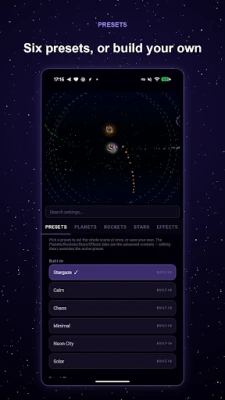
PRESETS
Five built-in scenes — Calm, Chaos, Minimal, Neon City, and Solar — get you a
complete look in one tap. Save your own tuned scene as a preset, and share it
with a friend as a single copyable string.
MOTION THAT RESPONDS TO YOU
• Parallax as you swipe between home screens
• Optional gyroscope tilt that shifts the scene as you move the phone
• A warp-speed animation on every unlock, with adjustable length and intensity
• Double-tap the wallpaper to reshuffle the scene, triple-tap for full-screen
screensaver mode
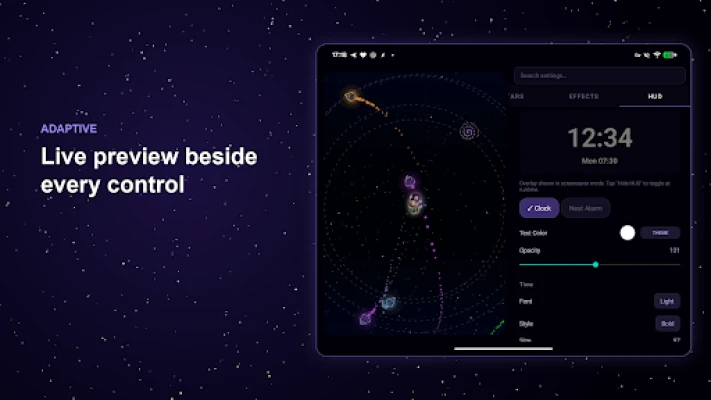
BUILT FOR BIG SCREENS
On a foldable's inner display, or a tablet held in landscape, the settings open
as two panes — a live preview beside the controls. The preview always matches
the shape of the screen it is previewing, and the scene re-composes for a new
aspect ratio instead of stretching. The wallpaper renders on the cover display
too.
EASY ON THE BATTERY
Rendering stops the moment the screen turns off, and there is a separate frame
rate cap for the wallpaper, the settings preview, and screensaver mode. A Low
Power mode halves the frame rate, and the wallpaper follows Android's own
Battery Saver automatically. An optional Pause on Lock setting stops rendering
behind the lock screen.
PRIVACY
No ads. No trackers. No accounts. No network permission at all — the app cannot
send anything anywhere, because it has no way to reach the internet. Your
settings stay on your device.
ALSO FROM SPGROUND
The scene engine here grew out of Space Playground, our space sandbox game.
If you like the wallpaper, the game is where it all started.
every time you wake the phone.
It is built to be tuned, not just installed. Over 60 controls let you shape the
scene down to the star count, the gravity between planets, the length of a
shooting star's trail, and the exact colour of the glass overlay.
WHAT YOU CAN CHANGE
• Planets — count, size, gravity strength and radius, orbit collisions,
rotation speed, wobble, and neon glow
• Rockets — speed, spawn rate, size, debris count and spin, trail glow
• Stars — density, glow, drift speed, constellations, shooting star count,
trail length and brightness, spiral galaxies
• Effects — glass overlay tint, dark scrim for icon readability, unlock warp
duration and intensity
• HUD — an optional clock and next-alarm overlay for screensaver mode, with
its own font, weight, size, colour and position
PRESETS
Five built-in scenes — Calm, Chaos, Minimal, Neon City, and Solar — get you a
complete look in one tap. Save your own tuned scene as a preset, and share it
with a friend as a single copyable string.
MOTION THAT RESPONDS TO YOU
• Parallax as you swipe between home screens
• Optional gyroscope tilt that shifts the scene as you move the phone
• A warp-speed animation on every unlock, with adjustable length and intensity
• Double-tap the wallpaper to reshuffle the scene, triple-tap for full-screen
screensaver mode
BUILT FOR BIG SCREENS
On a foldable's inner display, or a tablet held in landscape, the settings open
as two panes — a live preview beside the controls. The preview always matches
the shape of the screen it is previewing, and the scene re-composes for a new
aspect ratio instead of stretching. The wallpaper renders on the cover display
too.
EASY ON THE BATTERY
Rendering stops the moment the screen turns off, and there is a separate frame
rate cap for the wallpaper, the settings preview, and screensaver mode. A Low
Power mode halves the frame rate, and the wallpaper follows Android's own
Battery Saver automatically. An optional Pause on Lock setting stops rendering
behind the lock screen.
PRIVACY
No ads. No trackers. No accounts. No network permission at all — the app cannot
send anything anywhere, because it has no way to reach the internet. Your
settings stay on your device.
ALSO FROM SPGROUND
The scene engine here grew out of Space Playground, our space sandbox game.
If you like the wallpaper, the game is where it all started.
Rate the App
Add Comment & Review
User Reviews
Based on 0 reviews
No reviews added yet.
Comments will not be approved to be posted if they are SPAM, abusive, off-topic, use profanity, contain a personal attack, or promote hate of any kind.







More »

Popular Apps

phpFoxPHPFOX LLC

Moon Chai StoryOlha Dobel

World War Heroes — WW2 PvP FPSAzur Interactive Games Limited

Govee LiteGovee

AvSeaAvionics Electronics Geeks!

Viking Clan: RagnarokKano Games

Build World AdventureExplore city in cube world

Vikings: War of ClansPlarium LLC

Asphalt 9: LegendsGameloft SE

Dawn of Zombies: Survival GameRoyal Ark
More »
Editor's Choice

Grim Soul: Dark Survival RPGBrickworks Games Ltd

Craft of Survival - Gladiators101XP LIMITED

Last Shelter: SurvivalLong Tech Network Limited
Dawn of Zombies: Survival GameRoyal Ark

Merge Survival : WastelandStickyHands Inc.

AoD Vikings: Valhalla GameRoboBot Studio
Viking Clan: RagnarokKano Games
Vikings: War of ClansPlarium LLC
Asphalt 9: LegendsGameloft SE

Modern Tanks: War Tank GamesXDEVS LTD