

Latest Version
Update
October 03, 2026
October 03, 2026
Developer
SSJ Factory
SSJ Factory
Categories
Productivity
Productivity
Platforms
Android
Android
Downloads
0
0
License
Free
Free
Package Name
com.ssj.forwarder.base
com.ssj.forwarder.base
Report
Report a Problem
Report a Problem
More About SMS Forwarder - Auto Forward
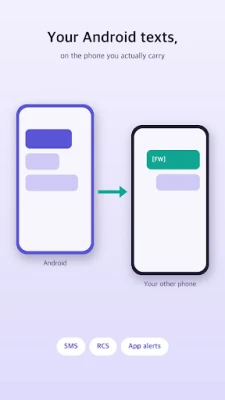
See the texts and calls that arrive on this phone from another phone you have paired.
Do you carry two phones? Leave the work phone on your desk and read its messages on the phone in your pocket.
■ Who it's for
· People who use two phones
· Anyone who wants work or second-phone texts on their main phone
· Anyone who keeps a SIM in a spare handset and doesn't want to miss its messages or calls
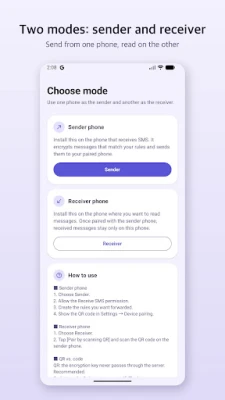
■ Two modes
· Sender — install it on the phone that receives the texts. It sends messages matching your rules to the phone you paired.
· Receiver — install it on the phone where you want to read them. Messages collect here.
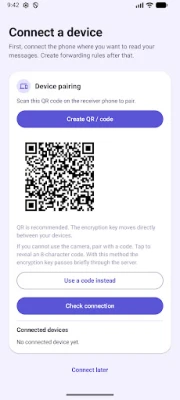
· Pair the two phones with a single QR scan, or type the code if you can't use the camera.
■ Features
· Forward everything — just pair and you're done
· Call alerts — see incoming and missed calls on the phone you paired (you cannot answer them there)
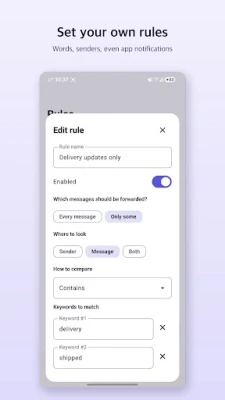
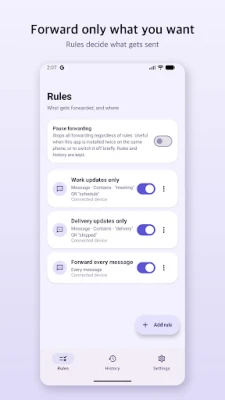
· Conditional forwarding — only messages with the words you choose, only calls from the numbers or names you choose
· Exclusion words — leave the ads behind
· Forwards RCS and messaging-app notifications too
· Received messages list with search
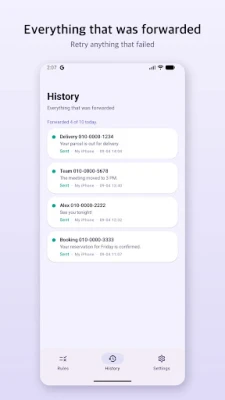
· Forwarding history, with retry for anything that failed
· One switch to pause forwarding
· Export and import your rules
■ Messages are forwarded encrypted
A forwarded message is encrypted on the sending phone and only arrives on the phone you paired. The key that opens it exists solely on those two phones, so neither the delivery service nor we can read it. We do not store message content on our servers.
Received messages are stored only on the receiving phone and are deleted automatically once the retention period you set has passed.
■ This app does not send texts
It only moves the messages you received to your own paired device.
■ No ads
· Free to use, with default limits on the number of rules, daily forwards, and paired devices.
· Lifetime pass: one payment removes the limits. It is not a subscription.
■ Permissions
· Notification access (required): reads the incoming message and call notifications so they can be forwarded. Forwarding does not work without it
· Notifications: for the ongoing status notification and for arrival alerts
· Camera (optional): only to read the pairing QR code. No photo or video is stored
· Contacts (optional): shows names instead of numbers, and lets call rules match by phone number
Use this only to move your own messages between devices you own. The notification stays visible while the app is running and cannot be hidden.
■ Who it's for
· People who use two phones
· Anyone who wants work or second-phone texts on their main phone
· Anyone who keeps a SIM in a spare handset and doesn't want to miss its messages or calls
■ Two modes
· Sender — install it on the phone that receives the texts. It sends messages matching your rules to the phone you paired.
· Receiver — install it on the phone where you want to read them. Messages collect here.
· Pair the two phones with a single QR scan, or type the code if you can't use the camera.
■ Features
· Forward everything — just pair and you're done
· Call alerts — see incoming and missed calls on the phone you paired (you cannot answer them there)
· Conditional forwarding — only messages with the words you choose, only calls from the numbers or names you choose
· Exclusion words — leave the ads behind
· Forwards RCS and messaging-app notifications too
· Received messages list with search
· Forwarding history, with retry for anything that failed
· One switch to pause forwarding
· Export and import your rules
■ Messages are forwarded encrypted
A forwarded message is encrypted on the sending phone and only arrives on the phone you paired. The key that opens it exists solely on those two phones, so neither the delivery service nor we can read it. We do not store message content on our servers.
Received messages are stored only on the receiving phone and are deleted automatically once the retention period you set has passed.
■ This app does not send texts
It only moves the messages you received to your own paired device.
■ No ads
· Free to use, with default limits on the number of rules, daily forwards, and paired devices.
· Lifetime pass: one payment removes the limits. It is not a subscription.
■ Permissions
· Notification access (required): reads the incoming message and call notifications so they can be forwarded. Forwarding does not work without it
· Notifications: for the ongoing status notification and for arrival alerts
· Camera (optional): only to read the pairing QR code. No photo or video is stored
· Contacts (optional): shows names instead of numbers, and lets call rules match by phone number
Use this only to move your own messages between devices you own. The notification stays visible while the app is running and cannot be hidden.
Rate the App
Add Comment & Review
User Reviews
Based on 0 reviews
No reviews added yet.
Comments will not be approved to be posted if they are SPAM, abusive, off-topic, use profanity, contain a personal attack, or promote hate of any kind.














More »

Popular Apps

phpFoxPHPFOX LLC

Moon Chai StoryOlha Dobel

World War Heroes — WW2 PvP FPSAzur Interactive Games Limited

Govee LiteGovee

AvSeaAvionics Electronics Geeks!

Viking Clan: RagnarokKano Games

Vikings: War of ClansPlarium LLC

Build World AdventureExplore city in cube world

Asphalt 9: LegendsGameloft SE

Dawn of Zombies: Survival GameRoyal Ark
More »
Editor's Choice

Grim Soul: Dark Survival RPGBrickworks Games Ltd

Craft of Survival - Gladiators101XP LIMITED

Last Shelter: SurvivalLong Tech Network Limited
Dawn of Zombies: Survival GameRoyal Ark

Merge Survival : WastelandStickyHands Inc.

AoD Vikings: Valhalla GameRoboBot Studio
Viking Clan: RagnarokKano Games
Vikings: War of ClansPlarium LLC
Asphalt 9: LegendsGameloft SE

Modern Tanks: War Tank GamesXDEVS LTD