

Latest Version
Update
March 21, 2026
March 21, 2026
Developer
LunexaLabs
LunexaLabs
Categories
Tools
Tools
Platforms
Android
Android
Downloads
0
0
License
Free
Free
Package Name
com.lunexalabs.sms_backup_export
com.lunexalabs.sms_backup_export
Report
Report a Problem
Report a Problem
More About SMS Backup & Transfer
SMS Backup & Transfer helps you back up, export, and transfer your SMS messages in portable file formats using a fully user-controlled workflow.
Save messages from your Android device and move them to your preferred destination, such as local storage, Google Drive, email, or another device using standard sharing options. Everything is initiated by you, and your exports stay under your control.
✨ Why people use this app
• 📄 Export SMS for records, documentation, or long-term storage
• 🔄 Transfer conversations to another phone, computer, or cloud storage
• 🏦 Save important OTP, banking, and business messages in portable formats
• 🗂 Keep an organized backup of personal or work-related SMS history
• 📤 Generate shareable files for legal, tax, support, or migration purposes
📦 Export and transfer your SMS
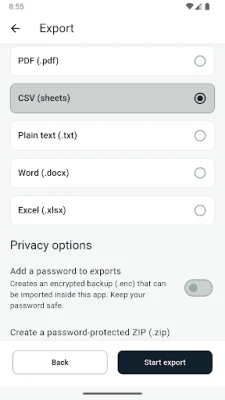
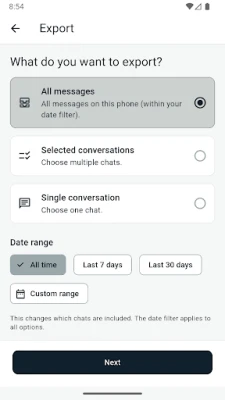
Choose one conversation, selected conversations, or your full SMS history, then export in the format that works best for you.
Supported formats:
• CSV
• TXT
• PDF
• DOCX
• XLSX
• SBX backup format
After export, you can keep the file on your device, share it, or transfer it to another destination using your preferred apps and services.
⏰ User-controlled backup and scheduled transfer
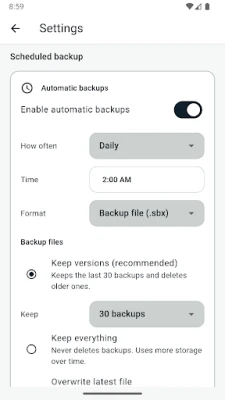
The app supports both manual exports and optional scheduled backups.
With scheduled backup, you control:
• enable or disable anytime
• frequency and timing
• Wi-Fi only option
• charging-only option
• battery-aware behavior
• local or Drive destination, depending on your setup
Nothing runs unless you configure it.
🔐 Privacy-first by design
Your SMS data is processed locally on your device for export. You stay in control of where the final file goes.
Privacy options include:
• hide sensitive messages
• mask phone numbers
• include or exclude OTP messages
• include or exclude banking alerts
• password protection and encryption options
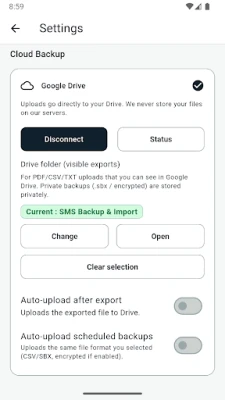
Optional Google Drive upload uses your own account and uploads only the exported file you choose to create.
⚡ Built for real-world SMS history
Designed to handle both small and large message libraries.
Features include:
• large history support
• memory-safe export flow
• progress tracking
• cancel support
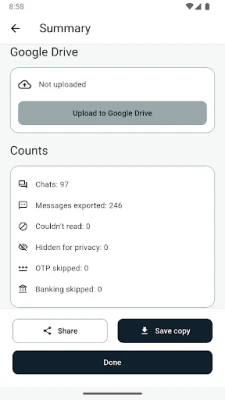
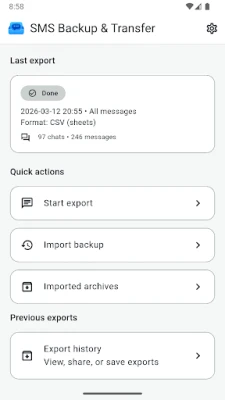
• export summary with conversation count, message count, and date range
📂 Import previously exported backups
You can open supported backup files inside the app to review imported content in the app archive.
Import features include:
• preview before import
• duplicate detection
• large file streaming support
• archive viewing inside the app
🛡 Permissions
This app requests:
• READ_SMS — required to read your existing SMS messages so you can export, back up, and transfer them
This app does not request:
• SEND_SMS
• RECEIVE_SMS
• WRITE_SMS
⭐ Premium features
Free version includes:
• manual exports
• core backup formats
• manual sharing and transfer
• archive import/view support
Premium unlocks:
• scheduled backups
• advanced formats such as PDF, DOCX, and XLSX
• encryption and password protection
• automatic Drive upload after user setup
📱 Your messages, your files, your control
If you want a practical way to export, back up, and transfer SMS without giving up control of your data, SMS Backup & Transfer is built for that job.
✨ Why people use this app
• 📄 Export SMS for records, documentation, or long-term storage
• 🔄 Transfer conversations to another phone, computer, or cloud storage
• 🏦 Save important OTP, banking, and business messages in portable formats
• 🗂 Keep an organized backup of personal or work-related SMS history
• 📤 Generate shareable files for legal, tax, support, or migration purposes
📦 Export and transfer your SMS
Choose one conversation, selected conversations, or your full SMS history, then export in the format that works best for you.
Supported formats:
• CSV
• TXT
• DOCX
• XLSX
• SBX backup format
After export, you can keep the file on your device, share it, or transfer it to another destination using your preferred apps and services.
⏰ User-controlled backup and scheduled transfer
The app supports both manual exports and optional scheduled backups.
With scheduled backup, you control:
• enable or disable anytime
• frequency and timing
• Wi-Fi only option
• charging-only option
• battery-aware behavior
• local or Drive destination, depending on your setup
Nothing runs unless you configure it.
🔐 Privacy-first by design
Your SMS data is processed locally on your device for export. You stay in control of where the final file goes.
Privacy options include:
• hide sensitive messages
• mask phone numbers
• include or exclude OTP messages
• include or exclude banking alerts
• password protection and encryption options
Optional Google Drive upload uses your own account and uploads only the exported file you choose to create.
⚡ Built for real-world SMS history
Designed to handle both small and large message libraries.
Features include:
• large history support
• memory-safe export flow
• progress tracking
• cancel support
• export summary with conversation count, message count, and date range
📂 Import previously exported backups
You can open supported backup files inside the app to review imported content in the app archive.
Import features include:
• preview before import
• duplicate detection
• large file streaming support
• archive viewing inside the app
🛡 Permissions
This app requests:
• READ_SMS — required to read your existing SMS messages so you can export, back up, and transfer them
This app does not request:
• SEND_SMS
• RECEIVE_SMS
• WRITE_SMS
⭐ Premium features
Free version includes:
• manual exports
• core backup formats
• manual sharing and transfer
• archive import/view support
Premium unlocks:
• scheduled backups
• advanced formats such as PDF, DOCX, and XLSX
• encryption and password protection
• automatic Drive upload after user setup
📱 Your messages, your files, your control
If you want a practical way to export, back up, and transfer SMS without giving up control of your data, SMS Backup & Transfer is built for that job.
Rate the App
Add Comment & Review
User Reviews
Based on 0 reviews
No reviews added yet.
Comments will not be approved to be posted if they are SPAM, abusive, off-topic, use profanity, contain a personal attack, or promote hate of any kind.














More »

Popular Apps

phpFoxPHPFOX LLC

Moon Chai StoryOlha Dobel

World War Heroes — WW2 PvP FPSAzur Interactive Games Limited

Govee LiteGovee

Build World AdventureExplore city in cube world

Viking Clan: RagnarokKano Games

Vikings: War of ClansPlarium LLC

Submarine Car Diving SimulatorSwim with dolphins & penguins

Asphalt 9: LegendsGameloft SE

Dawn of Zombies: Survival GameRoyal Ark
More »
Editor's Choice

Grim Soul: Dark Survival RPGBrickworks Games Ltd

Craft of Survival - Gladiators101XP LIMITED

Last Shelter: SurvivalLong Tech Network Limited
Dawn of Zombies: Survival GameRoyal Ark

Merge Survival : WastelandStickyHands Inc.

AoD Vikings: Valhalla GameRoboBot Studio
Viking Clan: RagnarokKano Games
Vikings: War of ClansPlarium LLC
Asphalt 9: LegendsGameloft SE

Modern Tanks: War Tank GamesXDEVS LTD