Latest Version
Update
June 07, 2026
June 07, 2026
Developer
Meta Core Apps
Meta Core Apps
Categories
Productivity
Productivity
Platforms
Android
Android
Downloads
0
0
License
Free
Free
Package Name
com.copymydata.datatransfer.smarttransfer
com.copymydata.datatransfer.smarttransfer
Report
Report a Problem
Report a Problem
More About Smart Switch - Data Transfer
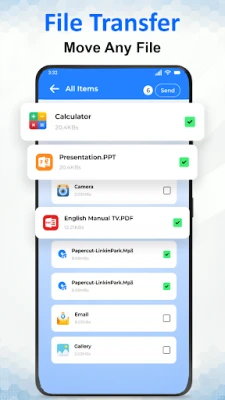
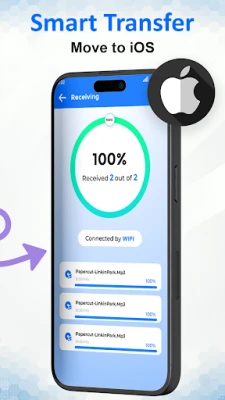
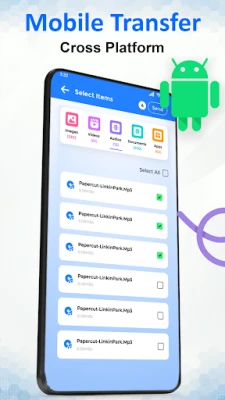
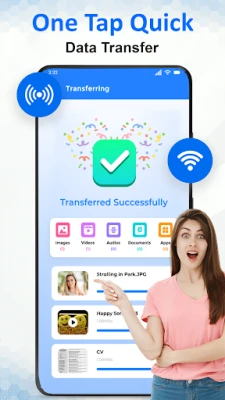
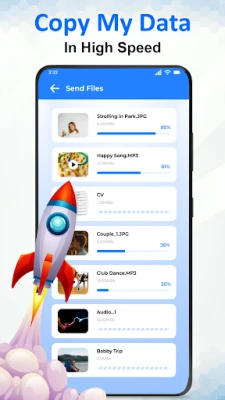
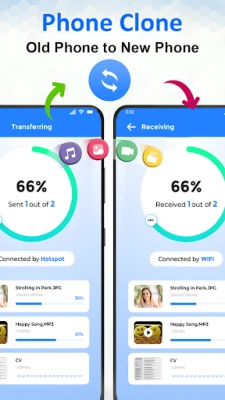
Data migration and phone setup are simple with Copy My Data: Mobile Transfer, allowing users to transfer their data between devices while keeping apps, files, and media secure. The data transfer app supports sending and receiving files seamlessly and lets users transfer my data without losing important content. Phone clone features make switching mobile devices smooth, and hotspot connections enable fast mobile transfer. The file transfer log organizes operations clearly, and notifications track activity efficiently.
Main Features of Copy My Data: Mobile Transfer:
● Send and Receive Files – transfer my data quickly and securely.
● Hotspot Sender & Receiver – supports phone clone without internet.
● Content Library – manage all transfers using the data transfer app.
● Dark Mode – interface enhanced with smart transfer app features.
● Clean Transfer & Receive History – maintain privacy while performing mobile transfer.
Smart File Transfer:
The clone app moves content across devices reliably while keeping files intact. Users switch mobile phones without losing data. Every file transfer is recorded for easy review, and content transfer happens securely. Phone transfer keeps apps and media accessible, and smart share connects devices instantly.
Seamless Connectivity and Management:
WiFi or a hotspot enables a smooth mobile transfer offline. Users manage files easily with the data transfer app. Content transfer logs help track past activity. Dark mode improves usability, and notifications keep users updated during every phone transfer.
Phone Migration Experience:
Smooth phone transfer is possible using a reliable hotspot and WiFi connections. Switching mobile devices is simple and secure. The smart transfer app interface allows full control over data migration. Content transfer management keeps all files organized and accessible after moving to a new device.
Benefits of Copy My Data: Mobile Transfer:
● Quick and reliable mobile transfer
● Organized content transfer library
● Track data transfer logs efficiently
● Phone clone support for seamless operations
● Easy-to-use smart transfer app interface
● Smart share enables instant connections
Privacy & Disclaimer:
Copy My Data: Mobile Transfer app is not affiliated with any brand. All operations are independent and secure.
Download the Copy My Data: Mobile Transfer app now to manage your phone transfer experience effortlessly. Also, safely copy my data between devices within seconds.
● Send and Receive Files – transfer my data quickly and securely.
● Hotspot Sender & Receiver – supports phone clone without internet.
● Content Library – manage all transfers using the data transfer app.
● Dark Mode – interface enhanced with smart transfer app features.
● Clean Transfer & Receive History – maintain privacy while performing mobile transfer.
Smart File Transfer:
The clone app moves content across devices reliably while keeping files intact. Users switch mobile phones without losing data. Every file transfer is recorded for easy review, and content transfer happens securely. Phone transfer keeps apps and media accessible, and smart share connects devices instantly.
Seamless Connectivity and Management:
WiFi or a hotspot enables a smooth mobile transfer offline. Users manage files easily with the data transfer app. Content transfer logs help track past activity. Dark mode improves usability, and notifications keep users updated during every phone transfer.
Phone Migration Experience:
Smooth phone transfer is possible using a reliable hotspot and WiFi connections. Switching mobile devices is simple and secure. The smart transfer app interface allows full control over data migration. Content transfer management keeps all files organized and accessible after moving to a new device.
Benefits of Copy My Data: Mobile Transfer:
● Quick and reliable mobile transfer
● Organized content transfer library
● Track data transfer logs efficiently
● Phone clone support for seamless operations
● Easy-to-use smart transfer app interface
● Smart share enables instant connections
Privacy & Disclaimer:
Copy My Data: Mobile Transfer app is not affiliated with any brand. All operations are independent and secure.
Download the Copy My Data: Mobile Transfer app now to manage your phone transfer experience effortlessly. Also, safely copy my data between devices within seconds.
Rate the App
Add Comment & Review
User Reviews
Based on 0 reviews
No reviews added yet.
Comments will not be approved to be posted if they are SPAM, abusive, off-topic, use profanity, contain a personal attack, or promote hate of any kind.







More »

Popular Apps

phpFoxPHPFOX LLC

Moon Chai StoryOlha Dobel

World War Heroes — WW2 PvP FPSAzur Interactive Games Limited

Govee LiteGovee

Viking Clan: RagnarokKano Games

Build World AdventureExplore city in cube world

Vikings: War of ClansPlarium LLC

AvSeaAvionics Electronics Geeks!

Asphalt 9: LegendsGameloft SE

Dawn of Zombies: Survival GameRoyal Ark
More »
Editor's Choice

Grim Soul: Dark Survival RPGBrickworks Games Ltd

Craft of Survival - Gladiators101XP LIMITED

Last Shelter: SurvivalLong Tech Network Limited
Dawn of Zombies: Survival GameRoyal Ark

Merge Survival : WastelandStickyHands Inc.

AoD Vikings: Valhalla GameRoboBot Studio
Viking Clan: RagnarokKano Games
Vikings: War of ClansPlarium LLC
Asphalt 9: LegendsGameloft SE

Modern Tanks: War Tank GamesXDEVS LTD