
Latest Version
Update
October 21, 2026
October 21, 2026
Developer
SupeCoder
SupeCoder
Categories
Productivity
Productivity
Platforms
Android
Android
Downloads
0
0
License
Free
Free
Package Name
simplenotes.notes.todolist.notebook.notepad.journal
simplenotes.notes.todolist.notebook.notepad.journal
Report
Report a Problem
Report a Problem
More About Simple Notes iOS Style Notepad
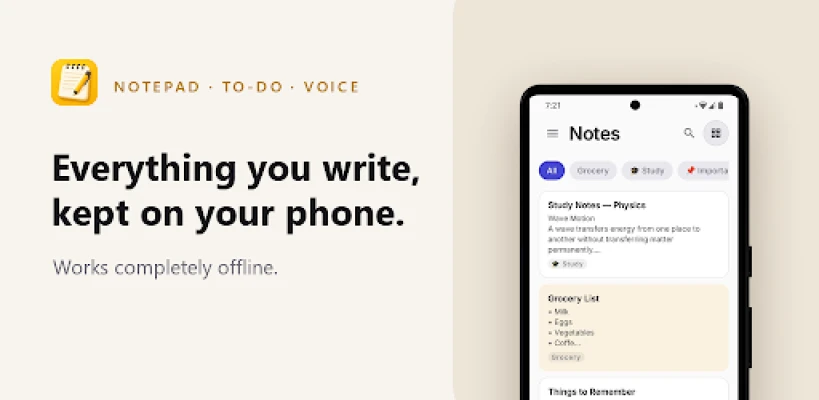
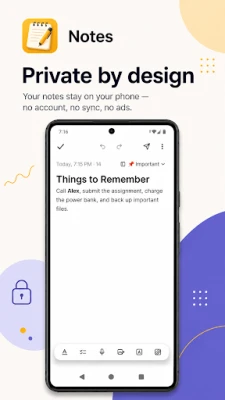
Notepad, to-do list, notebook and journal in one simple notes app. Your notes stay on your phone.
Notes is a fast notepad for everything you need to write down: quick notes, to-do lists, checklists, shopping lists, class notes, meeting notes, voice memos and a daily journal. No account, no sign-in, no ads. Every feature works offline.
WRITE NOTES THE EASY WAY
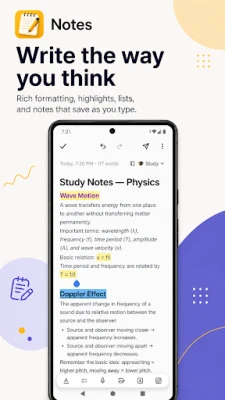
• No Save button. Every note saves itself as you type
• Rich text: bold, italic, underline, strikethrough, ink colors, highlighter and text size
• Twelve fonts to write in
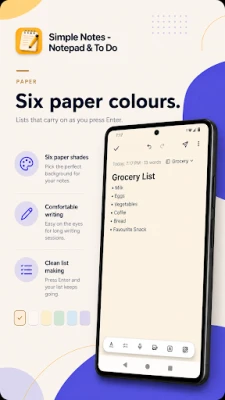
• Bullet lists and numbered lists that carry on when you press Enter
• Share a link or a message from any app straight into Notes
• Undo, redo, and a version history that brings back an earlier draft
• Six paper colors to color-code your notebook
• Focus mode clears every control away and leaves just the page
TO-DO LISTS AND CHECKLISTS
• Tick items off as you go, with progress shown on the note card
• Made for a shopping list, packing list, homework or a daily to-do list
• Ticked items can drop below the ones still to do (your choice, in Settings)
• Search looks inside your checklists too
VOICE NOTES AND PHOTOS
• Record voice memos as real audio, with a waveform you can see
• Attach photos, kept inside the app rather than left in your gallery
FIND ANY NOTE FAST
• Instant search across your notes and checklists
• Search operators when you want them
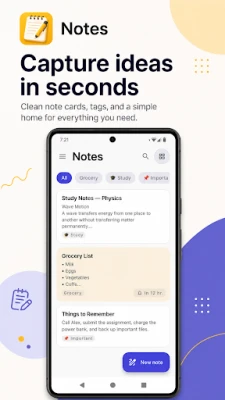
• Tags instead of folders: use one and the folder appears
• Pin what matters, archive what does not
REMINDERS AND HOME SCREEN WIDGETS
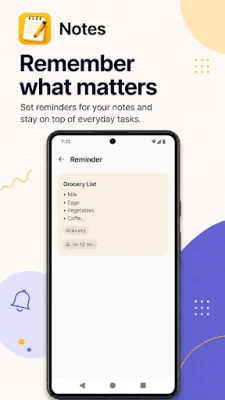
• Set a reminder on any note and it arrives on time
• Done and Snooze right on the notification
• Widgets for your recent notes, or one note pinned on its own
• Tick checklist boxes from the widget without opening the app
NOTHING GETS LOST
• Deleting is reversible: an Undo appears the moment you delete
• Deleted notes wait 30 days in the Trash
• "Delete forever" is the only action that cannot be undone, and it asks first
• Export every note, with its photos and voice clips, to one file you keep, and import it back
MADE TO LOOK RIGHT
• Light and dark themes, or follow your system
• A pure black mode for OLED screens
• Material You colors from your wallpaper
• Three layouts: a compact list, one column of cards, or a staggered grid
PERFECT FOR
Quick notes • to-do lists • shopping lists • meeting notes • lecture and class
notes • a daily journal or diary • recipes • ideas and reminders • packing
lists • homework • work notes • a simple notebook you actually keep using
YOUR NOTES STAY ON YOUR PHONE
Your notes are files on your device. Note text, photos and voice recordings
are stored in this app's own private storage and are never uploaded. No cloud,
no sync, no account, no sign-in, and nothing to log into on another device.
The app does send anonymous usage statistics, such as which screens get opened
and which features get used, so we can tell what is worth improving. It never
includes a single word you wrote, the name of a tag, or anything you typed
into search. Full details are in the privacy policy linked below.
A simple notebook that keeps what you write to itself.
WRITE NOTES THE EASY WAY
• No Save button. Every note saves itself as you type
• Rich text: bold, italic, underline, strikethrough, ink colors, highlighter and text size
• Twelve fonts to write in
• Bullet lists and numbered lists that carry on when you press Enter
• Share a link or a message from any app straight into Notes
• Undo, redo, and a version history that brings back an earlier draft
• Six paper colors to color-code your notebook
• Focus mode clears every control away and leaves just the page
TO-DO LISTS AND CHECKLISTS
• Tick items off as you go, with progress shown on the note card
• Made for a shopping list, packing list, homework or a daily to-do list
• Ticked items can drop below the ones still to do (your choice, in Settings)
• Search looks inside your checklists too
VOICE NOTES AND PHOTOS
• Record voice memos as real audio, with a waveform you can see
• Attach photos, kept inside the app rather than left in your gallery
FIND ANY NOTE FAST
• Instant search across your notes and checklists
• Search operators when you want them
• Tags instead of folders: use one and the folder appears
• Pin what matters, archive what does not
REMINDERS AND HOME SCREEN WIDGETS
• Set a reminder on any note and it arrives on time
• Done and Snooze right on the notification
• Widgets for your recent notes, or one note pinned on its own
• Tick checklist boxes from the widget without opening the app
NOTHING GETS LOST
• Deleting is reversible: an Undo appears the moment you delete
• Deleted notes wait 30 days in the Trash
• "Delete forever" is the only action that cannot be undone, and it asks first
• Export every note, with its photos and voice clips, to one file you keep, and import it back
MADE TO LOOK RIGHT
• Light and dark themes, or follow your system
• A pure black mode for OLED screens
• Material You colors from your wallpaper
• Three layouts: a compact list, one column of cards, or a staggered grid
PERFECT FOR
Quick notes • to-do lists • shopping lists • meeting notes • lecture and class
notes • a daily journal or diary • recipes • ideas and reminders • packing
lists • homework • work notes • a simple notebook you actually keep using
YOUR NOTES STAY ON YOUR PHONE
Your notes are files on your device. Note text, photos and voice recordings
are stored in this app's own private storage and are never uploaded. No cloud,
no sync, no account, no sign-in, and nothing to log into on another device.
The app does send anonymous usage statistics, such as which screens get opened
and which features get used, so we can tell what is worth improving. It never
includes a single word you wrote, the name of a tag, or anything you typed
into search. Full details are in the privacy policy linked below.
A simple notebook that keeps what you write to itself.
Rate the App
Add Comment & Review
User Reviews
Based on 0 reviews
No reviews added yet.
Comments will not be approved to be posted if they are SPAM, abusive, off-topic, use profanity, contain a personal attack, or promote hate of any kind.















More »

Popular Apps

phpFoxPHPFOX LLC

Moon Chai StoryOlha Dobel

World War Heroes — WW2 PvP FPSAzur Interactive Games Limited

Govee LiteGovee

AvSeaAvionics Electronics Geeks!

Viking Clan: RagnarokKano Games

Build World AdventureExplore city in cube world

Vikings: War of ClansPlarium LLC

Asphalt 9: LegendsGameloft SE

Dawn of Zombies: Survival GameRoyal Ark
More »
Editor's Choice

Grim Soul: Dark Survival RPGBrickworks Games Ltd

Craft of Survival - Gladiators101XP LIMITED

Last Shelter: SurvivalLong Tech Network Limited
Dawn of Zombies: Survival GameRoyal Ark

Merge Survival : WastelandStickyHands Inc.

AoD Vikings: Valhalla GameRoboBot Studio
Viking Clan: RagnarokKano Games
Vikings: War of ClansPlarium LLC
Asphalt 9: LegendsGameloft SE

Modern Tanks: War Tank GamesXDEVS LTD