
Latest Version
Update
October 14, 2026
October 14, 2026
Developer
DailyTools Studio
DailyTools Studio
Categories
Productivity
Productivity
Platforms
Android
Android
Downloads
0
0
License
Free
Free
Package Name
com.calendar.eventplanner.tasktracker
com.calendar.eventplanner.tasktracker
Report
Report a Problem
Report a Problem
More About Simple Calendar: Planner Home
Simple Calendar: Planner Home – Calendar, Events & Task Planner
Stay organized, plan your schedule, manage important dates, and keep track of everyday tasks with Simple Calendar: Planner Home. The app combines calendar views, events, holidays, tasks, memos, widgets, themes, and quick access features in one simple experience.
Whether you are planning your day, reviewing your week, managing events, or saving quick notes, Simple Calendar: Planner Home provides useful tools for everyday organization.
📅 Multiple Calendar Views
Choose the view that works best for you:
• Day View – Focus on your daily schedule.
• Week View – Plan and review your week.
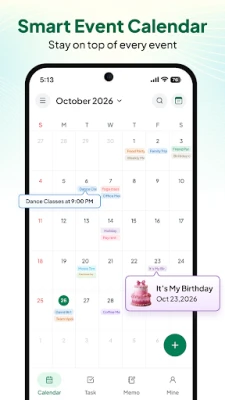
• Month View – See your monthly schedule at a glance.
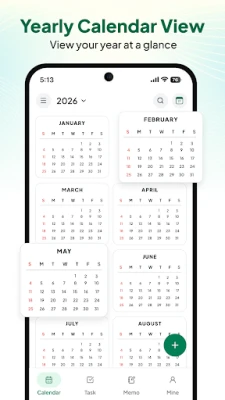
• Year View – Browse dates across the year.
• Month Day View – Easily navigate between dates and events.
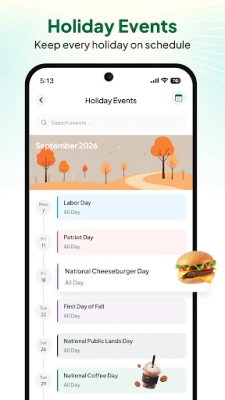
🎉 Events & Holidays
Keep important dates and special occasions organized.
• View available holiday information
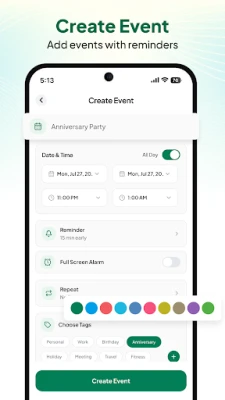
• Create and manage custom events
• Organize personal dates and occasions
• Plan birthdays, appointments, meetings, celebrations, and reminders
• Keep upcoming events easy to find
⏰ Tasks & To-Do Planning
Create tasks, organize your to-do list, and keep track of things you need to complete alongside your calendar events.
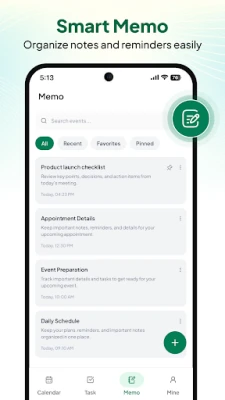
📝 Memo & Notes
Save quick notes, ideas, reminders, and useful planning information in one convenient place.
📱 Calendar Widgets
Access calendar information directly from your device's home screen. Check dates, upcoming events, and schedule information without opening the full app. Widget availability may vary by device and Android version.
🏠 Launcher & Quick Access
Use the optional launcher feature to quickly access supported calendar tools and app features.
Quick access may include:
• Calendar
• Events
• Tasks
• Memos
• Other supported features
The launcher is provided for convenience and does not replace, modify, or interfere with the Android operating system.
🎨 Themes & Personalization
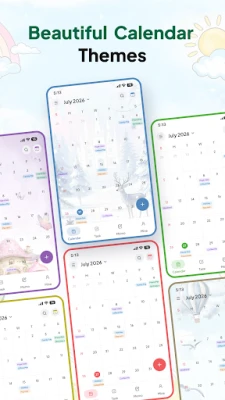
Customize your calendar experience with available themes and visual styles.
👤 Mine
Manage your app experience from one dedicated section with access to available options, settings, and useful information.
✨ Features at a Glance
• Simple and organized calendar
• Day, Week, Month, and Year views
• Month Day View
• Holiday information
• Custom events
• Task and to-do planning
• Memo and notes
• Home screen calendar widgets
• Launcher and quick access
• Customizable themes
• Everyday schedule planning
📌 Permissions & Feature Transparency
Some features may require relevant device permissions. Permission requirements can vary depending on the features you use, your device, and Android version.
Calendar permissions may be required when you choose to access or manage calendar information through supported features. You can review and manage permissions through your device settings.
⚠️ Disclaimer
Simple Calendar: Planner Home is an independent calendar and organization application. It is not affiliated with, sponsored by, or endorsed by Google, Android, or any other third-party service or brand.
The app does not claim to be an official Google Calendar or Android system application.
The launcher feature provides convenient access to supported app functionality. It does not modify, damage, or interfere with the Android operating system or other applications.
Features, widgets, themes, launcher functionality, and availability may vary depending on your device, Android version, permissions, and technical limitations.
Holiday or calendar information may depend on available data and configuration. Users should verify important dates when necessary.
📲 Organize Your Everyday Schedule
Plan your day, manage events, track tasks, save notes, and quickly access your calendar with Simple Calendar: Planner Home.
Plan your days. Manage your events. Organize your tasks. Keep everything in one place.
Whether you are planning your day, reviewing your week, managing events, or saving quick notes, Simple Calendar: Planner Home provides useful tools for everyday organization.
📅 Multiple Calendar Views
Choose the view that works best for you:
• Day View – Focus on your daily schedule.
• Week View – Plan and review your week.
• Month View – See your monthly schedule at a glance.
• Year View – Browse dates across the year.
• Month Day View – Easily navigate between dates and events.
🎉 Events & Holidays
Keep important dates and special occasions organized.
• View available holiday information
• Create and manage custom events
• Organize personal dates and occasions
• Plan birthdays, appointments, meetings, celebrations, and reminders
• Keep upcoming events easy to find
⏰ Tasks & To-Do Planning
Create tasks, organize your to-do list, and keep track of things you need to complete alongside your calendar events.
📝 Memo & Notes
Save quick notes, ideas, reminders, and useful planning information in one convenient place.
📱 Calendar Widgets
Access calendar information directly from your device's home screen. Check dates, upcoming events, and schedule information without opening the full app. Widget availability may vary by device and Android version.
🏠 Launcher & Quick Access
Use the optional launcher feature to quickly access supported calendar tools and app features.
Quick access may include:
• Calendar
• Events
• Tasks
• Memos
• Other supported features
The launcher is provided for convenience and does not replace, modify, or interfere with the Android operating system.
🎨 Themes & Personalization
Customize your calendar experience with available themes and visual styles.
👤 Mine
Manage your app experience from one dedicated section with access to available options, settings, and useful information.
✨ Features at a Glance
• Simple and organized calendar
• Day, Week, Month, and Year views
• Month Day View
• Holiday information
• Custom events
• Task and to-do planning
• Memo and notes
• Home screen calendar widgets
• Launcher and quick access
• Customizable themes
• Everyday schedule planning
📌 Permissions & Feature Transparency
Some features may require relevant device permissions. Permission requirements can vary depending on the features you use, your device, and Android version.
Calendar permissions may be required when you choose to access or manage calendar information through supported features. You can review and manage permissions through your device settings.
⚠️ Disclaimer
Simple Calendar: Planner Home is an independent calendar and organization application. It is not affiliated with, sponsored by, or endorsed by Google, Android, or any other third-party service or brand.
The app does not claim to be an official Google Calendar or Android system application.
The launcher feature provides convenient access to supported app functionality. It does not modify, damage, or interfere with the Android operating system or other applications.
Features, widgets, themes, launcher functionality, and availability may vary depending on your device, Android version, permissions, and technical limitations.
Holiday or calendar information may depend on available data and configuration. Users should verify important dates when necessary.
📲 Organize Your Everyday Schedule
Plan your day, manage events, track tasks, save notes, and quickly access your calendar with Simple Calendar: Planner Home.
Plan your days. Manage your events. Organize your tasks. Keep everything in one place.
Rate the App
Add Comment & Review
User Reviews
Based on 0 reviews
No reviews added yet.
Comments will not be approved to be posted if they are SPAM, abusive, off-topic, use profanity, contain a personal attack, or promote hate of any kind.















More »

Popular Apps

phpFoxPHPFOX LLC

Moon Chai StoryOlha Dobel

World War Heroes — WW2 PvP FPSAzur Interactive Games Limited

Govee LiteGovee

AvSeaAvionics Electronics Geeks!

Viking Clan: RagnarokKano Games

Build World AdventureExplore city in cube world

Vikings: War of ClansPlarium LLC

Asphalt 9: LegendsGameloft SE

Dawn of Zombies: Survival GameRoyal Ark
More »
Editor's Choice

Grim Soul: Dark Survival RPGBrickworks Games Ltd

Craft of Survival - Gladiators101XP LIMITED

Last Shelter: SurvivalLong Tech Network Limited
Dawn of Zombies: Survival GameRoyal Ark

Merge Survival : WastelandStickyHands Inc.

AoD Vikings: Valhalla GameRoboBot Studio
Viking Clan: RagnarokKano Games
Vikings: War of ClansPlarium LLC
Asphalt 9: LegendsGameloft SE

Modern Tanks: War Tank GamesXDEVS LTD