

Latest Version
Version
1.6
1.6
Update
June 13, 2026
June 13, 2026
Developer
2kit consulting
2kit consulting
Categories
Tools
Tools
Platforms
Android
Android
Downloads
0
0
License
Free
Free
Package Name
de.twokit.screen.recording.app
de.twokit.screen.recording.app
Report
Report a Problem
Report a Problem
More About Screen Recording App
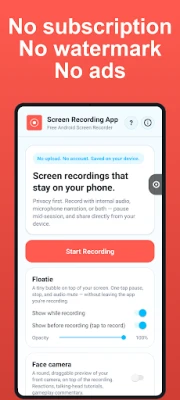
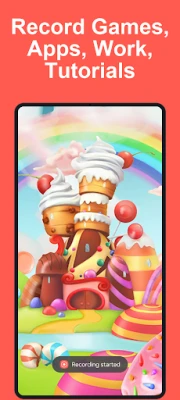
Screen Recorder for Android - record your screen in one tap. Gameplay, tutorials, reactions, bug reports - captured to MP4 and saved straight to your device.
Built for creators who want a simple, reliable recorder with internal audio, facecam, and draw tools, without the trade-offs:
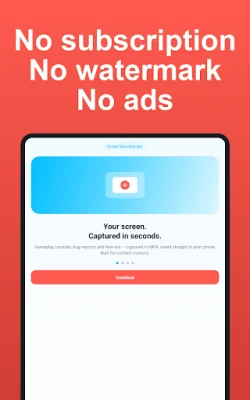
• No watermark
• No ads
• No subscription, no sign-up, no account
• No upload - recordings stay on your device
• Available in 17 languages
WORKS ON PHONE, TABLET, AND ANDROID TV - SAMSUNG GALAXY READY
One app that adapts to your device. Samsung Galaxy, Pixel, Xiaomi, OnePlus, and every major Android brand.
• Phone & tablet - one-tap recorder, portrait or landscape, inline preview of your clips
• Android TV - D-pad-native layout with quality / audio toggles. Save to internal storage or a USB drive.
CORE RECORDING
• Record any app or home screen as high-quality MP4
• Up to 1080p at 60 fps, bitrate up to 100 Mbps
• Record the full screen, or pick a region and capture just one part
• H.264 or H.265 / HEVC codec - choose HEVC for smaller files on supported devices
• Internal audio capture - game sounds, video, music - with adjustable volume
• Microphone narration with adjustable volume - mix both at once
• Pause and resume a single recording without creating two files
• Auto-stop timer: 5 / 15 / 30 min, 1 hour, 2 hours, or unlimited
• Countdown before recording starts
• Save to Movies folder, custom location each time, or USB drive on TV
PRIVACY MASKS - HIDE SENSITIVE DATA
Black out anything you don't want on camera. Drop boxes over passwords, names, or private messages and they stay hidden in the recording - set them before you start or adjust them mid-recording. Perfect for tutorials that touch real data.
FACECAM OVERLAY - SHOW YOUR REACTIONS
A draggable, round face-camera bubble over your recording. Front or back camera, switchable mid-recording, with mirror toggle, three sizes, four positions, and zoom. Ideal for reactions and talking-head tutorials - no separate facecam app needed.
FLOATIE - ONE-TAP CONTROLS FROM ANY APP
A tiny floating bubble on top of your screen while you record. One tap to pause / stop, screenshot, mute, toggle facecam, swap camera, draw, edit privacy masks, or open the app - no swiping down the notification shade.
DRAW ON SCREEN WHILE RECORDING
Pen and eraser, six colours, four widths, undo, clear all. Strokes are captured straight into the recording - no editing afterwards.
SCREENSHOTS
Built-in screenshots: one-tap from the Quick Settings tile, or long-press Floatie mid-recording. Browse them in the library with edit / share / delete.
GIF EXPORT
Turn any short recording into a shareable GIF, right inside the app - small / medium / large, encoded locally on your phone.
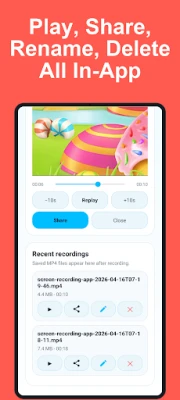
IN-APP LIBRARY
Every recording and screenshot lands in the library:
• See resolution, frame rate, bitrate, orientation, and codec at a glance
• Play inline with transport controls (scrub, ±10 s, replay)
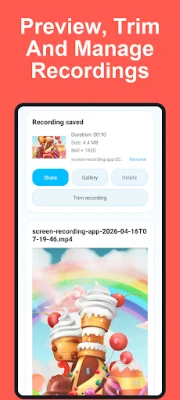
• Trim - lossless, keyframe-aware
• Rename, share to any app, delete
• Select several at once to delete in bulk or export as a single ZIP
• 30-day Recently Deleted recovery
LIGHT OR DARK
Light, dark, or follow your system theme - your choice.
PRIVACY
Local-first. Recordings stay on your device and are never uploaded. The app asks only for what it needs - screen capture, microphone, camera, notifications. No data collected for advertising; diagnostic pings contain no personal info or screen content.
PERFECT FOR
• Gamers capturing clips on Samsung Galaxy, Pixel, Android TV
• Creators making tutorials and reaction videos with facecam
• Developers filing bug reports with video context
• Teachers preparing lessons and walkthroughs
CHROMEBOOK NOTE
On ChromeOS, Android apps can't reliably capture the screen. Screen Recording App opens our free web recorder in Chrome (screenrecording.app) - no download, no sign-up, same privacy guarantees.
GET STARTED
Tap Start Recording, choose what to capture, and go. Everything you record stays on your device.
• No watermark
• No ads
• No subscription, no sign-up, no account
• No upload - recordings stay on your device
• Available in 17 languages
WORKS ON PHONE, TABLET, AND ANDROID TV - SAMSUNG GALAXY READY
One app that adapts to your device. Samsung Galaxy, Pixel, Xiaomi, OnePlus, and every major Android brand.
• Phone & tablet - one-tap recorder, portrait or landscape, inline preview of your clips
• Android TV - D-pad-native layout with quality / audio toggles. Save to internal storage or a USB drive.
CORE RECORDING
• Record any app or home screen as high-quality MP4
• Up to 1080p at 60 fps, bitrate up to 100 Mbps
• Record the full screen, or pick a region and capture just one part
• H.264 or H.265 / HEVC codec - choose HEVC for smaller files on supported devices
• Internal audio capture - game sounds, video, music - with adjustable volume
• Microphone narration with adjustable volume - mix both at once
• Pause and resume a single recording without creating two files
• Auto-stop timer: 5 / 15 / 30 min, 1 hour, 2 hours, or unlimited
• Countdown before recording starts
• Save to Movies folder, custom location each time, or USB drive on TV
PRIVACY MASKS - HIDE SENSITIVE DATA
Black out anything you don't want on camera. Drop boxes over passwords, names, or private messages and they stay hidden in the recording - set them before you start or adjust them mid-recording. Perfect for tutorials that touch real data.
FACECAM OVERLAY - SHOW YOUR REACTIONS
A draggable, round face-camera bubble over your recording. Front or back camera, switchable mid-recording, with mirror toggle, three sizes, four positions, and zoom. Ideal for reactions and talking-head tutorials - no separate facecam app needed.
FLOATIE - ONE-TAP CONTROLS FROM ANY APP
A tiny floating bubble on top of your screen while you record. One tap to pause / stop, screenshot, mute, toggle facecam, swap camera, draw, edit privacy masks, or open the app - no swiping down the notification shade.
DRAW ON SCREEN WHILE RECORDING
Pen and eraser, six colours, four widths, undo, clear all. Strokes are captured straight into the recording - no editing afterwards.
SCREENSHOTS
Built-in screenshots: one-tap from the Quick Settings tile, or long-press Floatie mid-recording. Browse them in the library with edit / share / delete.
GIF EXPORT
Turn any short recording into a shareable GIF, right inside the app - small / medium / large, encoded locally on your phone.
IN-APP LIBRARY
Every recording and screenshot lands in the library:
• See resolution, frame rate, bitrate, orientation, and codec at a glance
• Play inline with transport controls (scrub, ±10 s, replay)
• Trim - lossless, keyframe-aware
• Rename, share to any app, delete
• Select several at once to delete in bulk or export as a single ZIP
• 30-day Recently Deleted recovery
LIGHT OR DARK
Light, dark, or follow your system theme - your choice.
PRIVACY
Local-first. Recordings stay on your device and are never uploaded. The app asks only for what it needs - screen capture, microphone, camera, notifications. No data collected for advertising; diagnostic pings contain no personal info or screen content.
PERFECT FOR
• Gamers capturing clips on Samsung Galaxy, Pixel, Android TV
• Creators making tutorials and reaction videos with facecam
• Developers filing bug reports with video context
• Teachers preparing lessons and walkthroughs
CHROMEBOOK NOTE
On ChromeOS, Android apps can't reliably capture the screen. Screen Recording App opens our free web recorder in Chrome (screenrecording.app) - no download, no sign-up, same privacy guarantees.
GET STARTED
Tap Start Recording, choose what to capture, and go. Everything you record stays on your device.
Rate the App
Add Comment & Review
User Reviews
Based on 0 reviews
No reviews added yet.
Comments will not be approved to be posted if they are SPAM, abusive, off-topic, use profanity, contain a personal attack, or promote hate of any kind.









More »

Popular Apps

phpFoxPHPFOX LLC

Moon Chai StoryOlha Dobel

World War Heroes — WW2 PvP FPSAzur Interactive Games Limited

Govee LiteGovee

Build World AdventureExplore city in cube world

Viking Clan: RagnarokKano Games

Vikings: War of ClansPlarium LLC

Asphalt 9: LegendsGameloft SE

Submarine Car Diving SimulatorSwim with dolphins & penguins

Dawn of Zombies: Survival GameRoyal Ark
More »
Editor's Choice

Grim Soul: Dark Survival RPGBrickworks Games Ltd

Craft of Survival - Gladiators101XP LIMITED

Last Shelter: SurvivalLong Tech Network Limited
Dawn of Zombies: Survival GameRoyal Ark

Merge Survival : WastelandStickyHands Inc.

AoD Vikings: Valhalla GameRoboBot Studio
Viking Clan: RagnarokKano Games
Vikings: War of ClansPlarium LLC
Asphalt 9: LegendsGameloft SE

Modern Tanks: War Tank GamesXDEVS LTD