
Latest Version
Update
February 03, 2026
February 03, 2026
Developer
styles4you
styles4you
Categories
Personalization
Personalization
Platforms
Android
Android
Downloads
0
0
License
$1.89
$1.89
Package Name
com.watchfacestudio.s4uobsidian
com.watchfacestudio.s4uobsidian
Report
Report a Problem
Report a Problem
More About S4U Obsidian analog watch face
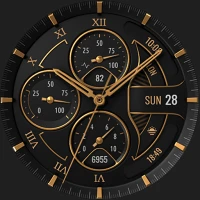
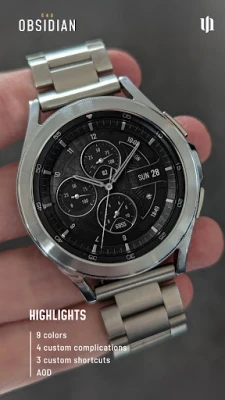
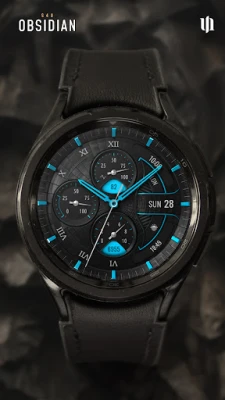
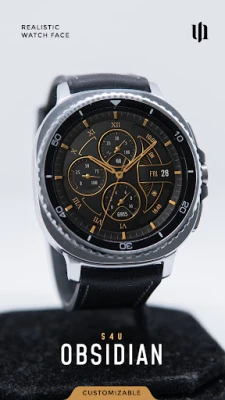
Experience realistic luxury with S4U Obsidian. A classic analog watch face with deep customization.
Discover the perfect blend of luxury and functionality. This realistic, classic analog watch face offers a huge range of customization options to suit your style. The dial features 4 editable complications and distinct Always-On Display layouts.
━━━━━━━━━━━━━━━━━━
⚠️ IMPORTANT: Compatibility & Installation
This app is optimized for the new Watch Face Format regarding Wear OS 5 (API 34+). Compatible devices include:
- Samsung Galaxy Watch 8, Ultra, 7, 6 , 5, 4 (Wear OS 5 update required)
- Google Pixel Watch Series
- Other Wear OS 5+ smartwatches
(Note: Only devices running Wear OS 5 or higher are supported!)
If you experience any issues with installation or downloading:
1. Ensure your watch is updated to the latest Wear OS version.
2. Open the companion app provided with your purchase.
3. Follow the steps in the Install/Issues section.
Still need help? Email me at [email protected].
━━━━━━━━━━━━━━━━━━
✨ Key Features:
- Realistic Design: A classic analog watch face with timeless elegance.
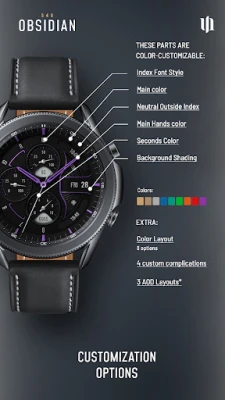
- Color Customization: Personalize your watch with countless color combinations.
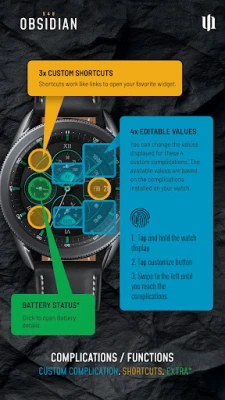
- 4 Editable Values: Display user-defined data (e.g., weather, battery, heart rate).
- 3 Shortcuts: Quickly access your favorite widgets/apps.
- Always-On Display: 3 distinctive layouts for optimal AOD functionality.
🕒 Data Displayed:
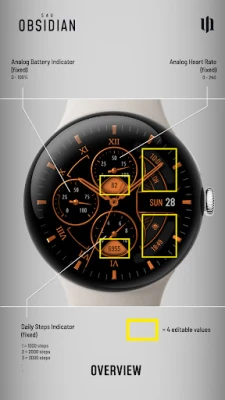
- Analog Time
- Analog Steps (Daily goal progress)
- Analog Battery Level
- Analog Heart Rate
- Weekday & Day of the Month
- 4 Custom Complications (editable values)
━━━━━━━━━━━━━━━━━━
🎨 CUSTOMIZATION
Personalize your S4U Obsidian in just a few steps:
1. Press and hold the center of the watch display.
2. Tap the "Customize" button.
3. Swipe left/right to navigate options, up/down to change them.
Available Options:
- Main color: 9 options
- Main Hand color: 9 options
- Seconds Hand color: 9 options
- Color Layout: 8 options
- Background shading: 4 options
- Neutral outside index: 3 options
- Index numbers: 6 variations
- AOD Layout: 4 options
━━━━━━━━━━━━━━━━━━
🌙 Always-On Display (AOD)
The watch face features an Always-On Display for continuous timekeeping. Colors automatically adapt to your chosen design.
3 AOD Layout Options: Full, Full (Shaded), Minimal.
Note: Using AOD affects battery life. AOD brightness depends on your device's specific algorithm.
━━━━━━━━━━━━━━━━━━
⚙️ SHORTCUTS & COMPLICATIONS
- App Shortcuts: Link to your favorite apps for quick access.
- Editable Values: Display exactly the data you need.
How to Set Up:
1. Long-press the watch display > Customize.
2. Swipe to the "Complications" section.
3. Tap the highlighted areas to select your preferred data or app.
━━━━━━━━━━━━━━━━━━
📬 Stay Connected
Enjoying the design? Check out my other creations! I’m constantly crafting new watch faces for Wear OS.
🌐 https://www.s4u-watches.com
Feedback & Support
I’d love to hear your thoughts! Suggestions and feedback help me improve.
📧 Email: [email protected]
💬 Please leave a review on the Play Store!
Follow Me
📸 Instagram: https://www.instagram.com/matze_styles4you/
👍 Facebook: https://www.facebook.com/styles4you
▶️ YouTube: https://www.youtube.com/c/styles4you-watches
🐦 X: https://x.com/MStyles4you
━━━━━━━━━━━━━━━━━━
⚠️ IMPORTANT: Compatibility & Installation
This app is optimized for the new Watch Face Format regarding Wear OS 5 (API 34+). Compatible devices include:
- Samsung Galaxy Watch 8, Ultra, 7, 6 , 5, 4 (Wear OS 5 update required)
- Google Pixel Watch Series
- Other Wear OS 5+ smartwatches
(Note: Only devices running Wear OS 5 or higher are supported!)
If you experience any issues with installation or downloading:
1. Ensure your watch is updated to the latest Wear OS version.
2. Open the companion app provided with your purchase.
3. Follow the steps in the Install/Issues section.
Still need help? Email me at [email protected].
━━━━━━━━━━━━━━━━━━
✨ Key Features:
- Realistic Design: A classic analog watch face with timeless elegance.
- Color Customization: Personalize your watch with countless color combinations.
- 4 Editable Values: Display user-defined data (e.g., weather, battery, heart rate).
- 3 Shortcuts: Quickly access your favorite widgets/apps.
- Always-On Display: 3 distinctive layouts for optimal AOD functionality.
🕒 Data Displayed:
- Analog Time
- Analog Steps (Daily goal progress)
- Analog Battery Level
- Analog Heart Rate
- Weekday & Day of the Month
- 4 Custom Complications (editable values)
━━━━━━━━━━━━━━━━━━
🎨 CUSTOMIZATION
Personalize your S4U Obsidian in just a few steps:
1. Press and hold the center of the watch display.
2. Tap the "Customize" button.
3. Swipe left/right to navigate options, up/down to change them.
Available Options:
- Main color: 9 options
- Main Hand color: 9 options
- Seconds Hand color: 9 options
- Color Layout: 8 options
- Background shading: 4 options
- Neutral outside index: 3 options
- Index numbers: 6 variations
- AOD Layout: 4 options
━━━━━━━━━━━━━━━━━━
🌙 Always-On Display (AOD)
The watch face features an Always-On Display for continuous timekeeping. Colors automatically adapt to your chosen design.
3 AOD Layout Options: Full, Full (Shaded), Minimal.
Note: Using AOD affects battery life. AOD brightness depends on your device's specific algorithm.
━━━━━━━━━━━━━━━━━━
⚙️ SHORTCUTS & COMPLICATIONS
- App Shortcuts: Link to your favorite apps for quick access.
- Editable Values: Display exactly the data you need.
How to Set Up:
1. Long-press the watch display > Customize.
2. Swipe to the "Complications" section.
3. Tap the highlighted areas to select your preferred data or app.
━━━━━━━━━━━━━━━━━━
📬 Stay Connected
Enjoying the design? Check out my other creations! I’m constantly crafting new watch faces for Wear OS.
🌐 https://www.s4u-watches.com
Feedback & Support
I’d love to hear your thoughts! Suggestions and feedback help me improve.
📧 Email: [email protected]
💬 Please leave a review on the Play Store!
Follow Me
📸 Instagram: https://www.instagram.com/matze_styles4you/
👍 Facebook: https://www.facebook.com/styles4you
▶️ YouTube: https://www.youtube.com/c/styles4you-watches
🐦 X: https://x.com/MStyles4you
Rate the App
Add Comment & Review
User Reviews
Based on 0 reviews
No reviews added yet.
Comments will not be approved to be posted if they are SPAM, abusive, off-topic, use profanity, contain a personal attack, or promote hate of any kind.










More »

Popular Apps

phpFoxPHPFOX LLC

Moon Chai StoryOlha Dobel

World War Heroes — WW2 PvP FPSAzur Interactive Games Limited

Govee LiteGovee

Build World AdventureExplore city in cube world

Viking Clan: RagnarokKano Games

Vikings: War of ClansPlarium LLC

Submarine Car Diving SimulatorSwim with dolphins & penguins

Asphalt 9: LegendsGameloft SE

Dawn of Zombies: Survival GameRoyal Ark
More »
Editor's Choice

Grim Soul: Dark Survival RPGBrickworks Games Ltd

Craft of Survival - Gladiators101XP LIMITED

Last Shelter: SurvivalLong Tech Network Limited
Dawn of Zombies: Survival GameRoyal Ark

Merge Survival : WastelandStickyHands Inc.

AoD Vikings: Valhalla GameRoboBot Studio
Viking Clan: RagnarokKano Games
Vikings: War of ClansPlarium LLC
Asphalt 9: LegendsGameloft SE

Modern Tanks: War Tank GamesXDEVS LTD