
Latest Version
Update
September 24, 2026
September 24, 2026
Developer
Teklix Apps
Teklix Apps
Categories
Business
Business
Platforms
Android
Android
Downloads
0
0
License
Free
Free
Package Name
com.cvmaker.resumebuilder.pdf
com.cvmaker.resumebuilder.pdf
Report
Report a Problem
Report a Problem
More About Resume Builder: CV Maker
"Create and update a professional CV on your phone with CV Maker: Resume Builder. Enter your details through a guided process, select a suitable CV template and export the finished document as an A4 or Letter PDF.
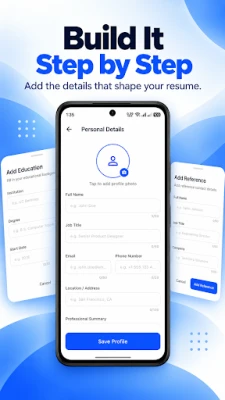
BUILD YOUR CV SECTION BY SECTION
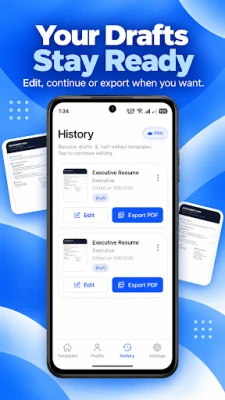
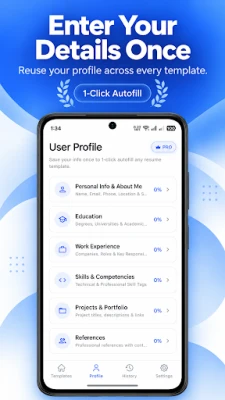
Add contact details, a personal profile, employment history, education, skills, projects, languages, certificates and your own custom sections. Saved profile information can be reused, while drafts make later changes straightforward.
CV TEMPLATES
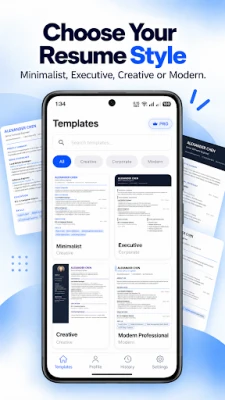
Choose a Minimalist, Executive, Creative or Modern Professional layout. Change the accent colour and organise the sections around your experience. Free templates are available, and premium templates may be unlocked by viewing a rewarded advert.
WORK OFFLINE
The core CV builder works without an internet connection, including editing and PDF export. A connection is needed for adverts, purchases and subscription management.
SAVE AND SHARE AS PDF
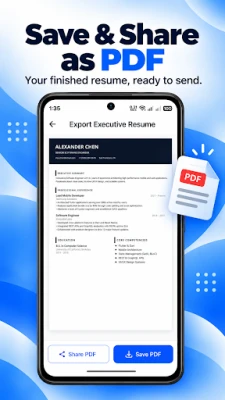
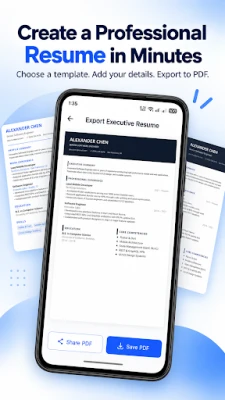
Create an A4 or Letter CV PDF, save it on your device and share it when applying for a role.
The interface is available in 72 languages and supports RTL layouts. Optional weekly, monthly and yearly subscriptions unlock paid features.
offline CV maker
Export the completed document as an A4 or Letter PDF. Save the file on your Android device, print it when required, or share it through compatible email, messaging and job application services. PDF export preserves a consistent document format for sending, storing and printing. Drafts remain editable, so a saved resume can be updated before the next export.
Useful for every career stage
Prepare a first resume for an internship or entry-level position, refresh an existing CV after gaining new experience, or create a focused version for a specific job application. The guided resume builder separates the document into manageable sections, so students, graduates, job seekers and experienced professionals can work at their own pace. Add only the sections that support your career story and return to the saved draft whenever information changes.
Create a focused job application
A resume is easier to review when the most relevant information is easy to find. Use the professional summary to introduce your background, employment sections to explain responsibilities and achievements, and skills sections to present important competencies. Projects, certifications and portfolio links can add supporting evidence when they are relevant to the role. Create a concise one-page resume or include additional information when a longer CV is appropriate.
Build versions for different opportunities
The same career history does not need to be presented in exactly the same way for every role. Update the professional summary, reorder the included information and highlight the experience, projects or skills that are most relevant to a particular application. Saved drafts make it easier to continue editing and create an updated resume when a new opportunity appears.
Suitable for many professions
Use the CV maker for roles in technology, business, administration, education, healthcare, engineering, sales, marketing, customer service, hospitality and other professional fields. Students can record education, projects and developing skills, while experienced applicants can emphasize employment history, achievements, certifications and leadership responsibilities. The document content remains under your control."
Add contact details, a personal profile, employment history, education, skills, projects, languages, certificates and your own custom sections. Saved profile information can be reused, while drafts make later changes straightforward.
CV TEMPLATES
Choose a Minimalist, Executive, Creative or Modern Professional layout. Change the accent colour and organise the sections around your experience. Free templates are available, and premium templates may be unlocked by viewing a rewarded advert.
WORK OFFLINE
The core CV builder works without an internet connection, including editing and PDF export. A connection is needed for adverts, purchases and subscription management.
SAVE AND SHARE AS PDF
Create an A4 or Letter CV PDF, save it on your device and share it when applying for a role.
The interface is available in 72 languages and supports RTL layouts. Optional weekly, monthly and yearly subscriptions unlock paid features.
offline CV maker
Export the completed document as an A4 or Letter PDF. Save the file on your Android device, print it when required, or share it through compatible email, messaging and job application services. PDF export preserves a consistent document format for sending, storing and printing. Drafts remain editable, so a saved resume can be updated before the next export.
Useful for every career stage
Prepare a first resume for an internship or entry-level position, refresh an existing CV after gaining new experience, or create a focused version for a specific job application. The guided resume builder separates the document into manageable sections, so students, graduates, job seekers and experienced professionals can work at their own pace. Add only the sections that support your career story and return to the saved draft whenever information changes.
Create a focused job application
A resume is easier to review when the most relevant information is easy to find. Use the professional summary to introduce your background, employment sections to explain responsibilities and achievements, and skills sections to present important competencies. Projects, certifications and portfolio links can add supporting evidence when they are relevant to the role. Create a concise one-page resume or include additional information when a longer CV is appropriate.
Build versions for different opportunities
The same career history does not need to be presented in exactly the same way for every role. Update the professional summary, reorder the included information and highlight the experience, projects or skills that are most relevant to a particular application. Saved drafts make it easier to continue editing and create an updated resume when a new opportunity appears.
Suitable for many professions
Use the CV maker for roles in technology, business, administration, education, healthcare, engineering, sales, marketing, customer service, hospitality and other professional fields. Students can record education, projects and developing skills, while experienced applicants can emphasize employment history, achievements, certifications and leadership responsibilities. The document content remains under your control."
Rate the App
Add Comment & Review
User Reviews
Based on 0 reviews
No reviews added yet.
Comments will not be approved to be posted if they are SPAM, abusive, off-topic, use profanity, contain a personal attack, or promote hate of any kind.













More »

Popular Apps

phpFoxPHPFOX LLC

Moon Chai StoryOlha Dobel

World War Heroes — WW2 PvP FPSAzur Interactive Games Limited

Govee LiteGovee

AvSeaAvionics Electronics Geeks!

Viking Clan: RagnarokKano Games

Vikings: War of ClansPlarium LLC

Build World AdventureExplore city in cube world

Asphalt 9: LegendsGameloft SE

Dawn of Zombies: Survival GameRoyal Ark
More »
Editor's Choice

Grim Soul: Dark Survival RPGBrickworks Games Ltd

Craft of Survival - Gladiators101XP LIMITED

Last Shelter: SurvivalLong Tech Network Limited
Dawn of Zombies: Survival GameRoyal Ark

Merge Survival : WastelandStickyHands Inc.

AoD Vikings: Valhalla GameRoboBot Studio
Viking Clan: RagnarokKano Games
Vikings: War of ClansPlarium LLC
Asphalt 9: LegendsGameloft SE

Modern Tanks: War Tank GamesXDEVS LTD