
Latest Version
Version
2.5.6
2.5.6
Update
September 08, 2026
September 08, 2026
Developer
Wooliv Solutions Private Limited
Wooliv Solutions Private Limited
Categories
Business
Business
Platforms
Android
Android
Downloads
1
1
License
Free
Free
Package Name
resji.resume.website.maker.link.builder
resji.resume.website.maker.link.builder
Report
Report a Problem
Report a Problem
More About Resume Builder app - CV Maker
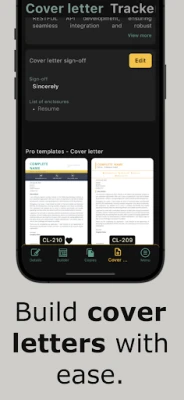
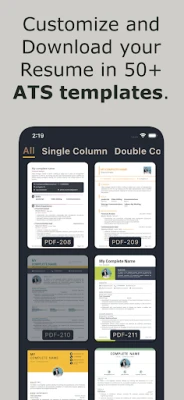
Resume Builder app (aka CV Maker app) app will help you build a ats friendly resume for your next job application. Our Resume Builder app will help you to write a professional curriculum vitae & cover letter content by taking minimal input build it in 50+ customizable PDF resume & cover letter templates to pass the Applicant Tracking System (ATS) used by the employer.
How to build a Ats resume in the professional CV Maker?
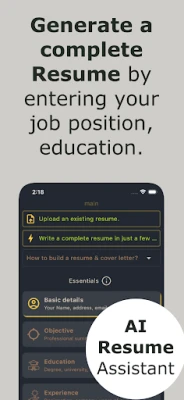
To build a Ats compliant resume, fill in your basic details like name, address, email, and phone number. Then move to the objective section, where Resume Builder app AI will help you to generate the job summary depending on the position you are applying for.
Then move on to the Education and experience in the CV Maker app. Here also chat gpt AI will generate the academic details or work experience details, depending on the course of study(curriculum) or the job position you have held. Then select and fill in the CV details applicable to you, like projects/accomplishments, photo, skills, awards, hobbies, Key qualifications, references, etc.
Once you have filled in all your CV details, move to the "Builder" tab, which opens your resume in many of the 50+ Ats compliant templates, then tap on any of the resume template in CV Maker to find the buttons to download and share the resume in PDF format.
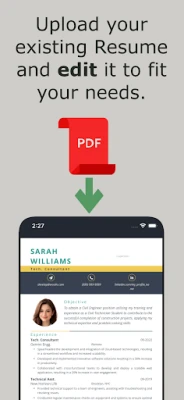
Could I edit my old resume without retyping it again in your Resume Builder app?
Yes, it is called Resume Editor funtion. Here you upload your old resume, app will extract the data from the uploaded CV, then you can edit your resume content to suit your needs. Further, in our Resume Editor you could also add new sections while keeping your old data.
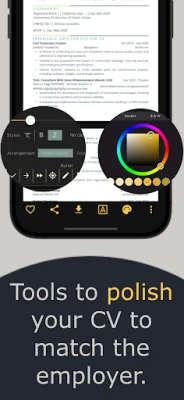
How to edit or style the PDF resume template in Resume Builder app?
On the individual Builder screen, along with the share and download buttons, the CV Maker android app will also show three additional buttons to edit the PDF resume template. They are
1. Font Styling - To change the font size, style, and font face of individual texts. You could also change how a particular resume section is arranged, viz, single column, double column, or continuous arrangement of the template.
2. Colors.
3. More options - To change page size (A4/letter), to rearrange sections, to change date format, to hide/show individual resume sections, etc.
Are there any Free resume templates in this PDF CV Maker?
Template no. 200 & 300 (which are ats friendly) will always be free to download and share without the purchase of any plan.
What other useful features does the app have except building an Resume Builder app?
- Resume Translator - Just with few taps you can do resume translation to French, German and all the supported langauges.
- Rearrange the resume sections as you wish, like functional, reverse chronological, or combination.
- Resume Reviews - Ask your friends & colleagues to review your resume before submitting it to Indeed or LinkedIn in AI CV Maker.
- Resume Editor - Upload your old resume and start editing the PDF to suit your needs.
- Copy others' resume - You could copy a friend's resume to your account with consent and edit the copied CV to suit you.
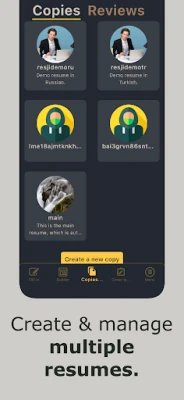
- Multiple resume copies - Instead of editing a single resume for every job, you could create multiple resume copies (one for each kind of job).
- Separate resume templates for References.
- Multi language support - You could use the app, write a resume & cover letter in English, French, German, Italian, Portuguese, Spanish, Indonesian, Polish, Russian and Turkish.
- Dedicated section to make the resignation letter.
- Secure cloud storage for the resume and also for the PDF styling.
The Resume Builder app (aka CV Maker) will also be called as AI CV Maker, AI Resume Builder, Cover letter Builder, Resume maker, etc.
To build a Ats compliant resume, fill in your basic details like name, address, email, and phone number. Then move to the objective section, where Resume Builder app AI will help you to generate the job summary depending on the position you are applying for.
Then move on to the Education and experience in the CV Maker app. Here also chat gpt AI will generate the academic details or work experience details, depending on the course of study(curriculum) or the job position you have held. Then select and fill in the CV details applicable to you, like projects/accomplishments, photo, skills, awards, hobbies, Key qualifications, references, etc.
Once you have filled in all your CV details, move to the "Builder" tab, which opens your resume in many of the 50+ Ats compliant templates, then tap on any of the resume template in CV Maker to find the buttons to download and share the resume in PDF format.
Could I edit my old resume without retyping it again in your Resume Builder app?
Yes, it is called Resume Editor funtion. Here you upload your old resume, app will extract the data from the uploaded CV, then you can edit your resume content to suit your needs. Further, in our Resume Editor you could also add new sections while keeping your old data.
How to edit or style the PDF resume template in Resume Builder app?
On the individual Builder screen, along with the share and download buttons, the CV Maker android app will also show three additional buttons to edit the PDF resume template. They are
1. Font Styling - To change the font size, style, and font face of individual texts. You could also change how a particular resume section is arranged, viz, single column, double column, or continuous arrangement of the template.
2. Colors.
3. More options - To change page size (A4/letter), to rearrange sections, to change date format, to hide/show individual resume sections, etc.
Are there any Free resume templates in this PDF CV Maker?
Template no. 200 & 300 (which are ats friendly) will always be free to download and share without the purchase of any plan.
What other useful features does the app have except building an Resume Builder app?
- Resume Translator - Just with few taps you can do resume translation to French, German and all the supported langauges.
- Rearrange the resume sections as you wish, like functional, reverse chronological, or combination.
- Resume Reviews - Ask your friends & colleagues to review your resume before submitting it to Indeed or LinkedIn in AI CV Maker.
- Resume Editor - Upload your old resume and start editing the PDF to suit your needs.
- Copy others' resume - You could copy a friend's resume to your account with consent and edit the copied CV to suit you.
- Multiple resume copies - Instead of editing a single resume for every job, you could create multiple resume copies (one for each kind of job).
- Separate resume templates for References.
- Multi language support - You could use the app, write a resume & cover letter in English, French, German, Italian, Portuguese, Spanish, Indonesian, Polish, Russian and Turkish.
- Dedicated section to make the resignation letter.
- Secure cloud storage for the resume and also for the PDF styling.
The Resume Builder app (aka CV Maker) will also be called as AI CV Maker, AI Resume Builder, Cover letter Builder, Resume maker, etc.
Rate the App
Add Comment & Review
User Reviews
Based on 0 reviews
No reviews added yet.
Comments will not be approved to be posted if they are SPAM, abusive, off-topic, use profanity, contain a personal attack, or promote hate of any kind.











More »

Popular Apps

phpFoxPHPFOX LLC

Moon Chai StoryOlha Dobel

World War Heroes — WW2 PvP FPSAzur Interactive Games Limited

Govee LiteGovee

AvSeaAvionics Electronics Geeks!

Viking Clan: RagnarokKano Games

Vikings: War of ClansPlarium LLC

Build World AdventureExplore city in cube world

Asphalt 9: LegendsGameloft SE

Dawn of Zombies: Survival GameRoyal Ark
More »
Editor's Choice

Grim Soul: Dark Survival RPGBrickworks Games Ltd

Craft of Survival - Gladiators101XP LIMITED

Last Shelter: SurvivalLong Tech Network Limited
Dawn of Zombies: Survival GameRoyal Ark

Merge Survival : WastelandStickyHands Inc.

AoD Vikings: Valhalla GameRoboBot Studio
Viking Clan: RagnarokKano Games
Vikings: War of ClansPlarium LLC
Asphalt 9: LegendsGameloft SE

Modern Tanks: War Tank GamesXDEVS LTD