Latest Version
Update
August 26, 2026
August 26, 2026
Developer
CAAI LTD
CAAI LTD
Categories
Tools
Tools
Platforms
Android
Android
Downloads
0
0
License
Free
Free
Package Name
com.reading.lamp.midnight.oil
com.reading.lamp.midnight.oil
Report
Report a Problem
Report a Problem
More About Reading Lamp
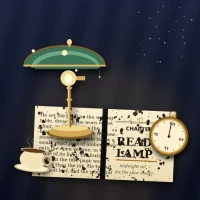
Reading Lamp is a calm, lamplit reading tracker styled as a writer's desk at midnight. Every book on your nightstand is a small cloth-bound volume with a brass head-band, a gold rule, and the title's initials set in serif up the spine — the way real books look when they're standing on a shelf at midnight under a banker's lamp. Reading sessions are the time you spend under that lamp; the glow on the home screen swells with each page you turn.
DESK (home)
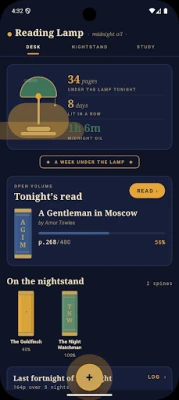
The home screen is your desk. Up top, a tiny amber lamp-dot sits beside the brand wordmark "Reading Lamp" and the italicised tagline "midnight oil". Below it, the navigation lives where most apps don't put it — at the TOP of the screen — as three little caps: DESK, NIGHTSTAND, STUDY. The hero card is dominated by a brass banker's lamp graphic on the left, its green glass shade shading a warm pool of amber light whose size literally grows with how many pages you've turned tonight. To the lamp's right, three stat rows stack in elegant serif: UNDER THE LAMP TONIGHT, LIT IN A ROW (your day-streak), and MIDNIGHT OIL (time at the lamp). Below the hero, the OPEN VOLUME card holds the book you've been reading most recently; the READ pill button sits in the TOP-RIGHT corner of the card, an intentional inversion of the usual bottom or left position so the action stays near the eye, not the thumb. The ON THE NIGHTSTAND row is a horizontally scrolling shelf of upright book spines — tap any spine to open the book's chapter. A LAST FORTNIGHT card draws a soft "light curve" of dots-and-lines instead of bars: each night is a dot whose diameter and warmth scale with the pages you read. A glowing brass FAB sits at the BOTTOM-CENTRE of the screen (not the corners), surrounded by an amber halo — it opens the study to add a new volume.
THE BOOK (per-volume detail)
Each book has its own chapter screen. A taller book spine sits at the top with three stat cells (readings, pages read, time at the lamp), then a big lamp-shaped reading timer. Tap LIGHT THE LAMP · START READING to begin; the digits tick up second by second, and BLOW OUT THE LAMP ends the session and asks for your current page and an optional marginal note. Older readings are listed below as a typewritten log — long-press a reading to blow it out.
THE LOG (stats)
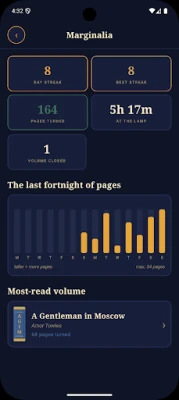
The log gathers all the numbers: current streak of reading nights, your longest streak ever, total pages read across all volumes, total midnight oil burned, and how many volumes you've finished. A fourteen-night chart shows pages-per-night, and a "burned the most oil" panel surfaces the book that's eaten the most of your lamplight.
THE STUDY (settings)
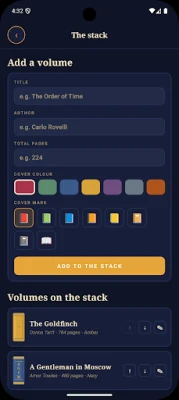
The study screen holds the add-a-volume form (title, author, total pages, spine colour, mark), the full list of your nightstand with reorder/edit/remove controls, and your preferences: haptic feedback, the midnight-indigo palette, and whether the week starts on Monday. A reset action clears the entire study.
PRIVATE BY DESIGN
All volumes, readings, and notes are encrypted on your device with AES, using a key stored in the Android Keystore. The released app has no INTERNET permission at all — it physically cannot send anything anywhere. There is no account, no cloud, no sync, no notifications, and nothing is ever transmitted.
Reading Lamp starts with a small sample nightstand seeded in so the app isn't empty on first launch, and you can wipe everything at any time. It doesn't gamify, nag, or guilt. It just keeps a quiet, lamplit record of the pages you've turned and the time you've spent reading.
Light the lamp. Read. Watch the pages fall behind you.
The home screen is your desk. Up top, a tiny amber lamp-dot sits beside the brand wordmark "Reading Lamp" and the italicised tagline "midnight oil". Below it, the navigation lives where most apps don't put it — at the TOP of the screen — as three little caps: DESK, NIGHTSTAND, STUDY. The hero card is dominated by a brass banker's lamp graphic on the left, its green glass shade shading a warm pool of amber light whose size literally grows with how many pages you've turned tonight. To the lamp's right, three stat rows stack in elegant serif: UNDER THE LAMP TONIGHT, LIT IN A ROW (your day-streak), and MIDNIGHT OIL (time at the lamp). Below the hero, the OPEN VOLUME card holds the book you've been reading most recently; the READ pill button sits in the TOP-RIGHT corner of the card, an intentional inversion of the usual bottom or left position so the action stays near the eye, not the thumb. The ON THE NIGHTSTAND row is a horizontally scrolling shelf of upright book spines — tap any spine to open the book's chapter. A LAST FORTNIGHT card draws a soft "light curve" of dots-and-lines instead of bars: each night is a dot whose diameter and warmth scale with the pages you read. A glowing brass FAB sits at the BOTTOM-CENTRE of the screen (not the corners), surrounded by an amber halo — it opens the study to add a new volume.
THE BOOK (per-volume detail)
Each book has its own chapter screen. A taller book spine sits at the top with three stat cells (readings, pages read, time at the lamp), then a big lamp-shaped reading timer. Tap LIGHT THE LAMP · START READING to begin; the digits tick up second by second, and BLOW OUT THE LAMP ends the session and asks for your current page and an optional marginal note. Older readings are listed below as a typewritten log — long-press a reading to blow it out.
THE LOG (stats)
The log gathers all the numbers: current streak of reading nights, your longest streak ever, total pages read across all volumes, total midnight oil burned, and how many volumes you've finished. A fourteen-night chart shows pages-per-night, and a "burned the most oil" panel surfaces the book that's eaten the most of your lamplight.
THE STUDY (settings)
The study screen holds the add-a-volume form (title, author, total pages, spine colour, mark), the full list of your nightstand with reorder/edit/remove controls, and your preferences: haptic feedback, the midnight-indigo palette, and whether the week starts on Monday. A reset action clears the entire study.
PRIVATE BY DESIGN
All volumes, readings, and notes are encrypted on your device with AES, using a key stored in the Android Keystore. The released app has no INTERNET permission at all — it physically cannot send anything anywhere. There is no account, no cloud, no sync, no notifications, and nothing is ever transmitted.
Reading Lamp starts with a small sample nightstand seeded in so the app isn't empty on first launch, and you can wipe everything at any time. It doesn't gamify, nag, or guilt. It just keeps a quiet, lamplit record of the pages you've turned and the time you've spent reading.
Light the lamp. Read. Watch the pages fall behind you.
Rate the App
Add Comment & Review
User Reviews
Based on 0 reviews
No reviews added yet.
Comments will not be approved to be posted if they are SPAM, abusive, off-topic, use profanity, contain a personal attack, or promote hate of any kind.











More »

Popular Apps

phpFoxPHPFOX LLC

Moon Chai StoryOlha Dobel

World War Heroes — WW2 PvP FPSAzur Interactive Games Limited

Govee LiteGovee

Viking Clan: RagnarokKano Games

Build World AdventureExplore city in cube world

Vikings: War of ClansPlarium LLC

Asphalt 9: LegendsGameloft SE

Submarine Car Diving SimulatorSwim with dolphins & penguins

Dawn of Zombies: Survival GameRoyal Ark
More »
Editor's Choice

Grim Soul: Dark Survival RPGBrickworks Games Ltd

Craft of Survival - Gladiators101XP LIMITED

Last Shelter: SurvivalLong Tech Network Limited
Dawn of Zombies: Survival GameRoyal Ark

Merge Survival : WastelandStickyHands Inc.

AoD Vikings: Valhalla GameRoboBot Studio
Viking Clan: RagnarokKano Games
Vikings: War of ClansPlarium LLC
Asphalt 9: LegendsGameloft SE

Modern Tanks: War Tank GamesXDEVS LTD