

Latest Version
Update
September 26, 2026
September 26, 2026
Developer
OAppDev
OAppDev
Categories
Productivity
Productivity
Platforms
Android
Android
Downloads
1
1
License
Free
Free
Package Name
in.readanything
in.readanything
Report
Report a Problem
Report a Problem
More About ReadAnything Text to Speech AI
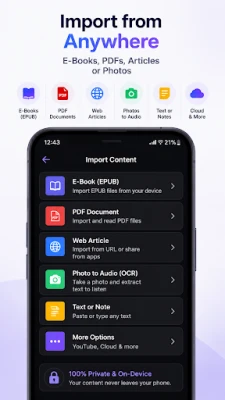
ReadAnything is a private, offline text to speech (TTS) audio reader that converts any PDF, EPUB ebook, document, web article, or physical book page into natural, human-like audio using on-device AI.
Read aloud any reading material without an internet connection. Enjoy complete data privacy: your files and reading history never leave your phone, with zero cloud uploads and no required subscriptions.
WHY CHOOSE READANYTHING?
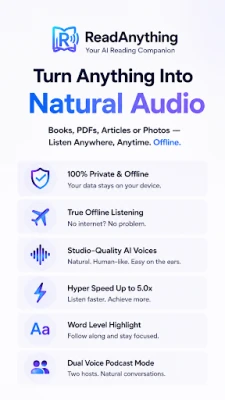
True Offline Text to Speech: Listen to text anywhere without Wi-Fi or mobile data. Ideal for daily commutes, flights, subways, and areas with low network connectivity.
100% Private On-Device AI: Unlike cloud-based voice readers that upload private documents to remote servers, ReadAnything processes text synthesis locally on your phone.
Natural AI Voice Reader: Experience fluid, realistic voice synthesis with human warmth, balanced pacing, and natural pronunciation.
Dual-Voice Podcast Mode: Transform long articles, essays, and web stories into an engaging two-host conversational audio discussion.
Exact Word-for-Word Reading: Read text aloud with full fidelity. No AI hallucination, altered phrasing, or missing paragraphs.
POWERFUL READING FEATURES
Smart PDF Text to Speech
Convert complex PDFs, academic papers, and technical reports into clear spoken audio.
Intelligent text filter cleans up clutter by automatically skipping page numbers, headers, footers, and repetitive citations.
EPUB Ebook & Audiobook Reader
Import EPUB files and turn your digital ebook collection into personalized audiobooks.
Chapter navigation, reading progress tracking, and smooth navigation for long documents and books.
High-Precision OCR Camera Scanner
Snap photos of physical book pages, printed notes, study guides, and paper documents.
High-accuracy on-device OCR extracts text instantly and begins reading aloud within seconds.
Web Article & Link Reader
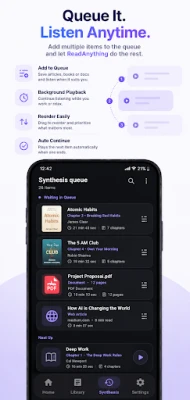
Share links directly from Chrome, news readers, or text apps to create an instant audio queue.
Background playback lets you build uninterrupted listening playlists while multitasking.
ADHD & Dyslexia Assistive Tools
Karaoke Word Tracking: Synchronized word-by-word visual highlighting centered on screen as audio plays.
Bionic Reading Mode: Specially formatted typographic cues to boost reading speed and visual comprehension.
Accessible alternative screen reader for individuals with dyslexia, low vision, and reading fatigue.
Playback Speed Control & Audio Export
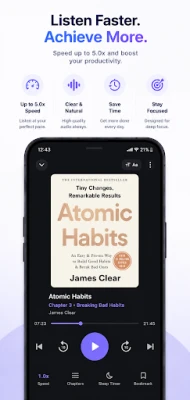
Customize playback speeds from 0.5x up to 5.0x for rapid listening and productive studying.
Export synthesized audio files directly to device storage to listen across any media player.
Google Drive Backup
Securely back up and restore your reading library and folders through your private Google Drive storage.
WHO USES READANYTHING?
Students & Researchers: Read aloud textbook chapters, research papers, and study guides faster to improve information retention.
Commuters & Professionals: Turn business reports, PDFs, and newsletters into hands-free audio while driving or exercising.
Accessibility Seekers: Visual word tracking combined with high-quality voice audio makes reading accessible for ADHD, dyslexia, and visual impairment.
Language Learners: Improve pronunciation and auditory comprehension with clear, steady spoken narration.
READANYTHING PRO
Access expanded productivity features, including lifetime access options:
Unlimited document and multi-page ebook processing.
Complete library of premium studio neural voices.
Accelerated hyper-speed controls up to 5.0x.
Direct offline audio file export.
ReadAnything requires no account registration to read documents. All text processing, OCR document scanning, and speech synthesis are performed locally on your device.
Privacy Policy: https://readanything.omkard.workers.dev/privacy_policy
Terms of Service: https://readanything.omkard.workers.dev/terms_of_service
Download ReadAnything to experience fast, private, offline text to speech on Android.
WHY CHOOSE READANYTHING?
True Offline Text to Speech: Listen to text anywhere without Wi-Fi or mobile data. Ideal for daily commutes, flights, subways, and areas with low network connectivity.
100% Private On-Device AI: Unlike cloud-based voice readers that upload private documents to remote servers, ReadAnything processes text synthesis locally on your phone.
Natural AI Voice Reader: Experience fluid, realistic voice synthesis with human warmth, balanced pacing, and natural pronunciation.
Dual-Voice Podcast Mode: Transform long articles, essays, and web stories into an engaging two-host conversational audio discussion.
Exact Word-for-Word Reading: Read text aloud with full fidelity. No AI hallucination, altered phrasing, or missing paragraphs.
POWERFUL READING FEATURES
Smart PDF Text to Speech
Convert complex PDFs, academic papers, and technical reports into clear spoken audio.
Intelligent text filter cleans up clutter by automatically skipping page numbers, headers, footers, and repetitive citations.
EPUB Ebook & Audiobook Reader
Import EPUB files and turn your digital ebook collection into personalized audiobooks.
Chapter navigation, reading progress tracking, and smooth navigation for long documents and books.
High-Precision OCR Camera Scanner
Snap photos of physical book pages, printed notes, study guides, and paper documents.
High-accuracy on-device OCR extracts text instantly and begins reading aloud within seconds.
Web Article & Link Reader
Share links directly from Chrome, news readers, or text apps to create an instant audio queue.
Background playback lets you build uninterrupted listening playlists while multitasking.
ADHD & Dyslexia Assistive Tools
Karaoke Word Tracking: Synchronized word-by-word visual highlighting centered on screen as audio plays.
Bionic Reading Mode: Specially formatted typographic cues to boost reading speed and visual comprehension.
Accessible alternative screen reader for individuals with dyslexia, low vision, and reading fatigue.
Playback Speed Control & Audio Export
Customize playback speeds from 0.5x up to 5.0x for rapid listening and productive studying.
Export synthesized audio files directly to device storage to listen across any media player.
Google Drive Backup
Securely back up and restore your reading library and folders through your private Google Drive storage.
WHO USES READANYTHING?
Students & Researchers: Read aloud textbook chapters, research papers, and study guides faster to improve information retention.
Commuters & Professionals: Turn business reports, PDFs, and newsletters into hands-free audio while driving or exercising.
Accessibility Seekers: Visual word tracking combined with high-quality voice audio makes reading accessible for ADHD, dyslexia, and visual impairment.
Language Learners: Improve pronunciation and auditory comprehension with clear, steady spoken narration.
READANYTHING PRO
Access expanded productivity features, including lifetime access options:
Unlimited document and multi-page ebook processing.
Complete library of premium studio neural voices.
Accelerated hyper-speed controls up to 5.0x.
Direct offline audio file export.
ReadAnything requires no account registration to read documents. All text processing, OCR document scanning, and speech synthesis are performed locally on your device.
Privacy Policy: https://readanything.omkard.workers.dev/privacy_policy
Terms of Service: https://readanything.omkard.workers.dev/terms_of_service
Download ReadAnything to experience fast, private, offline text to speech on Android.
Rate the App
Add Comment & Review
User Reviews
Based on 0 reviews
No reviews added yet.
Comments will not be approved to be posted if they are SPAM, abusive, off-topic, use profanity, contain a personal attack, or promote hate of any kind.













More »

Popular Apps

phpFoxPHPFOX LLC

Moon Chai StoryOlha Dobel

World War Heroes — WW2 PvP FPSAzur Interactive Games Limited

Govee LiteGovee

AvSeaAvionics Electronics Geeks!

Viking Clan: RagnarokKano Games

Vikings: War of ClansPlarium LLC

Build World AdventureExplore city in cube world

Asphalt 9: LegendsGameloft SE

Dawn of Zombies: Survival GameRoyal Ark
More »
Editor's Choice

Grim Soul: Dark Survival RPGBrickworks Games Ltd

Craft of Survival - Gladiators101XP LIMITED

Last Shelter: SurvivalLong Tech Network Limited
Dawn of Zombies: Survival GameRoyal Ark

Merge Survival : WastelandStickyHands Inc.

AoD Vikings: Valhalla GameRoboBot Studio
Viking Clan: RagnarokKano Games
Vikings: War of ClansPlarium LLC
Asphalt 9: LegendsGameloft SE

Modern Tanks: War Tank GamesXDEVS LTD