Latest Version
Version
1.0.7
1.0.7
Update
March 04, 2026
March 04, 2026
Developer
Uniqode Phygital, Inc.
Uniqode Phygital, Inc.
Categories
Tools
Tools
Platforms
Android
Android
Downloads
0
0
License
Free
Free
Package Name
com.polo.scanner_and_generator
com.polo.scanner_and_generator
Report
Report a Problem
Report a Problem
More About QR Code Generator & Reader App
The QR Code Generator & Reader App is your all-in-one tool for fast scanning and creating fully customizable QR Codes on Android.
It works as a powerful QR and barcode scanner and a feature-rich QR Code maker — perfect for daily use, retail, marketing, education, events, payments, and personal sharing.
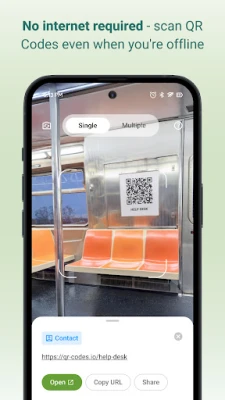
Scan anything instantly — product packaging, menus, bills, tickets, coupons, ID cards, app links, and more.
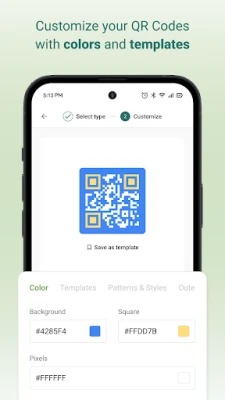
Create branded QR Codes with custom colors, shapes, borders, and templates whenever you need.
Why Choose The QR Code Generator & Reader App?
- Lightweight, fast, and battery-friendly
- Create custom QR Codes with colors, patterns, and templates
- Generate QR Codes for URL, SMS, Email, contact, text, and more
- Save and re-use previously created QR Codes
- Privacy-first: all scan data stays on your device
- Safe link preview before opening URLs
- Real-time autofocus for instant detection
- Offline scanning — no internet required
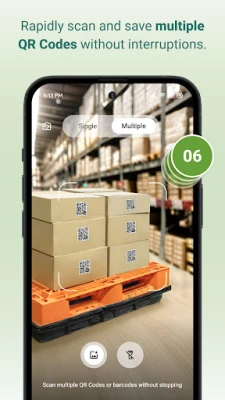
- Bulk scan mode for scanning many codes quickly
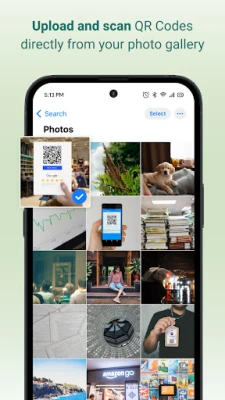
- Scan QR Codes from gallery images
- Works on small, blurry, low-light, or damaged codes
QR Code Generator — Features & Customization
Create unique, branded, high-quality QR Codes in seconds.
Customization Tools
- Solid colors or gradients
- Multiple QR patterns: dots, squares, rounded
- Custom eye shapes and border styles
- Ready-made templates for business and personal use
Creator Features
- Real-time preview
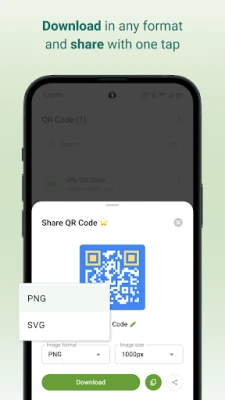
- High-resolution PNG/JPG downloads
- Save designs in history for future use
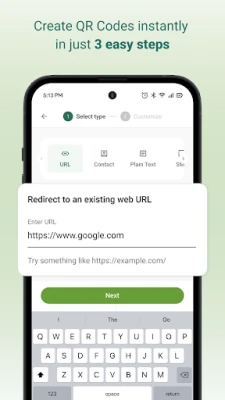
- Supports static QR types: URL, Contact card, Phone, Email, SMS, Text
Ideal for: menus, posters, packaging, business cards, brochures, event tickets, print marketing, and digital payments.
QR Code & Barcode Scanner — Fast & Accurate
The scanner detects QR Codes and barcodes instantly as soon as they appear in the camera frame — no buttons needed.
Scanner Features
- Auto-detection for all QR Codes and major barcodes
- Scan from gallery photos
- Flashlight for low-light scanning
- Bulk scan mode
- Quick actions: open link, save contact, copy text, call, send email, share, and more
- Clean scan details with formatting
- Searchable scan history + export options
- Supports UPC, EAN, ISBN, Code 128, Code 39, ITF, and more
- High accuracy even on angled, faded, or low-light codes
Supported Scan Types
- Website URLs
- Contact cards (vCard)
- Text
- Email
- Phone numbers
- SMS
- Wi-Fi networks
- Calendar events
- Location coordinates
- App links
- Business pages
- All common barcodes
How to Scan a QR Code
1. Open the app and tap Scan
2. Point the camera at the QR Code/Barcode
3. Detection happens instantly
4. Tap an action (open link, save contact, share, etc.)
5. View all past scans in History
How to Create a QR Code
1. Tap Generate
2. Select a QR type (URL, SMS, Contact, Email, etc.)
3. Enter your details
4. Customize colors, patterns, and templates
5. Download, copy, or share instantly
Extra Tips
- Use good lighting for best accuracy
- Ensure printed QR Codes have strong contrast
- Keep QR Codes at least 2×2 cm
- Avoid blurry uploads when generating QR Codes
- Always test before printing or publishing
Safe, Private & Easy to Use
The QR Code Generator & Reader App stores all scans and designs locally on your device.
Nothing is uploaded or shared.
Only essential permissions are used — camera for scanning and storage for saving designs.
Scan anything instantly — product packaging, menus, bills, tickets, coupons, ID cards, app links, and more.
Create branded QR Codes with custom colors, shapes, borders, and templates whenever you need.
Why Choose The QR Code Generator & Reader App?
- Lightweight, fast, and battery-friendly
- Create custom QR Codes with colors, patterns, and templates
- Generate QR Codes for URL, SMS, Email, contact, text, and more
- Save and re-use previously created QR Codes
- Privacy-first: all scan data stays on your device
- Safe link preview before opening URLs
- Real-time autofocus for instant detection
- Offline scanning — no internet required
- Bulk scan mode for scanning many codes quickly
- Scan QR Codes from gallery images
- Works on small, blurry, low-light, or damaged codes
QR Code Generator — Features & Customization
Create unique, branded, high-quality QR Codes in seconds.
Customization Tools
- Solid colors or gradients
- Multiple QR patterns: dots, squares, rounded
- Custom eye shapes and border styles
- Ready-made templates for business and personal use
Creator Features
- Real-time preview
- High-resolution PNG/JPG downloads
- Save designs in history for future use
- Supports static QR types: URL, Contact card, Phone, Email, SMS, Text
Ideal for: menus, posters, packaging, business cards, brochures, event tickets, print marketing, and digital payments.
QR Code & Barcode Scanner — Fast & Accurate
The scanner detects QR Codes and barcodes instantly as soon as they appear in the camera frame — no buttons needed.
Scanner Features
- Auto-detection for all QR Codes and major barcodes
- Scan from gallery photos
- Flashlight for low-light scanning
- Bulk scan mode
- Quick actions: open link, save contact, copy text, call, send email, share, and more
- Clean scan details with formatting
- Searchable scan history + export options
- Supports UPC, EAN, ISBN, Code 128, Code 39, ITF, and more
- High accuracy even on angled, faded, or low-light codes
Supported Scan Types
- Website URLs
- Contact cards (vCard)
- Text
- Phone numbers
- SMS
- Wi-Fi networks
- Calendar events
- Location coordinates
- App links
- Business pages
- All common barcodes
How to Scan a QR Code
1. Open the app and tap Scan
2. Point the camera at the QR Code/Barcode
3. Detection happens instantly
4. Tap an action (open link, save contact, share, etc.)
5. View all past scans in History
How to Create a QR Code
1. Tap Generate
2. Select a QR type (URL, SMS, Contact, Email, etc.)
3. Enter your details
4. Customize colors, patterns, and templates
5. Download, copy, or share instantly
Extra Tips
- Use good lighting for best accuracy
- Ensure printed QR Codes have strong contrast
- Keep QR Codes at least 2×2 cm
- Avoid blurry uploads when generating QR Codes
- Always test before printing or publishing
Safe, Private & Easy to Use
The QR Code Generator & Reader App stores all scans and designs locally on your device.
Nothing is uploaded or shared.
Only essential permissions are used — camera for scanning and storage for saving designs.
Rate the App
Add Comment & Review
User Reviews
Based on 0 reviews
No reviews added yet.
Comments will not be approved to be posted if they are SPAM, abusive, off-topic, use profanity, contain a personal attack, or promote hate of any kind.









More »

Popular Apps

phpFoxPHPFOX LLC

Moon Chai StoryOlha Dobel

World War Heroes — WW2 PvP FPSAzur Interactive Games Limited

Govee LiteGovee

Build World AdventureExplore city in cube world

Viking Clan: RagnarokKano Games

Vikings: War of ClansPlarium LLC

Asphalt 9: LegendsGameloft SE

Submarine Car Diving SimulatorSwim with dolphins & penguins

Dawn of Zombies: Survival GameRoyal Ark
More »
Editor's Choice

Grim Soul: Dark Survival RPGBrickworks Games Ltd

Craft of Survival - Gladiators101XP LIMITED

Last Shelter: SurvivalLong Tech Network Limited
Dawn of Zombies: Survival GameRoyal Ark

Merge Survival : WastelandStickyHands Inc.

AoD Vikings: Valhalla GameRoboBot Studio
Viking Clan: RagnarokKano Games
Vikings: War of ClansPlarium LLC
Asphalt 9: LegendsGameloft SE

Modern Tanks: War Tank GamesXDEVS LTD