

Latest Version
Version
7.3.5
7.3.5
Update
July 22, 2026
July 22, 2026
Developer
Krepel Studio
Krepel Studio
Categories
Productivity
Productivity
Platforms
Android
Android
Downloads
0
0
License
Free
Free
Package Name
com.crmprofit.app
com.crmprofit.app
Report
Report a Problem
Report a Problem
More About Profit Calendar: Finance
Control income, expenses, clients, payments, wallets, goals, shift schedule, and daily financial results in one app.
Official Telegram channel: https://t.me/profit_calendar
Profit Calendar helps you see the full picture of your money: how much you earned, how much you spent, who paid, which payments are expected, which wallets are used, how your financial goals are progressing, and what happens with your profit every day.
This is not a regular expense tracker or a simple budget app. Profit Calendar combines a financial calendar, profit calendar, finance management, client CRM, wallet manager, income and expense tracker, payment planner, shift schedule, goal system, notebook, and business analytics in one convenient workspace.
Who is this app for?
Profit Calendar is useful for freelancers, entrepreneurs, self-employed professionals, consultants, content creators, service providers, small business owners, people with irregular income, shift workers, and anyone who wants better control over money, work, clients, payments, and personal finances.
📅 Financial calendar
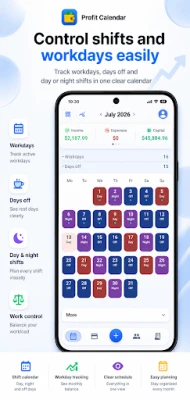
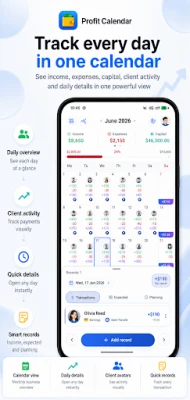
The main idea of Profit Calendar is to show money through a calendar. Each day displays income, expenses, result, transactions, clients, expected payments, notes, tasks, planning, voice records, workday, day off, and goal progress.
Open the calendar and instantly see which days were profitable, where expenses happened, when clients paid, which payments are planned, and how the whole month looks.
💸 Income, expenses, and transactions
Keep financial records: income, expenses, commissions, categories, projects, clients, wallets, currencies, notes, receipts, payment screenshots, search, filters, and transaction history.
Each transaction is connected to a day, client, wallet, and project. You see not just an amount, but a financial event: where the money came from, where it went, who paid, and how it affected the daily result.
🤝 Clients and CRM
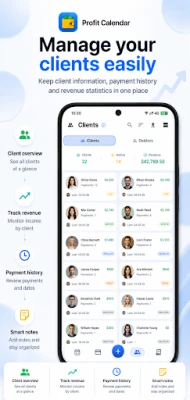
Profit Calendar helps you control clients, payments, and interaction history: who paid, how much they paid, when the last payment was made, what the average payment is, and how much each client brought in total.
For each client, you can store an avatar, color, client source, project, phone number, Telegram, Instagram, preferred wallet, notes, payment history, total paid amount, number of transactions, and activity period.
💳 Wallets, currencies, and capital
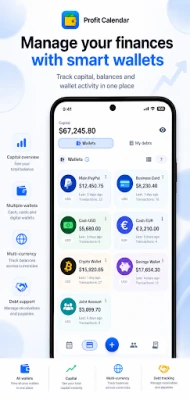
Manage money across different sources: bank cards, cash, PayPal, Monobank, Binance, crypto, USD, UAH, and other currencies.
Each wallet shows balance, income, expenses, result, commissions, and transaction history. This helps you understand where your money is, which sources are used most often, and how your capital changes.
🎯 Goals, analytics, and profit plan
Create financial goals, set an amount and period, track progress, over-target results, remaining amount, daily plan, and the income pace you need.
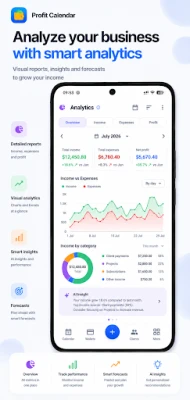
Analytics show financial trend, income forecast, average income, average payment, project income, client sources, client ranking, client lifetime, commissions, workdays, days off, debts, and business reports.
⏰ Shift schedule and planning
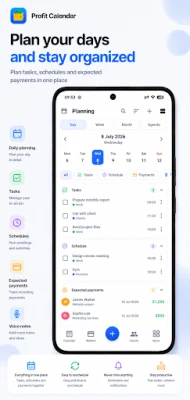
Profit Calendar fits different work rhythms. You can manage a shift schedule, mark workdays and days off, set working hours, and see how your schedule is connected to income.
The app includes planning, tasks, expected payments with notifications, notebook, voice notes, and quick record creation directly from the calendar.
🔐 Backup, export, and restore
Profit Calendar includes local backup, Google Drive backup, data restore, and export of important information.
You can export clients, notes, transactions, financial history, and other data for work, archive, or personal control.
Profit Calendar also includes subscriptions, assets, currency converter, interface personalization, app icon customization, widget, trash, local data storage, AI integration through your own API key, and tools for daily financial control.
Profit Calendar helps you see the full picture of your money: how much you earned, how much you spent, who paid, which payments are expected, which wallets are used, how your financial goals are progressing, and what happens with your profit every day.
This is not a regular expense tracker or a simple budget app. Profit Calendar combines a financial calendar, profit calendar, finance management, client CRM, wallet manager, income and expense tracker, payment planner, shift schedule, goal system, notebook, and business analytics in one convenient workspace.
Who is this app for?
Profit Calendar is useful for freelancers, entrepreneurs, self-employed professionals, consultants, content creators, service providers, small business owners, people with irregular income, shift workers, and anyone who wants better control over money, work, clients, payments, and personal finances.
📅 Financial calendar
The main idea of Profit Calendar is to show money through a calendar. Each day displays income, expenses, result, transactions, clients, expected payments, notes, tasks, planning, voice records, workday, day off, and goal progress.
Open the calendar and instantly see which days were profitable, where expenses happened, when clients paid, which payments are planned, and how the whole month looks.
💸 Income, expenses, and transactions
Keep financial records: income, expenses, commissions, categories, projects, clients, wallets, currencies, notes, receipts, payment screenshots, search, filters, and transaction history.
Each transaction is connected to a day, client, wallet, and project. You see not just an amount, but a financial event: where the money came from, where it went, who paid, and how it affected the daily result.
🤝 Clients and CRM
Profit Calendar helps you control clients, payments, and interaction history: who paid, how much they paid, when the last payment was made, what the average payment is, and how much each client brought in total.
For each client, you can store an avatar, color, client source, project, phone number, Telegram, Instagram, preferred wallet, notes, payment history, total paid amount, number of transactions, and activity period.
💳 Wallets, currencies, and capital
Manage money across different sources: bank cards, cash, PayPal, Monobank, Binance, crypto, USD, UAH, and other currencies.
Each wallet shows balance, income, expenses, result, commissions, and transaction history. This helps you understand where your money is, which sources are used most often, and how your capital changes.
🎯 Goals, analytics, and profit plan
Create financial goals, set an amount and period, track progress, over-target results, remaining amount, daily plan, and the income pace you need.
Analytics show financial trend, income forecast, average income, average payment, project income, client sources, client ranking, client lifetime, commissions, workdays, days off, debts, and business reports.
⏰ Shift schedule and planning
Profit Calendar fits different work rhythms. You can manage a shift schedule, mark workdays and days off, set working hours, and see how your schedule is connected to income.
The app includes planning, tasks, expected payments with notifications, notebook, voice notes, and quick record creation directly from the calendar.
🔐 Backup, export, and restore
Profit Calendar includes local backup, Google Drive backup, data restore, and export of important information.
You can export clients, notes, transactions, financial history, and other data for work, archive, or personal control.
Profit Calendar also includes subscriptions, assets, currency converter, interface personalization, app icon customization, widget, trash, local data storage, AI integration through your own API key, and tools for daily financial control.
Rate the App
Add Comment & Review
User Reviews
Based on 0 reviews
No reviews added yet.
Comments will not be approved to be posted if they are SPAM, abusive, off-topic, use profanity, contain a personal attack, or promote hate of any kind.















More »

Popular Apps

phpFoxPHPFOX LLC

Moon Chai StoryOlha Dobel

World War Heroes — WW2 PvP FPSAzur Interactive Games Limited

Govee LiteGovee

AvSeaAvionics Electronics Geeks!

Viking Clan: RagnarokKano Games

Vikings: War of ClansPlarium LLC

Build World AdventureExplore city in cube world

Asphalt 9: LegendsGameloft SE

Dawn of Zombies: Survival GameRoyal Ark
More »
Editor's Choice

Grim Soul: Dark Survival RPGBrickworks Games Ltd

Craft of Survival - Gladiators101XP LIMITED

Last Shelter: SurvivalLong Tech Network Limited
Dawn of Zombies: Survival GameRoyal Ark

Merge Survival : WastelandStickyHands Inc.

AoD Vikings: Valhalla GameRoboBot Studio
Viking Clan: RagnarokKano Games
Vikings: War of ClansPlarium LLC
Asphalt 9: LegendsGameloft SE

Modern Tanks: War Tank GamesXDEVS LTD