Latest Version
Update
October 04, 2026
October 04, 2026
Developer
Clement Ochieng
Clement Ochieng
Categories
ART & Design
ART & Design
Platforms
Android
Android
Downloads
0
0
License
Free
Free
Package Name
info.camposha.poster
info.camposha.poster
Report
Report a Problem
Report a Problem
More About Poster Studio
A free, offline, multi-language app for creating Posters and Flyers.
Poster Studio turns your phone into a small print shop. Start from a designed template, swap the words for yours, drop in a photo, recolor the whole thing with one tap, and export a poster that looks like a studio made it.
Built for people who need something good in five minutes: shop owners announcing a sale, organizers promoting an event, churches, gyms, agents listing a home, teams hiring, and anyone who wants a social post that does not look like everyone else's.
START FROM A TEMPLATE
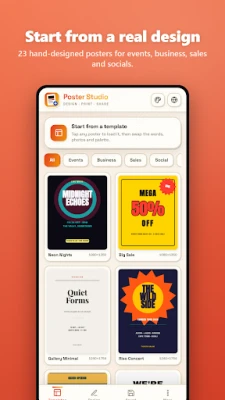
Twenty-three hand-designed posters across events, business, sales, social, quotes and occasions. Concert bills, sale blasts, gallery notices, grand openings, hiring posts, property listings, menus, quote cards, birthday invites, workshops, match days, product launches, wedding invitations and more. Every template is fully editable, right down to the last dot.
REAL EDITING, NOT JUST TEXT SWAPS
Drag anything on the canvas. Resize and rotate handles sit right on the element you selected. Add text, photos and shapes as separate layers, then reorder them, hide them, duplicate them, centre them or send them to the front.
TYPOGRAPHY THAT CARRIES A POSTER
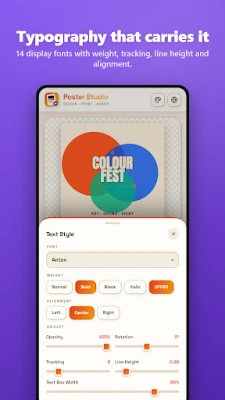
Fourteen display and text fonts. Control weight, italics, uppercase, alignment, tracking, line height, text box width, opacity and rotation. Add shadow, glow, outline, hollow lettering or a solid highlight bar, or apply one of nine quick looks in a single tap.
PHOTOS AND SHAPES
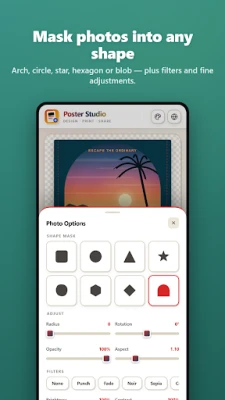
Bring in any photo and mask it into a circle, arch, star, hexagon, diamond, blob, triangle or rounded frame. Adjust brightness, contrast, saturation and blur, switch to grayscale, or use one of eight filter presets. Twelve vector shapes - bursts, rings, stars, arrows, arches and more - with fill, stroke and outline-only modes.
ONE-TAP RECOLOUR
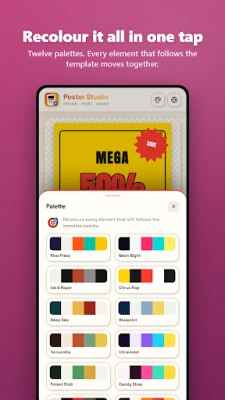
Every template follows a five-color palette. Tap a new palette and the entire poster recolors in place, staying balanced and readable. Twelve palettes included, from riso press to neon night to terracotta.
BACKGROUNDS
Solid color, gradient, generated patterns (dots, halftone, grid, stripes, waves, confetti, crosses, diagonals) or your own photo, with a darken and tint overlay so text always stays legible.
BUILT FOR PRINT AND FOR SCREEN
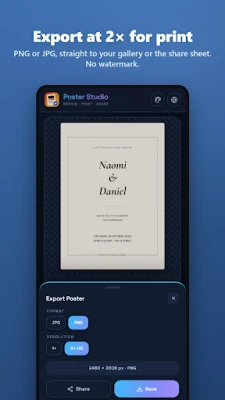
Twelve canvas sizes covering A4, A3, US Letter, tabloid, big poster, flyer 5x7, square, portrait post, story, landscape, wide banner and cover. Export as PNG or JPG, or at 2x resolution for real printing.
WORK THE WAY YOU LIKE
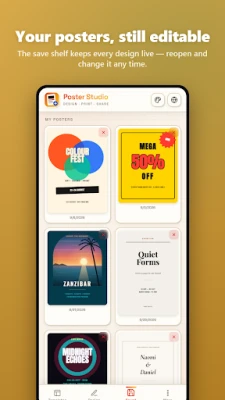
Undo and redo, smart snapping to center and edges, a rule-of-thirds and margin grid, and a save shelf that keeps your posters ready to reopen and edit later. Eight app themes, light and dark.
FREE
- Nine templates and five canvas sizes
- Text, photo and shape layers with full styling
- Twelve shapes, eight photo masks, six palettes, eight fonts, four app themes
- Up to twelve elements per poster
- Save, export and share - no watermark, ever
More
- Fourteen premium templates and seven extra canvas sizes
- Text effects: shadow, glow, outline, hollow, highlight box and quick looks
- Gradient and pattern backgrounds
- Photo and background filters
- Six premium fonts, six premium palettes, four premium themes
- Unlimited elements per poster
- 2x HD export for print
No account. No subscription trap. Your posters stay on your device.
Make something worth putting on a wall.
Built for people who need something good in five minutes: shop owners announcing a sale, organizers promoting an event, churches, gyms, agents listing a home, teams hiring, and anyone who wants a social post that does not look like everyone else's.
START FROM A TEMPLATE
Twenty-three hand-designed posters across events, business, sales, social, quotes and occasions. Concert bills, sale blasts, gallery notices, grand openings, hiring posts, property listings, menus, quote cards, birthday invites, workshops, match days, product launches, wedding invitations and more. Every template is fully editable, right down to the last dot.
REAL EDITING, NOT JUST TEXT SWAPS
Drag anything on the canvas. Resize and rotate handles sit right on the element you selected. Add text, photos and shapes as separate layers, then reorder them, hide them, duplicate them, centre them or send them to the front.
TYPOGRAPHY THAT CARRIES A POSTER
Fourteen display and text fonts. Control weight, italics, uppercase, alignment, tracking, line height, text box width, opacity and rotation. Add shadow, glow, outline, hollow lettering or a solid highlight bar, or apply one of nine quick looks in a single tap.
PHOTOS AND SHAPES
Bring in any photo and mask it into a circle, arch, star, hexagon, diamond, blob, triangle or rounded frame. Adjust brightness, contrast, saturation and blur, switch to grayscale, or use one of eight filter presets. Twelve vector shapes - bursts, rings, stars, arrows, arches and more - with fill, stroke and outline-only modes.
ONE-TAP RECOLOUR
Every template follows a five-color palette. Tap a new palette and the entire poster recolors in place, staying balanced and readable. Twelve palettes included, from riso press to neon night to terracotta.
BACKGROUNDS
Solid color, gradient, generated patterns (dots, halftone, grid, stripes, waves, confetti, crosses, diagonals) or your own photo, with a darken and tint overlay so text always stays legible.
BUILT FOR PRINT AND FOR SCREEN
Twelve canvas sizes covering A4, A3, US Letter, tabloid, big poster, flyer 5x7, square, portrait post, story, landscape, wide banner and cover. Export as PNG or JPG, or at 2x resolution for real printing.
WORK THE WAY YOU LIKE
Undo and redo, smart snapping to center and edges, a rule-of-thirds and margin grid, and a save shelf that keeps your posters ready to reopen and edit later. Eight app themes, light and dark.
FREE
- Nine templates and five canvas sizes
- Text, photo and shape layers with full styling
- Twelve shapes, eight photo masks, six palettes, eight fonts, four app themes
- Up to twelve elements per poster
- Save, export and share - no watermark, ever
More
- Fourteen premium templates and seven extra canvas sizes
- Text effects: shadow, glow, outline, hollow, highlight box and quick looks
- Gradient and pattern backgrounds
- Photo and background filters
- Six premium fonts, six premium palettes, four premium themes
- Unlimited elements per poster
- 2x HD export for print
No account. No subscription trap. Your posters stay on your device.
Make something worth putting on a wall.
Rate the App
Add Comment & Review
User Reviews
Based on 0 reviews
No reviews added yet.
Comments will not be approved to be posted if they are SPAM, abusive, off-topic, use profanity, contain a personal attack, or promote hate of any kind.







More »

Popular Apps

phpFoxPHPFOX LLC

Moon Chai StoryOlha Dobel

World War Heroes — WW2 PvP FPSAzur Interactive Games Limited

Govee LiteGovee

Viking Clan: RagnarokKano Games

Build World AdventureExplore city in cube world

Vikings: War of ClansPlarium LLC

AvSeaAvionics Electronics Geeks!

Asphalt 9: LegendsGameloft SE

Dawn of Zombies: Survival GameRoyal Ark
More »
Editor's Choice

Grim Soul: Dark Survival RPGBrickworks Games Ltd

Craft of Survival - Gladiators101XP LIMITED

Last Shelter: SurvivalLong Tech Network Limited
Dawn of Zombies: Survival GameRoyal Ark

Merge Survival : WastelandStickyHands Inc.

AoD Vikings: Valhalla GameRoboBot Studio
Viking Clan: RagnarokKano Games
Vikings: War of ClansPlarium LLC
Asphalt 9: LegendsGameloft SE

Modern Tanks: War Tank GamesXDEVS LTD