
Latest Version
Update
November 03, 2026
November 03, 2026
Developer
ALLStudio
ALLStudio
Categories
Tools
Tools
Platforms
Android
Android
Downloads
0
0
License
Free
Free
Package Name
app.allstudio.noky
app.allstudio.noky
Report
Report a Problem
Report a Problem
More About NoKy Keyboard: Hacker & Custom
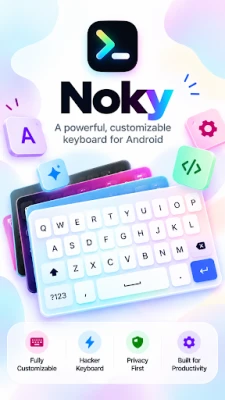
Noky Keyboard is a modular, dynamic keyboard engine designed for power users, developers, and customization enthusiasts.
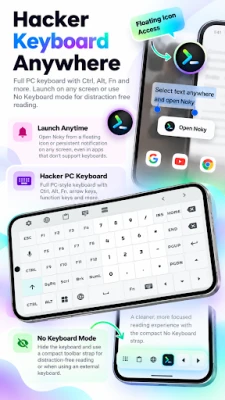
Whether you need a full PC keyboard/Hacker Keyboard with Ctrl and Alt keys for terminal sessions, a minimalist T9 pad, or a completely tailored layout built from scratch, Noky adapts to the way you work. 100% private, completely ad-free, and built to work offline.
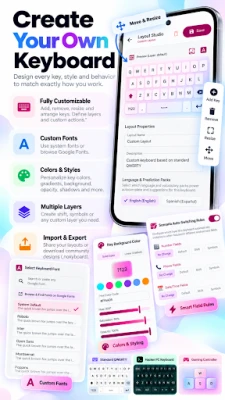
🛠️ Build Your Own Keyboard (Layout Manager)
Don’t settle for fixed layouts. Design the keyboard you actually want:
• Create Custom Layouts: Place keys, assign layers, define key actions, and adjust keyboard depth.
• Import & Export (.nokyboard): Share your custom keyboard layouts with friends or download community configurations in one tap.
• Specialized Presets Included: Hacker PC Keyboard (with Esc, Ctrl, Alt, Fn, and cursor arrows), Programmer & Code Pad, T9 Compact Phone Pad, Gamepad / Gaming Controller, Giant 4-Button Pad, and multi-language layouts.
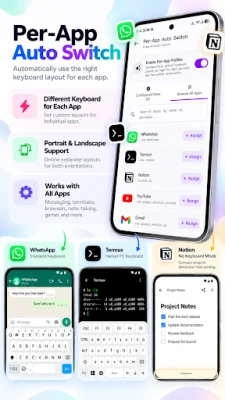
🔄 Per-App Auto Switch
Eliminate manual layout toggling. Noky switches keyboards automatically based on what you are doing:
• Assign specific layouts to individual apps (e.g., Hacker PC Keyboard for Termux/code editors, standard QWERTY for messaging apps).
• Set independent layout preferences for Portrait and Landscape orientations.
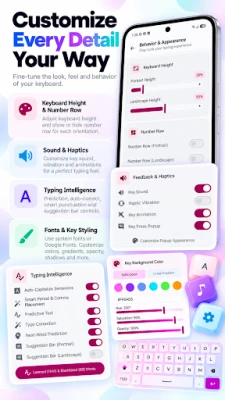
🎨 Deep Visual Styling & Typography
Take complete control over every pixel of your typing interface:
• Custom Fonts & Sizing: Adjust app font size, individual key text font size, key icon sizing, and emoji size.
• Geometry & Shadows: Fine-tune corner radius, key padding, and drop shadow / elevation.
• Transparency & Glassmorphism: Independently customize keyboard canvas opacity, key background opacity, and label opacity.
• Dynamic Color Palettes: Choose from Material Expressive themes, AMOLED true dark mode, or pick any custom hex accent color.
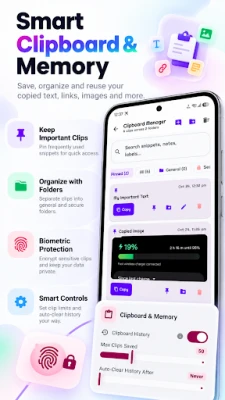
🔒 Biometric Secure Clipboard Manager
Keep your clips organized and sensitive data safe:
• Folder Organization: Separate general clips from confidential snippets.
• Secure Vault: Encrypt sensitive clips at rest and protect them behind biometric authentication (Fingerprint, Face Unlock, or PIN/Pattern).
• Smart Memory Controls: Configurable clip limits and auto-clear history timers.
⚡ Scenario-Based Dynamic Layers
Type faster with context-aware layers:
• Entering a phone number automatically brings up the dedicated dial pad.
• Entering numeric fields triggers specialized number rows and pads.
• Built-in Interactive Typing Sandbox lets you test layouts, themes, and input behaviors in real time.
🗜️ Customizable "No Keyboard" Strap Mode
Need your entire screen visible while using external input or reading? Activate the compact toolbar strap:
• Replaces the entire key area with an ultra-thin toolbar strap.
• Fully adjustable strap height and transparency levels.
🧠 Typing Intelligence & Controls
• Enhanced typo correction and next-word prediction engines.
• Toggle intelligence features, suggestion bars, and number rows on or off independently for portrait and landscape modes.
• Responsive haptic vibration intensity sliders and tactile keypress sound controls.
🛡️ Encrypted Backup & Restore (.noky)
• Export all your custom layouts, settings, learned vocabulary, and clipboard folders into an AES-256-GCM encrypted .noky file.
• Effortlessly restore your entire setup when switching devices.
🔐 100% Private, Ad-Free & Indie
Your keystrokes belong to you. Noky operates without background trackers, requires no unnecessary permissions, serves zero ads, and never transmits your typed data.
🛠️ Build Your Own Keyboard (Layout Manager)
Don’t settle for fixed layouts. Design the keyboard you actually want:
• Create Custom Layouts: Place keys, assign layers, define key actions, and adjust keyboard depth.
• Import & Export (.nokyboard): Share your custom keyboard layouts with friends or download community configurations in one tap.
• Specialized Presets Included: Hacker PC Keyboard (with Esc, Ctrl, Alt, Fn, and cursor arrows), Programmer & Code Pad, T9 Compact Phone Pad, Gamepad / Gaming Controller, Giant 4-Button Pad, and multi-language layouts.
🔄 Per-App Auto Switch
Eliminate manual layout toggling. Noky switches keyboards automatically based on what you are doing:
• Assign specific layouts to individual apps (e.g., Hacker PC Keyboard for Termux/code editors, standard QWERTY for messaging apps).
• Set independent layout preferences for Portrait and Landscape orientations.
🎨 Deep Visual Styling & Typography
Take complete control over every pixel of your typing interface:
• Custom Fonts & Sizing: Adjust app font size, individual key text font size, key icon sizing, and emoji size.
• Geometry & Shadows: Fine-tune corner radius, key padding, and drop shadow / elevation.
• Transparency & Glassmorphism: Independently customize keyboard canvas opacity, key background opacity, and label opacity.
• Dynamic Color Palettes: Choose from Material Expressive themes, AMOLED true dark mode, or pick any custom hex accent color.
🔒 Biometric Secure Clipboard Manager
Keep your clips organized and sensitive data safe:
• Folder Organization: Separate general clips from confidential snippets.
• Secure Vault: Encrypt sensitive clips at rest and protect them behind biometric authentication (Fingerprint, Face Unlock, or PIN/Pattern).
• Smart Memory Controls: Configurable clip limits and auto-clear history timers.
⚡ Scenario-Based Dynamic Layers
Type faster with context-aware layers:
• Entering a phone number automatically brings up the dedicated dial pad.
• Entering numeric fields triggers specialized number rows and pads.
• Built-in Interactive Typing Sandbox lets you test layouts, themes, and input behaviors in real time.
🗜️ Customizable "No Keyboard" Strap Mode
Need your entire screen visible while using external input or reading? Activate the compact toolbar strap:
• Replaces the entire key area with an ultra-thin toolbar strap.
• Fully adjustable strap height and transparency levels.
🧠 Typing Intelligence & Controls
• Enhanced typo correction and next-word prediction engines.
• Toggle intelligence features, suggestion bars, and number rows on or off independently for portrait and landscape modes.
• Responsive haptic vibration intensity sliders and tactile keypress sound controls.
🛡️ Encrypted Backup & Restore (.noky)
• Export all your custom layouts, settings, learned vocabulary, and clipboard folders into an AES-256-GCM encrypted .noky file.
• Effortlessly restore your entire setup when switching devices.
🔐 100% Private, Ad-Free & Indie
Your keystrokes belong to you. Noky operates without background trackers, requires no unnecessary permissions, serves zero ads, and never transmits your typed data.
Rate the App
Add Comment & Review
User Reviews
Based on 0 reviews
No reviews added yet.
Comments will not be approved to be posted if they are SPAM, abusive, off-topic, use profanity, contain a personal attack, or promote hate of any kind.







More »

Popular Apps

phpFoxPHPFOX LLC

Moon Chai StoryOlha Dobel

World War Heroes — WW2 PvP FPSAzur Interactive Games Limited
Govee LiteGovee

AvSeaAvionics Electronics Geeks!

Viking Clan: RagnarokKano Games

Vikings: War of ClansPlarium LLC

Build World AdventureExplore city in cube world

Asphalt 9: LegendsGameloft SE

Dawn of Zombies: Survival GameRoyal Ark
More »
Editor's Choice

Grim Soul: Dark Survival RPGBrickworks Games Ltd

Craft of Survival - Gladiators101XP LIMITED

Last Shelter: SurvivalLong Tech Network Limited
Dawn of Zombies: Survival GameRoyal Ark

Merge Survival : WastelandStickyHands Inc.

AoD Vikings: Valhalla GameRoboBot Studio
Viking Clan: RagnarokKano Games
Vikings: War of ClansPlarium LLC
Asphalt 9: LegendsGameloft SE

Modern Tanks: War Tank GamesXDEVS LTD