
Latest Version
Update
August 28, 2026
August 28, 2026
Developer
AppUpdo
AppUpdo
Categories
Tools
Tools
Platforms
Android
Android
Downloads
0
0
License
Free
Free
Package Name
com.appupdo.netdefendy
com.appupdo.netdefendy
Report
Report a Problem
Report a Problem
More About NetDefendy: Firewall & VPN
Control which apps can access the internet and route selected applications through an encrypted VPN connection.
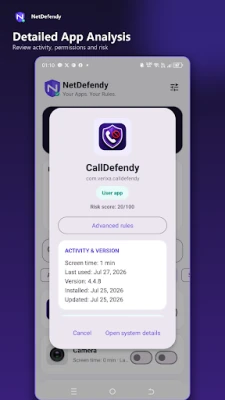
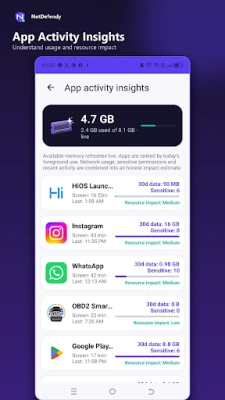
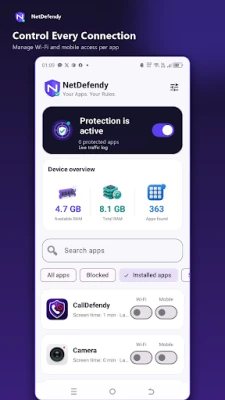
NetDefendy combines an on-device app firewall with an optional Global VPN. Manage Wi-Fi and mobile data access for individual apps, review blocked connections, and choose which applications use the VPN tunnel.
App firewall
• Block Wi-Fi access for individual apps
• Block mobile data access separately
• Keep firewall rules locally on your device
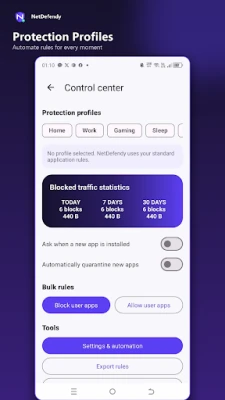
• Review blocked connection statistics
• Automatically protect newly installed apps
• Search and manage installed applications
• Restore your firewall protection after disconnecting Global VPN
Selective Global VPN
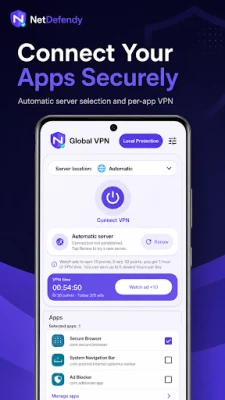
• Route only selected apps through an encrypted VPN tunnel
• Keep other applications on their normal internet connection
• Choose a server location or use automatic server selection
• Automatically try another server when a connection fails
• Reconnect when switching between Wi-Fi and mobile data
• View connection duration, transferred data and exit IP information
• Exclude banking and financial applications from VPN selection
Optional rewarded advertisements
You can choose to watch rewarded advertisements to receive additional VPN connection time. Watching an advertisement is optional and does not affect the local app firewall features.
How NetDefendy uses Android VpnService
NetDefendy uses Android’s VpnService API to provide both the on-device firewall and Global VPN features. Android permits only one VPN service to operate at a time. Therefore, the local firewall and Global VPN cannot run simultaneously.
When Global VPN is disconnected, NetDefendy can restore your previous local firewall rules.
VPN server information
Global VPN connections may use third-party, volunteer-operated VPN servers. Server availability, speed, latency and location can vary. NetDefendy does not operate or control these volunteer servers.
Avoid transmitting highly sensitive information through servers you do not trust. Banking and financial applications are excluded from Global VPN selection for additional safety.
Privacy and local storage
Firewall rules and connection statistics are stored locally on your device. NetDefendy does not require an account to use its core firewall features.
Review the privacy policy and the in-app VPN disclosure before enabling Global VPN.
App firewall
• Block Wi-Fi access for individual apps
• Block mobile data access separately
• Keep firewall rules locally on your device
• Review blocked connection statistics
• Automatically protect newly installed apps
• Search and manage installed applications
• Restore your firewall protection after disconnecting Global VPN
Selective Global VPN
• Route only selected apps through an encrypted VPN tunnel
• Keep other applications on their normal internet connection
• Choose a server location or use automatic server selection
• Automatically try another server when a connection fails
• Reconnect when switching between Wi-Fi and mobile data
• View connection duration, transferred data and exit IP information
• Exclude banking and financial applications from VPN selection
Optional rewarded advertisements
You can choose to watch rewarded advertisements to receive additional VPN connection time. Watching an advertisement is optional and does not affect the local app firewall features.
How NetDefendy uses Android VpnService
NetDefendy uses Android’s VpnService API to provide both the on-device firewall and Global VPN features. Android permits only one VPN service to operate at a time. Therefore, the local firewall and Global VPN cannot run simultaneously.
When Global VPN is disconnected, NetDefendy can restore your previous local firewall rules.
VPN server information
Global VPN connections may use third-party, volunteer-operated VPN servers. Server availability, speed, latency and location can vary. NetDefendy does not operate or control these volunteer servers.
Avoid transmitting highly sensitive information through servers you do not trust. Banking and financial applications are excluded from Global VPN selection for additional safety.
Privacy and local storage
Firewall rules and connection statistics are stored locally on your device. NetDefendy does not require an account to use its core firewall features.
Review the privacy policy and the in-app VPN disclosure before enabling Global VPN.
Rate the App
Add Comment & Review
User Reviews
Based on 0 reviews
No reviews added yet.
Comments will not be approved to be posted if they are SPAM, abusive, off-topic, use profanity, contain a personal attack, or promote hate of any kind.















More »

Popular Apps

phpFoxPHPFOX LLC

Moon Chai StoryOlha Dobel

World War Heroes — WW2 PvP FPSAzur Interactive Games Limited

Govee LiteGovee

Viking Clan: RagnarokKano Games

Build World AdventureExplore city in cube world

Vikings: War of ClansPlarium LLC

Asphalt 9: LegendsGameloft SE

Submarine Car Diving SimulatorSwim with dolphins & penguins

Dawn of Zombies: Survival GameRoyal Ark
More »
Editor's Choice

Grim Soul: Dark Survival RPGBrickworks Games Ltd

Craft of Survival - Gladiators101XP LIMITED

Last Shelter: SurvivalLong Tech Network Limited
Dawn of Zombies: Survival GameRoyal Ark

Merge Survival : WastelandStickyHands Inc.

AoD Vikings: Valhalla GameRoboBot Studio
Viking Clan: RagnarokKano Games
Vikings: War of ClansPlarium LLC
Asphalt 9: LegendsGameloft SE

Modern Tanks: War Tank GamesXDEVS LTD