

Latest Version
Update
October 11, 2026
October 11, 2026
Developer
Mediant Technologies
Mediant Technologies
Categories
Communication
Communication
Platforms
Android
Android
Downloads
0
0
License
Free
Free
Package Name
com.mt.messages2
com.mt.messages2
Report
Report a Problem
Report a Problem
More About Messages: Bulk SMS Sender
Messages is a fast, no-nonsense SMS app for people who text a lot, with a built-in Business Mode for sending one personalized message to many people at once, straight from your own SIM.
Set it as your default messaging app for a clean, modern inbox with everything you expect, plus tools most messaging apps never build.
EVERYDAY MESSAGING (FREE)
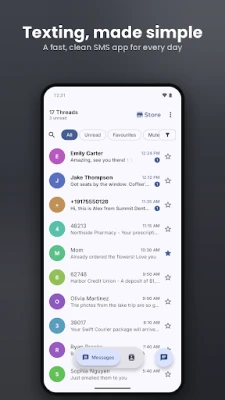
• Clean, fast inbox with Unread, Favourites, Campaign and other quick filters
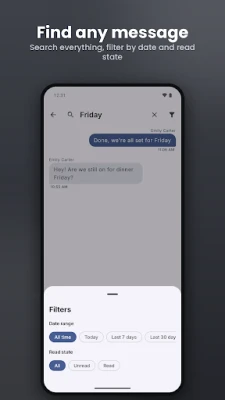
• Search every message, and narrow results by date range and read state
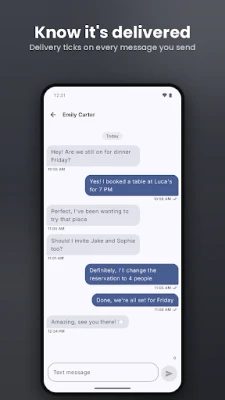
• Delivery ticks show when a message has been sent and delivered
• Recycle Bin: swipe a deleted message right to restore it
• Long-press any message to copy, forward, share, see its details or retry a failed send
• Reply, mark as read or dismiss straight from the notification
• Dual-SIM support: choose which SIM each message sends from
• Swipe actions for archive, delete and more
• Pin a conversation to the top, and lock a conversation behind your screen lock
• Tappable links in messages
BUSINESS MODE: BULK SMS THAT FEELS PERSONAL
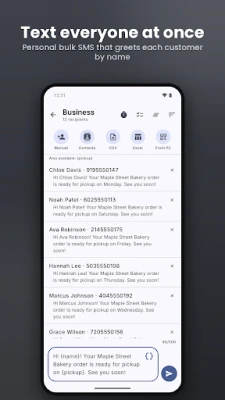
Send appointment reminders, order updates, event invites or offers to your customers, each one greeting the person by name.
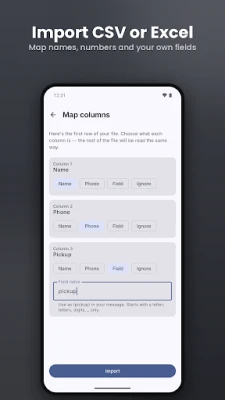
• Add recipients by typing them, picking contacts, or importing a CSV or Excel file
• Map your file's columns to name, number and your own fields, then use {name}, {number} or any custom field in the message
• See a live preview of every personalized message before you send
• Watch the batch go out live, pause or stop at any time, and see a clear sent or failed result for each recipient
• Replies arrive in your inbox, and the Campaign filter collects those threads in one place
Business Mode has a Free plan, with CSV and Excel import included. The Plus and Max subscriptions raise the recipient and message-length limits and add:
• Scheduled sends that go out on time even if the app is closed (Plus and Max)
• Rotating a send across multiple SIMs (Max)
• Splitting a scheduled batch across the days of the week you choose (Max)
• Import from Computer: scan a QR code to upload a contact list from your PC (Max)
Messages sent on the Free plan end with a short line mentioning the app.
MAKE IT YOURS
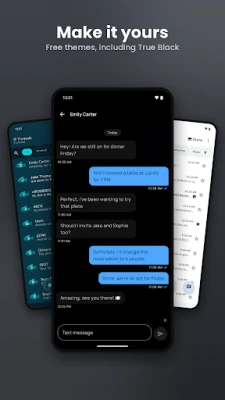
Three themes are free: True Black for OLED screens, Oceanic and Enterprise Slate. Ten more premium themes, from warm metallic Gold to retro Terminal green, are available as one-time purchases.
OPTIONAL UPGRADES
Everyday messaging needs no account, has no ads and no subscription. Optional extras:
• Premium themes (one-time)
• Unlimited pinned conversations and unlimited secured chats (one-time)
• Business Mode Plus or Max (subscription)
PRIVATE BY DESIGN
Your messages stay on your device, in the app's own database. There is no account to create, and your messages are never uploaded to our servers. Backups follow your phone's own backup settings.
WHY SET IT AS YOUR DEFAULT SMS APP?
Android only lets the default SMS app fully send, receive and manage your texts. Messages asks for the permissions that role needs, such as SMS, contacts for names, and phone state for dual-SIM sending, plus notifications and exact alarms for scheduled sends.
Standard carrier SMS rates apply. Please only text people who have agreed to hear from you.
Have feedback or found a problem? We're actively building this app, and your input shapes what comes next.
EVERYDAY MESSAGING (FREE)
• Clean, fast inbox with Unread, Favourites, Campaign and other quick filters
• Search every message, and narrow results by date range and read state
• Delivery ticks show when a message has been sent and delivered
• Recycle Bin: swipe a deleted message right to restore it
• Long-press any message to copy, forward, share, see its details or retry a failed send
• Reply, mark as read or dismiss straight from the notification
• Dual-SIM support: choose which SIM each message sends from
• Swipe actions for archive, delete and more
• Pin a conversation to the top, and lock a conversation behind your screen lock
• Tappable links in messages
BUSINESS MODE: BULK SMS THAT FEELS PERSONAL
Send appointment reminders, order updates, event invites or offers to your customers, each one greeting the person by name.
• Add recipients by typing them, picking contacts, or importing a CSV or Excel file
• Map your file's columns to name, number and your own fields, then use {name}, {number} or any custom field in the message
• See a live preview of every personalized message before you send
• Watch the batch go out live, pause or stop at any time, and see a clear sent or failed result for each recipient
• Replies arrive in your inbox, and the Campaign filter collects those threads in one place
Business Mode has a Free plan, with CSV and Excel import included. The Plus and Max subscriptions raise the recipient and message-length limits and add:
• Scheduled sends that go out on time even if the app is closed (Plus and Max)
• Rotating a send across multiple SIMs (Max)
• Splitting a scheduled batch across the days of the week you choose (Max)
• Import from Computer: scan a QR code to upload a contact list from your PC (Max)
Messages sent on the Free plan end with a short line mentioning the app.
MAKE IT YOURS
Three themes are free: True Black for OLED screens, Oceanic and Enterprise Slate. Ten more premium themes, from warm metallic Gold to retro Terminal green, are available as one-time purchases.
OPTIONAL UPGRADES
Everyday messaging needs no account, has no ads and no subscription. Optional extras:
• Premium themes (one-time)
• Unlimited pinned conversations and unlimited secured chats (one-time)
• Business Mode Plus or Max (subscription)
PRIVATE BY DESIGN
Your messages stay on your device, in the app's own database. There is no account to create, and your messages are never uploaded to our servers. Backups follow your phone's own backup settings.
WHY SET IT AS YOUR DEFAULT SMS APP?
Android only lets the default SMS app fully send, receive and manage your texts. Messages asks for the permissions that role needs, such as SMS, contacts for names, and phone state for dual-SIM sending, plus notifications and exact alarms for scheduled sends.
Standard carrier SMS rates apply. Please only text people who have agreed to hear from you.
Have feedback or found a problem? We're actively building this app, and your input shapes what comes next.
Rate the App
Add Comment & Review
User Reviews
Based on 0 reviews
No reviews added yet.
Comments will not be approved to be posted if they are SPAM, abusive, off-topic, use profanity, contain a personal attack, or promote hate of any kind.













More »

Popular Apps

phpFoxPHPFOX LLC

Moon Chai StoryOlha Dobel

World War Heroes — WW2 PvP FPSAzur Interactive Games Limited

Govee LiteGovee

Viking Clan: RagnarokKano Games

Build World AdventureExplore city in cube world

AvSeaAvionics Electronics Geeks!

Vikings: War of ClansPlarium LLC

Asphalt 9: LegendsGameloft SE

Dawn of Zombies: Survival GameRoyal Ark
More »
Editor's Choice

Grim Soul: Dark Survival RPGBrickworks Games Ltd

Craft of Survival - Gladiators101XP LIMITED

Last Shelter: SurvivalLong Tech Network Limited
Dawn of Zombies: Survival GameRoyal Ark

Merge Survival : WastelandStickyHands Inc.

AoD Vikings: Valhalla GameRoboBot Studio
Viking Clan: RagnarokKano Games
Vikings: War of ClansPlarium LLC
Asphalt 9: LegendsGameloft SE

Modern Tanks: War Tank GamesXDEVS LTD