
Latest Version
Update
October 13, 2026
October 13, 2026
Developer
Meeting Room 365
Meeting Room 365
Categories
Business
Business
Platforms
Android
Android
Downloads
0
0
License
Free
Free
Package Name
com.meetingroom365.desks
com.meetingroom365.desks
Report
Report a Problem
Report a Problem
More About Meeting Room 365 Desk Booking
Meeting Room 365 Desk Booking turns your Microsoft 365 calendar into a hybrid work plan you and your team can actually see.
Book a desk for the days you're in. Mark the days you're remote or out. Find a room and send the invite. And know, before you commit to the commute, who else will be there.
A desk booking app for hybrid teams — hot desking, office hoteling and room booking on one screen, with your work calendar as the system of record.
BOOK A DESK
• Reserve a desk or workspace in any building your organization has set up
• Desk reservation by day, by week, or as a recurring pattern
• Check in to the desk you actually sat at, so teammates can find you
• Browse buildings, floors and rooms with photos, maps and live availability
HOT DESKING AND OFFICE HOTELING
• Shared desk pools your workplace team defines — no fixed seats required
• See what's free before you travel, and release a desk you no longer need
• Floor maps show which seats are taken and who is sitting where
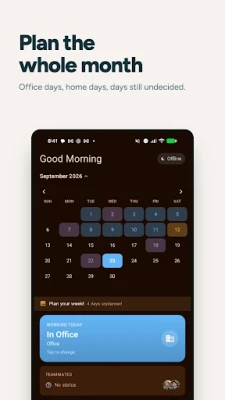
PLAN YOUR WEEK
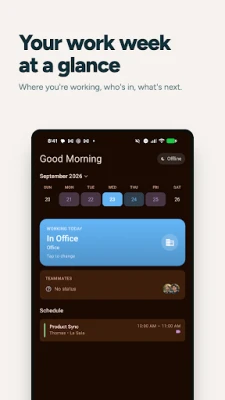
• Set your work location for any day: in office, remote, or out of office
• Save recurring work patterns — "office on Tuesdays and Thursdays" — so your usual week fills itself in
• Import your working hours from Outlook, or push your schedule back to it
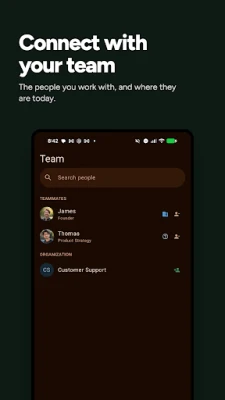
SEE YOUR TEAM
• Two weeks of where your teammates are working, at a glance
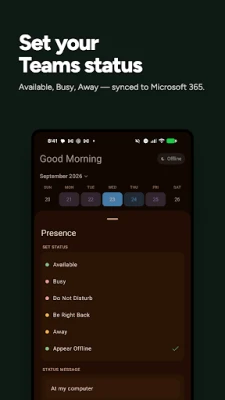
• Live Microsoft Teams availability and status messages
• Follow the people you coordinate with most
MEETING ROOM BOOKING
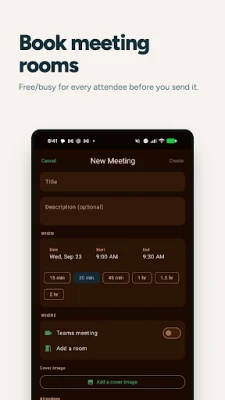
• Create meetings, pick attendees from your directory, and find a room that's free
• Workspace booking and room booking from the same app
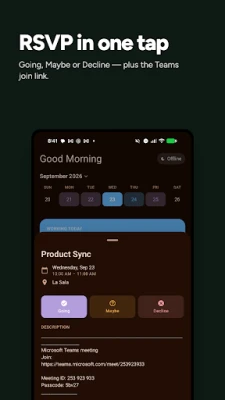
• Review your day's agenda and RSVP without leaving the app
ON YOUR HOME SCREEN
• A widget with your work location, what's next, and who's in
BUILT ON MICROSOFT 365
Your calendar is the system of record. Every desk booking is a real calendar event — visible in Outlook, on every device, to anyone you'd expect. Sign in with your work account; the app reads only what you grant it permission to read. Your meetings stay between your device and Microsoft — we never copy them to our servers. Sharing your work location with colleagues is optional, and off with one switch.
REQUIREMENTS
A Microsoft 365 work or school account. Desk pools, building photos, and team presence sharing require your organization to be set up with Meeting Room 365.
A desk booking app for hybrid teams — hot desking, office hoteling and room booking on one screen, with your work calendar as the system of record.
BOOK A DESK
• Reserve a desk or workspace in any building your organization has set up
• Desk reservation by day, by week, or as a recurring pattern
• Check in to the desk you actually sat at, so teammates can find you
• Browse buildings, floors and rooms with photos, maps and live availability
HOT DESKING AND OFFICE HOTELING
• Shared desk pools your workplace team defines — no fixed seats required
• See what's free before you travel, and release a desk you no longer need
• Floor maps show which seats are taken and who is sitting where
PLAN YOUR WEEK
• Set your work location for any day: in office, remote, or out of office
• Save recurring work patterns — "office on Tuesdays and Thursdays" — so your usual week fills itself in
• Import your working hours from Outlook, or push your schedule back to it
SEE YOUR TEAM
• Two weeks of where your teammates are working, at a glance
• Live Microsoft Teams availability and status messages
• Follow the people you coordinate with most
MEETING ROOM BOOKING
• Create meetings, pick attendees from your directory, and find a room that's free
• Workspace booking and room booking from the same app
• Review your day's agenda and RSVP without leaving the app
ON YOUR HOME SCREEN
• A widget with your work location, what's next, and who's in
BUILT ON MICROSOFT 365
Your calendar is the system of record. Every desk booking is a real calendar event — visible in Outlook, on every device, to anyone you'd expect. Sign in with your work account; the app reads only what you grant it permission to read. Your meetings stay between your device and Microsoft — we never copy them to our servers. Sharing your work location with colleagues is optional, and off with one switch.
REQUIREMENTS
A Microsoft 365 work or school account. Desk pools, building photos, and team presence sharing require your organization to be set up with Meeting Room 365.
Rate the App
Add Comment & Review
User Reviews
Based on 0 reviews
No reviews added yet.
Comments will not be approved to be posted if they are SPAM, abusive, off-topic, use profanity, contain a personal attack, or promote hate of any kind.













More »

Popular Apps

phpFoxPHPFOX LLC

Moon Chai StoryOlha Dobel

World War Heroes — WW2 PvP FPSAzur Interactive Games Limited

Govee LiteGovee

AvSeaAvionics Electronics Geeks!

Viking Clan: RagnarokKano Games

Vikings: War of ClansPlarium LLC

Build World AdventureExplore city in cube world

Asphalt 9: LegendsGameloft SE

Dawn of Zombies: Survival GameRoyal Ark
More »
Editor's Choice

Grim Soul: Dark Survival RPGBrickworks Games Ltd

Craft of Survival - Gladiators101XP LIMITED

Last Shelter: SurvivalLong Tech Network Limited
Dawn of Zombies: Survival GameRoyal Ark

Merge Survival : WastelandStickyHands Inc.

AoD Vikings: Valhalla GameRoboBot Studio
Viking Clan: RagnarokKano Games
Vikings: War of ClansPlarium LLC
Asphalt 9: LegendsGameloft SE

Modern Tanks: War Tank GamesXDEVS LTD