

Latest Version
Update
August 07, 2026
August 07, 2026
Developer
Relentless Cloud
Relentless Cloud
Categories
Tools
Tools
Platforms
Android
Android
Downloads
0
0
License
Free
Free
Package Name
com.magnifying.glassapp.magnifier
com.magnifying.glassapp.magnifier
Report
Report a Problem
Report a Problem
More About Magnifier
📄 Magnifier – Magnifying Glass, Zoom Camera & Text Reader
Magnifier is a simple and useful magnifying glass app that helps you see small text, objects, labels, documents, and other details more clearly. Use the camera zoom to enlarge what you are viewing, adjust brightness for better visibility, and choose a display filter that suits your reading needs.
With up to 11x zoom, front and back camera support, reading mode, flashlight control, and an easy camera view, Magnifier can be useful for reading small print, examining details, viewing labels, and everyday close-up tasks.
Easy Magnifier App switch between front and back cameras, adjust brightness, select different filters, capture camera content, recognize text with OCR, copy or share recognized text, and use text-to-speech to listen to recognized content.
Magnifier is a practical magnifying glass and text reader for everyday close-up viewing, reading, and examining small details with your Android device.
🔍 Magnifying Glass & Camera Zoom
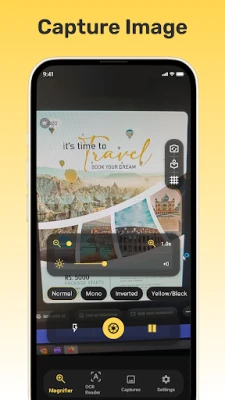
Magnifier provides up to 11x camera zoom to make small details easier to view.
Zoom up to 11x for close-up viewing.
Switch between the front and back camera.
Use the camera view to examine small text and objects.
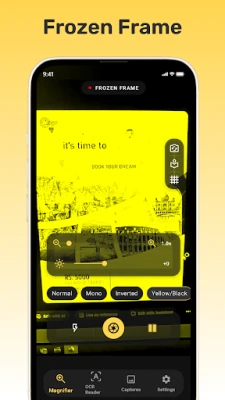
Pause the current camera position when you need to keep a view on screen.
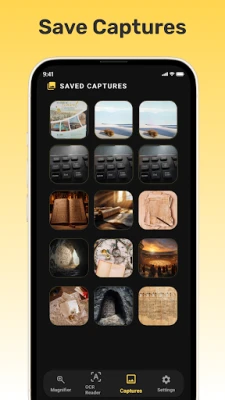
Capture an image directly from the camera.
View captured media inside the app.
📖 Reading Mode
Reading mode provides a focused viewing experience for small text and close-up content.
Enable reading mode for easier viewing.
Use the reading guide to help follow text.
Change the reading guide color according to your preference.
Adjust screen brightness from low to high.
Keep the screen on while using the magnifier when needed.
Enable or disable vibration.
🎨 Magnifier Filters
Choose a display filter to make content easier to view in different situations.
Normal filter for regular viewing.
Mono filter for a simple monochrome view.
Inverted filter for an inverted display.
Yellow and Black filter for high-contrast viewing.
Sepia filter for a warm-toned display.
🔦 Flashlight & Camera Capture
Use the built-in flashlight when additional light is needed while viewing small details.
Turn the flashlight on or off.
Adjust brightness for better visibility.
Capture the current camera view.
View captured media within the application.
🔤 OCR Text Reader
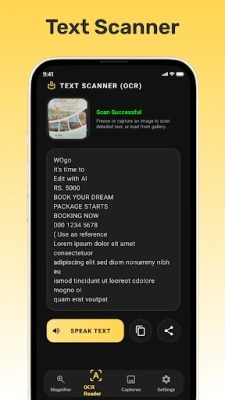
The built-in OCR text reader helps recognize text from the camera view or captured content.
Recognize text using OCR.
Copy recognized text for use elsewhere.
Share recognized text with other applications.
Speak recognized text aloud.
⚙️ Settings & Language
Customize the viewing experience according to your needs.
Control screen brightness.
Turn the flashlight on or off.
Enable or disable vibration.
Keep the screen on or turn this option off.
Change the reading guide color.
Select your preferred application language.
Magnifier App Function
Magnifier brings camera zoom, magnifying glass features, reading mode, display filters, flashlight control, image capture, and OCR text recognition together in one simple application. It is designed for everyday close-up viewing when you need to see small text, labels, documents, or other details more clearly.
With up to 11x zoom, front and back camera support, reading mode, flashlight control, and an easy camera view, Magnifier can be useful for reading small print, examining details, viewing labels, and everyday close-up tasks.
Easy Magnifier App switch between front and back cameras, adjust brightness, select different filters, capture camera content, recognize text with OCR, copy or share recognized text, and use text-to-speech to listen to recognized content.
Magnifier is a practical magnifying glass and text reader for everyday close-up viewing, reading, and examining small details with your Android device.
🔍 Magnifying Glass & Camera Zoom
Magnifier provides up to 11x camera zoom to make small details easier to view.
Zoom up to 11x for close-up viewing.
Switch between the front and back camera.
Use the camera view to examine small text and objects.
Pause the current camera position when you need to keep a view on screen.
Capture an image directly from the camera.
View captured media inside the app.
📖 Reading Mode
Reading mode provides a focused viewing experience for small text and close-up content.
Enable reading mode for easier viewing.
Use the reading guide to help follow text.
Change the reading guide color according to your preference.
Adjust screen brightness from low to high.
Keep the screen on while using the magnifier when needed.
Enable or disable vibration.
🎨 Magnifier Filters
Choose a display filter to make content easier to view in different situations.
Normal filter for regular viewing.
Mono filter for a simple monochrome view.
Inverted filter for an inverted display.
Yellow and Black filter for high-contrast viewing.
Sepia filter for a warm-toned display.
🔦 Flashlight & Camera Capture
Use the built-in flashlight when additional light is needed while viewing small details.
Turn the flashlight on or off.
Adjust brightness for better visibility.
Capture the current camera view.
View captured media within the application.
🔤 OCR Text Reader
The built-in OCR text reader helps recognize text from the camera view or captured content.
Recognize text using OCR.
Copy recognized text for use elsewhere.
Share recognized text with other applications.
Speak recognized text aloud.
⚙️ Settings & Language
Customize the viewing experience according to your needs.
Control screen brightness.
Turn the flashlight on or off.
Enable or disable vibration.
Keep the screen on or turn this option off.
Change the reading guide color.
Select your preferred application language.
Magnifier App Function
Magnifier brings camera zoom, magnifying glass features, reading mode, display filters, flashlight control, image capture, and OCR text recognition together in one simple application. It is designed for everyday close-up viewing when you need to see small text, labels, documents, or other details more clearly.
Rate the App
Add Comment & Review
User Reviews
Based on 0 reviews
No reviews added yet.
Comments will not be approved to be posted if they are SPAM, abusive, off-topic, use profanity, contain a personal attack, or promote hate of any kind.














More »

Popular Apps

phpFoxPHPFOX LLC

Moon Chai StoryOlha Dobel

World War Heroes — WW2 PvP FPSAzur Interactive Games Limited

Govee LiteGovee

Build World AdventureExplore city in cube world

Viking Clan: RagnarokKano Games

Vikings: War of ClansPlarium LLC

Asphalt 9: LegendsGameloft SE

Submarine Car Diving SimulatorSwim with dolphins & penguins

Dawn of Zombies: Survival GameRoyal Ark
More »
Editor's Choice

Grim Soul: Dark Survival RPGBrickworks Games Ltd

Craft of Survival - Gladiators101XP LIMITED

Last Shelter: SurvivalLong Tech Network Limited
Dawn of Zombies: Survival GameRoyal Ark

Merge Survival : WastelandStickyHands Inc.

AoD Vikings: Valhalla GameRoboBot Studio
Viking Clan: RagnarokKano Games
Vikings: War of ClansPlarium LLC
Asphalt 9: LegendsGameloft SE

Modern Tanks: War Tank GamesXDEVS LTD