

Latest Version
Update
October 21, 2026
October 21, 2026
Developer
Librera
Librera
Categories
Books & Reference
Books & Reference
Platforms
Android
Android
Downloads
0
0
License
Free
Free
Package Name
com.librerax
com.librerax
Report
Report a Problem
Report a Problem
More About LibreraX - EPUB Reader, PDF
Formats
• EPUB, MOBI, AZW, AZW3, KF8, PRC, FB2, FB2.ZIP, CBZ, PDF, TXT and Markdown.
• Reflowable books render through foliate-js in a WebView; PDF pages through PDFium.
• TXT and Markdown are converted to a single HTML document and read like any other book.
• Files opened from other apps, and folders attached through the system file picker.
Library
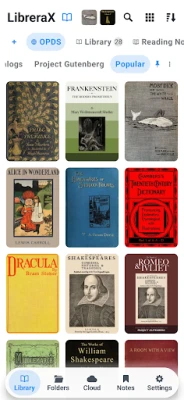
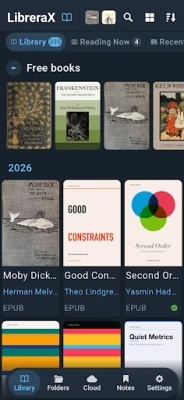
• Scans chosen folders for books and keeps covers, titles, authors and progress.
• Grid, list, condensed and cover views.
• Grouping by author, series, genre, tag, keyword, language, publisher and publication date.
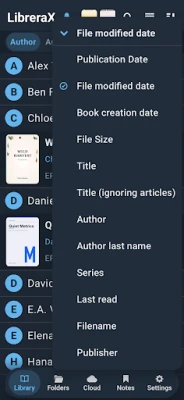
• Sorting by title, author, series, number in series, filename, size, date, page count and extension.
• Recent, favourites, read and unread shelves, and shelves of the reader's own tags.
• Search across the library; per-book search inside the open book.
• Book actions: open with, send, delete, add to or remove from the library, reset progress, mark as read or unread, file info.
Reading
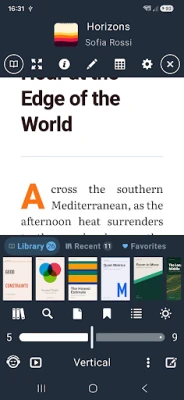
• Paged and vertical scrolling, one column or two, left-to-right or right-to-left.
• Page animation, fullscreen, screen-rotation lock.
• Table of contents, go to page over a grid of page previews, and progress by page or percentage.
• PDF: pinch zoom, page fitting, and the reading theme carried onto the page in night mode.
Themes and typography
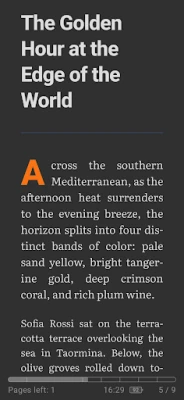
• Reading themes are the reader's own list: what is on it, what each is coloured, in what order it sits, and which of them the settings offer at a tap.
• Themes are added, recoloured, reordered by dragging, hidden without being deleted, and restored to the built-in set.
• A theme is edited over a live page, set in the book's own font, size and spacing, with the WCAG contrast of ink against paper shown in the title bar.
• Colours are chosen from ready-made papers and inks, by hex, or by RGB slider.
• Aged-paper texture, drawn by the browser in whatever colour the theme is.
• White backgrounds in illustrations can be multiplied into the page, so a drawing sits on the same sheet as the words instead of standing as a bright card on a tinted page.
• Bundled font families, font size, line spacing, page padding and text alignment.
• Hyphenation through the browser, Hyphenopoly or hyphen, with the languages chosen per shelf and the book's own language honoured or overridden.
• User CSS, applied to every book or only where the book's own styling is set aside.
• Find and replace rules applied to the text of reflowable books as sections load.
Notes and bookmarks
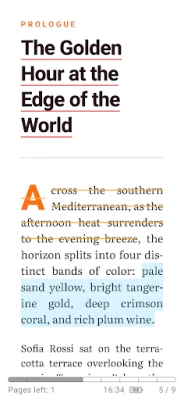
• Highlights, underlines and strikethroughs in a choice of colours, kept per book.
• Bookmarks, each keeping the text it was made on.
• Copy, translate and search the selection.
Reading aloud
• Text to speech with a choice of engine, voice and speed.
• A media session, so the notification, the lock screen and headset buttons drive it.
• Reading follows the voice: the paragraph being spoken is marked and the page turns itself.
Metadata
• Title, author, series, genre, keywords, annotation, ISBN, publisher and publication date.
• Covers taken from the book's own images, from a file or from a link.
• Saving writes the fields into the book file itself: EPUB, FB2 and PDF for the fields, EPUB and FB2 for the cover.
Elsewhere on the device
• Home-screen widgets: one book opened where reading stopped, and a shelf of recent books, favourites or a tag.
• A Wear OS companion showing what is being read, and driving the voice from the wrist: play and pause, skip, stop, and open the last book on the phone.
Data
• Backup exports and imports the library, its metadata and the settings.
• Light, dark and e-ink app themes, and the interface language.
• Reflowable books render through foliate-js in a WebView; PDF pages through PDFium.
• TXT and Markdown are converted to a single HTML document and read like any other book.
• Files opened from other apps, and folders attached through the system file picker.
Library
• Scans chosen folders for books and keeps covers, titles, authors and progress.
• Grid, list, condensed and cover views.
• Grouping by author, series, genre, tag, keyword, language, publisher and publication date.
• Sorting by title, author, series, number in series, filename, size, date, page count and extension.
• Recent, favourites, read and unread shelves, and shelves of the reader's own tags.
• Search across the library; per-book search inside the open book.
• Book actions: open with, send, delete, add to or remove from the library, reset progress, mark as read or unread, file info.
Reading
• Paged and vertical scrolling, one column or two, left-to-right or right-to-left.
• Page animation, fullscreen, screen-rotation lock.
• Table of contents, go to page over a grid of page previews, and progress by page or percentage.
• PDF: pinch zoom, page fitting, and the reading theme carried onto the page in night mode.
Themes and typography
• Reading themes are the reader's own list: what is on it, what each is coloured, in what order it sits, and which of them the settings offer at a tap.
• Themes are added, recoloured, reordered by dragging, hidden without being deleted, and restored to the built-in set.
• A theme is edited over a live page, set in the book's own font, size and spacing, with the WCAG contrast of ink against paper shown in the title bar.
• Colours are chosen from ready-made papers and inks, by hex, or by RGB slider.
• Aged-paper texture, drawn by the browser in whatever colour the theme is.
• White backgrounds in illustrations can be multiplied into the page, so a drawing sits on the same sheet as the words instead of standing as a bright card on a tinted page.
• Bundled font families, font size, line spacing, page padding and text alignment.
• Hyphenation through the browser, Hyphenopoly or hyphen, with the languages chosen per shelf and the book's own language honoured or overridden.
• User CSS, applied to every book or only where the book's own styling is set aside.
• Find and replace rules applied to the text of reflowable books as sections load.
Notes and bookmarks
• Highlights, underlines and strikethroughs in a choice of colours, kept per book.
• Bookmarks, each keeping the text it was made on.
• Copy, translate and search the selection.
Reading aloud
• Text to speech with a choice of engine, voice and speed.
• A media session, so the notification, the lock screen and headset buttons drive it.
• Reading follows the voice: the paragraph being spoken is marked and the page turns itself.
Metadata
• Title, author, series, genre, keywords, annotation, ISBN, publisher and publication date.
• Covers taken from the book's own images, from a file or from a link.
• Saving writes the fields into the book file itself: EPUB, FB2 and PDF for the fields, EPUB and FB2 for the cover.
Elsewhere on the device
• Home-screen widgets: one book opened where reading stopped, and a shelf of recent books, favourites or a tag.
• A Wear OS companion showing what is being read, and driving the voice from the wrist: play and pause, skip, stop, and open the last book on the phone.
Data
• Backup exports and imports the library, its metadata and the settings.
• Light, dark and e-ink app themes, and the interface language.
Rate the App
Add Comment & Review
User Reviews
Based on 0 reviews
No reviews added yet.
Comments will not be approved to be posted if they are SPAM, abusive, off-topic, use profanity, contain a personal attack, or promote hate of any kind.











More »

Popular Apps

phpFoxPHPFOX LLC

Moon Chai StoryOlha Dobel

World War Heroes — WW2 PvP FPSAzur Interactive Games Limited

Govee LiteGovee

AvSeaAvionics Electronics Geeks!

Viking Clan: RagnarokKano Games

Build World AdventureExplore city in cube world

Vikings: War of ClansPlarium LLC

Asphalt 9: LegendsGameloft SE

Dawn of Zombies: Survival GameRoyal Ark
More »
Editor's Choice

Grim Soul: Dark Survival RPGBrickworks Games Ltd

Craft of Survival - Gladiators101XP LIMITED

Last Shelter: SurvivalLong Tech Network Limited
Dawn of Zombies: Survival GameRoyal Ark

Merge Survival : WastelandStickyHands Inc.

AoD Vikings: Valhalla GameRoboBot Studio
Viking Clan: RagnarokKano Games
Vikings: War of ClansPlarium LLC
Asphalt 9: LegendsGameloft SE

Modern Tanks: War Tank GamesXDEVS LTD