
Latest Version
Update
August 13, 2026
August 13, 2026
Developer
VoidStudio
VoidStudio
Categories
Lifestyle
Lifestyle
Platforms
Android
Android
Downloads
2
2
License
Free
Free
Package Name
com.wishlists.gifts
com.wishlists.gifts
Report
Report a Problem
Report a Problem
More About Jinnie: Wishlist Maker
Jinnie is a free wishlist app for iPhone and Android. Build a gift list for a birthday, Christmas, or any occasion, share it with one link, and the people buying for you can open the list in a browser and claim a gift - so nobody buys the same thing twice.
WHAT YOU CAN DO
Build a list in seconds
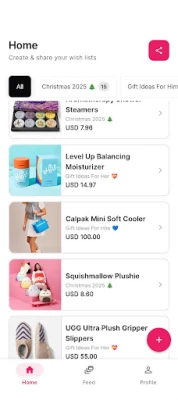
- Create as many wishlists as you want, with as many items as you want
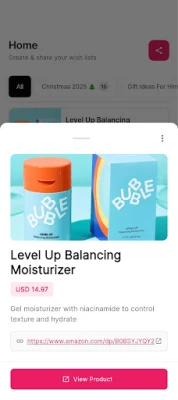
- Paste a product link and Jinnie fills in the title, image, and price for you
- Or add an item by hand, with your own photo, price, and note
- Save from Safari or Chrome with the iOS share sheet, or from your desktop with the Jinnie Chrome extension
- See the total value of everything on a list
Share it with one link
- Send one link by message, email, or anywhere else
- Whoever opens it sees your list in their browser. No download, no signup wall
- Or share your public profile at jinnie.co/yourname so people always find the current list
- Every list is private, friends-only, or public - you choose, per list
Claim gifts, avoid duplicates
- A gift-giver marks an item as claimed so other people know it is taken
- Other gift-givers see that an item is claimed, never who claimed it
- Claims can be cancelled if plans change
- Buying from the web needs an email confirmation, not a full account
Follow the people you buy for
- Add friends and family, and see their lists when they share them
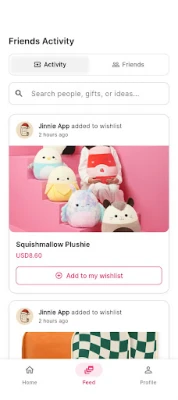
- An activity feed shows what changed since you last looked
- Browse curated gift guides inside the app when you have no idea what to buy
MADE FOR
Birthday planners - the person who always gets asked "what do you want?" three weeks before
Families organising Christmas - one list per person, so cousins and grandparents stop buying the same board game
Couples - a shared list of things you are both saving toward
Anyone with a "someday" list - keep the things you want in one place instead of 40 open browser tabs
FREQUENTLY ASKED QUESTIONS
How do I share a wishlist?
Open the list, tap share, and send the link. The person who opens it sees your list in a browser straight away - they do not need the app or an account to look at it.
Can people claim gifts without me seeing who?
Gift-givers can mark an item as claimed. Other gift-givers see that it is taken but never see who took it, so two people do not buy the same present.
Do my friends need the app to use my list?
No. Anyone with the link can open your list in a browser. To claim an item from the web they confirm an email address, which keeps claims honest - but there is no account to create.
Is Jinnie a wishlist or a gift registry?
Both, in practice. A registry is usually one list tied to one event; Jinnie is a list you keep all year and reuse for birthdays, Christmas, weddings, or a baby shower. You just make a new list per occasion.
Can I add things from any online store?
Paste the product link and Jinnie pulls in the details. It works best on large retailers like Amazon and Best Buy; on smaller sites it fills in what the page publishes and you can edit the rest.
Is Jinnie free?
Yes. There is no paid plan, no subscription, and no limit on how many lists or items you can have.
Who can see my list?
Only the people you send it to, unless you set the list to public. Every list is private, friends-only, or public, and you can change it whenever you like.
Does it work for Secret Santa or a group?
You can each make a list and share the links, so everyone knows what to buy. Jinnie does not draw names for you and does not split the cost of one gift between people.
Jinnie is available on Android, iPhone, the web at jinnie.co, and as a Chrome extension. The app is translated into 33 languages.
Get Jinnie on Google Play, or use it in your browser at jinnie.co.
Build a list in seconds
- Create as many wishlists as you want, with as many items as you want
- Paste a product link and Jinnie fills in the title, image, and price for you
- Or add an item by hand, with your own photo, price, and note
- Save from Safari or Chrome with the iOS share sheet, or from your desktop with the Jinnie Chrome extension
- See the total value of everything on a list
Share it with one link
- Send one link by message, email, or anywhere else
- Whoever opens it sees your list in their browser. No download, no signup wall
- Or share your public profile at jinnie.co/yourname so people always find the current list
- Every list is private, friends-only, or public - you choose, per list
Claim gifts, avoid duplicates
- A gift-giver marks an item as claimed so other people know it is taken
- Other gift-givers see that an item is claimed, never who claimed it
- Claims can be cancelled if plans change
- Buying from the web needs an email confirmation, not a full account
Follow the people you buy for
- Add friends and family, and see their lists when they share them
- An activity feed shows what changed since you last looked
- Browse curated gift guides inside the app when you have no idea what to buy
MADE FOR
Birthday planners - the person who always gets asked "what do you want?" three weeks before
Families organising Christmas - one list per person, so cousins and grandparents stop buying the same board game
Couples - a shared list of things you are both saving toward
Anyone with a "someday" list - keep the things you want in one place instead of 40 open browser tabs
FREQUENTLY ASKED QUESTIONS
How do I share a wishlist?
Open the list, tap share, and send the link. The person who opens it sees your list in a browser straight away - they do not need the app or an account to look at it.
Can people claim gifts without me seeing who?
Gift-givers can mark an item as claimed. Other gift-givers see that it is taken but never see who took it, so two people do not buy the same present.
Do my friends need the app to use my list?
No. Anyone with the link can open your list in a browser. To claim an item from the web they confirm an email address, which keeps claims honest - but there is no account to create.
Is Jinnie a wishlist or a gift registry?
Both, in practice. A registry is usually one list tied to one event; Jinnie is a list you keep all year and reuse for birthdays, Christmas, weddings, or a baby shower. You just make a new list per occasion.
Can I add things from any online store?
Paste the product link and Jinnie pulls in the details. It works best on large retailers like Amazon and Best Buy; on smaller sites it fills in what the page publishes and you can edit the rest.
Is Jinnie free?
Yes. There is no paid plan, no subscription, and no limit on how many lists or items you can have.
Who can see my list?
Only the people you send it to, unless you set the list to public. Every list is private, friends-only, or public, and you can change it whenever you like.
Does it work for Secret Santa or a group?
You can each make a list and share the links, so everyone knows what to buy. Jinnie does not draw names for you and does not split the cost of one gift between people.
Jinnie is available on Android, iPhone, the web at jinnie.co, and as a Chrome extension. The app is translated into 33 languages.
Get Jinnie on Google Play, or use it in your browser at jinnie.co.
Rate the App
Add Comment & Review
User Reviews
Based on 0 reviews
No reviews added yet.
Comments will not be approved to be posted if they are SPAM, abusive, off-topic, use profanity, contain a personal attack, or promote hate of any kind.


![[WISH] 좋은느낌만 카톡 테마](https://apkstore.app/images/17903685158900636.webp)











More »

Popular Apps

phpFoxPHPFOX LLC

Moon Chai StoryOlha Dobel

World War Heroes — WW2 PvP FPSAzur Interactive Games Limited

Govee LiteGovee

Viking Clan: RagnarokKano Games

Build World AdventureExplore city in cube world

Vikings: War of ClansPlarium LLC

AvSeaAvionics Electronics Geeks!

Asphalt 9: LegendsGameloft SE

Dawn of Zombies: Survival GameRoyal Ark
More »
Editor's Choice

Grim Soul: Dark Survival RPGBrickworks Games Ltd

Craft of Survival - Gladiators101XP LIMITED

Last Shelter: SurvivalLong Tech Network Limited
Dawn of Zombies: Survival GameRoyal Ark

Merge Survival : WastelandStickyHands Inc.

AoD Vikings: Valhalla GameRoboBot Studio
Viking Clan: RagnarokKano Games
Vikings: War of ClansPlarium LLC
Asphalt 9: LegendsGameloft SE

Modern Tanks: War Tank GamesXDEVS LTD