

Latest Version
Update
October 07, 2026
October 07, 2026
Developer
PRAKRITI ORGANICS INDIA PRIVATE LIMITED
PRAKRITI ORGANICS INDIA PRIVATE LIMITED
Categories
Tools
Tools
Platforms
Android
Android
Downloads
0
0
License
Free
Free
Package Name
com.kk.icall.dialer
com.kk.icall.dialer
Report
Report a Problem
Report a Problem
More About iCall Phone Dialer & Contacts
📞 iCall Dialer: Phone & Contacts – Smart Phone Dialer & Contact Manager
Make calling and contact management easier with iCall Dialer: Phone & Contacts, a modern phone dialer and contacts app designed for a simple, fast, and organized calling experience.
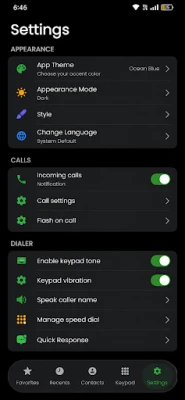
Manage your phone contacts, make calls quickly, view recent calls, identify callers, block unwanted numbers, use quick replies, access favorite contacts, and enjoy a clean iOS-inspired phone interface.
Whether you are looking for a phone dialer, contacts app, contact manager, caller ID app, call history manager, call blocker, or an iOS-style dialer, this app brings essential phone and contact features together in one convenient place.
━━━━━━━━━━━━━━━━━━
📞 SMART PHONE DIALER
━━━━━━━━━━━━━━━━━━
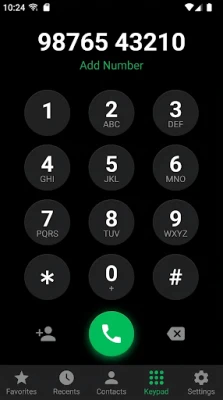
Enjoy a clean and easy-to-use phone dialer for everyday calling.
The dialer is designed to make entering phone numbers and making calls simple and convenient. Quickly access your contacts and start a call with minimal steps.
With the phone dialer, you can:
• Enter phone numbers quickly
• Make calls directly from the dial pad
• Access contacts while dialing
• Quickly call saved contacts
• Access recent calls
• Call favorite contacts
• Take quick actions while managing calls
If you want a simple phone app with a clean dialer experience, iCall Dialer: Phone & Contacts provides the essential tools you need for everyday communication.
━━━━━━━━━━━━━━━━━━
👥 CONTACTS & CONTACT MANAGER
━━━━━━━━━━━━━━━━━━
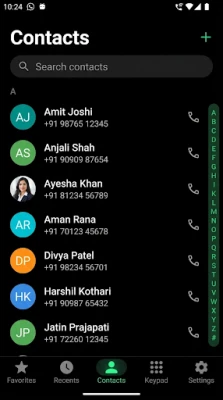
Keep your phone contacts organized with an easy-to-use contact manager.
View and manage your saved contacts from one convenient place. Quickly find the person you want to call and access their available contact information.
Use the contacts app to:
• View your phone contacts
• Search contacts quickly
• Open contact details
• Add new contacts
• Edit contact information
• Delete contacts when needed
• Call contacts directly
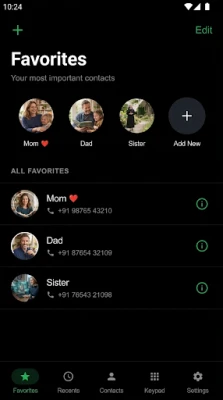
• Add important contacts to Favorites
The clean contact manager helps you keep frequently used contacts easy to access while making everyday calling more convenient.
━━━━━━━━━━━━━━━━━━
🆔 CALLER ID
━━━━━━━━━━━━━━━━━━
Know who is calling with a convenient Caller ID experience.
Caller ID can display available caller information and help you recognize incoming calls more easily.
With Caller ID, you can quickly understand whether an incoming call is from a saved contact and access available caller details.
Caller ID functionality may depend on Android permissions, device capabilities, and system limitations.
━━━━━━━━━━━━━━━━━━
📲 AFTER-CALL SCREEN
━━━━━━━━━━━━━━━━━━
Take quick action after a phone call with the convenient After-Call Screen.
After a call ends, the After-Call Screen gives you quick access to useful actions without requiring you to manually open your phone contacts or call history.
Depending on the available functionality, you can quickly:
• Call the number again
• Send a quick reply
• Save an unknown number as a contact
• View caller information
• Block or unblock a number
• Access available contact actions
The After-Call Screen is designed to make post-call actions faster and easier.
━━━━━━━━━━━━━━━━━━
🕘 CALL HISTORY & RECENT CALLS
━━━━━━━━━━━━━━━━━━
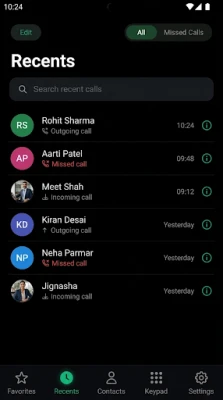
Keep track of your recent communication with an organized Call History.
View your recent incoming, outgoing, and missed calls in one place.
Call History can help you:
• Find recent calls
• Check incoming calls
• Check outgoing calls
• Find missed calls
• View caller information
• Quickly call back
• Access contact details
The Recent Calls section makes it easy to find previous communication without searching through your phone manually.
━━━━━━━━━━━━━━━━━━
⭐ FAVORITES
━━━━━━━━━━━━━━━━━━
Keep the people you contact most within easy reach.
Add important contacts to Favorites and access them quickly whenever you need them.
Favorites are useful for:
• Family
• Friends
• Important contacts
• Frequently called people
• Personal contacts
Manage your phone contacts, make calls quickly, view recent calls, identify callers, block unwanted numbers, use quick replies, access favorite contacts, and enjoy a clean iOS-inspired phone interface.
Whether you are looking for a phone dialer, contacts app, contact manager, caller ID app, call history manager, call blocker, or an iOS-style dialer, this app brings essential phone and contact features together in one convenient place.
━━━━━━━━━━━━━━━━━━
📞 SMART PHONE DIALER
━━━━━━━━━━━━━━━━━━
Enjoy a clean and easy-to-use phone dialer for everyday calling.
The dialer is designed to make entering phone numbers and making calls simple and convenient. Quickly access your contacts and start a call with minimal steps.
With the phone dialer, you can:
• Enter phone numbers quickly
• Make calls directly from the dial pad
• Access contacts while dialing
• Quickly call saved contacts
• Access recent calls
• Call favorite contacts
• Take quick actions while managing calls
If you want a simple phone app with a clean dialer experience, iCall Dialer: Phone & Contacts provides the essential tools you need for everyday communication.
━━━━━━━━━━━━━━━━━━
👥 CONTACTS & CONTACT MANAGER
━━━━━━━━━━━━━━━━━━
Keep your phone contacts organized with an easy-to-use contact manager.
View and manage your saved contacts from one convenient place. Quickly find the person you want to call and access their available contact information.
Use the contacts app to:
• View your phone contacts
• Search contacts quickly
• Open contact details
• Add new contacts
• Edit contact information
• Delete contacts when needed
• Call contacts directly
• Add important contacts to Favorites
The clean contact manager helps you keep frequently used contacts easy to access while making everyday calling more convenient.
━━━━━━━━━━━━━━━━━━
🆔 CALLER ID
━━━━━━━━━━━━━━━━━━
Know who is calling with a convenient Caller ID experience.
Caller ID can display available caller information and help you recognize incoming calls more easily.
With Caller ID, you can quickly understand whether an incoming call is from a saved contact and access available caller details.
Caller ID functionality may depend on Android permissions, device capabilities, and system limitations.
━━━━━━━━━━━━━━━━━━
📲 AFTER-CALL SCREEN
━━━━━━━━━━━━━━━━━━
Take quick action after a phone call with the convenient After-Call Screen.
After a call ends, the After-Call Screen gives you quick access to useful actions without requiring you to manually open your phone contacts or call history.
Depending on the available functionality, you can quickly:
• Call the number again
• Send a quick reply
• Save an unknown number as a contact
• View caller information
• Block or unblock a number
• Access available contact actions
The After-Call Screen is designed to make post-call actions faster and easier.
━━━━━━━━━━━━━━━━━━
🕘 CALL HISTORY & RECENT CALLS
━━━━━━━━━━━━━━━━━━
Keep track of your recent communication with an organized Call History.
View your recent incoming, outgoing, and missed calls in one place.
Call History can help you:
• Find recent calls
• Check incoming calls
• Check outgoing calls
• Find missed calls
• View caller information
• Quickly call back
• Access contact details
The Recent Calls section makes it easy to find previous communication without searching through your phone manually.
━━━━━━━━━━━━━━━━━━
⭐ FAVORITES
━━━━━━━━━━━━━━━━━━
Keep the people you contact most within easy reach.
Add important contacts to Favorites and access them quickly whenever you need them.
Favorites are useful for:
• Family
• Friends
• Important contacts
• Frequently called people
• Personal contacts
Rate the App
Add Comment & Review
User Reviews
Based on 0 reviews
No reviews added yet.
Comments will not be approved to be posted if they are SPAM, abusive, off-topic, use profanity, contain a personal attack, or promote hate of any kind.














More »

Popular Apps

phpFoxPHPFOX LLC

Moon Chai StoryOlha Dobel

World War Heroes — WW2 PvP FPSAzur Interactive Games Limited

Govee LiteGovee

Viking Clan: RagnarokKano Games

Build World AdventureExplore city in cube world

Vikings: War of ClansPlarium LLC

AvSeaAvionics Electronics Geeks!

Asphalt 9: LegendsGameloft SE

Dawn of Zombies: Survival GameRoyal Ark
More »
Editor's Choice

Grim Soul: Dark Survival RPGBrickworks Games Ltd

Craft of Survival - Gladiators101XP LIMITED

Last Shelter: SurvivalLong Tech Network Limited
Dawn of Zombies: Survival GameRoyal Ark

Merge Survival : WastelandStickyHands Inc.

AoD Vikings: Valhalla GameRoboBot Studio
Viking Clan: RagnarokKano Games
Vikings: War of ClansPlarium LLC
Asphalt 9: LegendsGameloft SE

Modern Tanks: War Tank GamesXDEVS LTD