
Latest Version
Version
1.34
1.34
Update
November 13, 2026
November 13, 2026
Developer
AhmetEmre
AhmetEmre
Categories
Tools
Tools
Platforms
Android
Android
Downloads
0
0
License
Free
Free
Package Name
com.basitce.htmltoapk
com.basitce.htmltoapk
Report
Report a Problem
Report a Problem
More About HTML to APK Builder
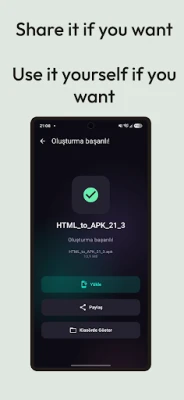
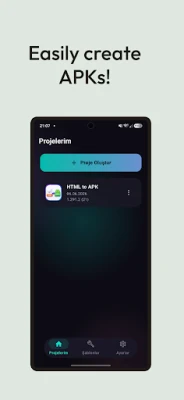
Turn your HTML projects, local files or web sites into the Android apps - without a computer, Android Studio, or build servers. Compiles and signs directly on your device.
Supported imports:
• Single HTML file with embedded CSS and JavaScript
• Folders or ZIP archives with HTML, CSS, JS, images, audio, and custom fonts
• Live URLs or web portals
• Built-in code editor for writing and editing HTML with live preview, syntax highlighting, search and undo/redo
• PDF files (turned into an app with its own reader)
PDF reader and editor:
• Read your PDFs in the built-in library with zoom, bookmarks and night mode
• Edit them too: rotate, delete or move pages, merge files, draw or add text
App properties:
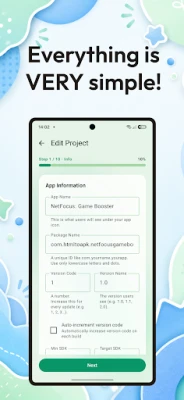
• Set the desired app name, package name, version and Min SDK, with an auto-increment version code toggle for Google Play
• Upload an App Icon (with built-in 1:1 cropper) or generate a unique letter/emoji icon
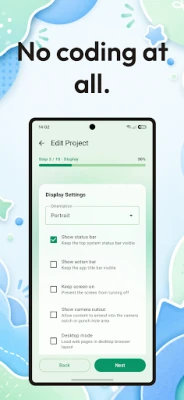
• Set a custom splash screen, choose background color and screen orientation (Portrait, Landscape, or Auto), request fullscreen or hide the top-bar/notch, use the 'keep-screen-on' mode for kiosks/dashboards/games
• Desktop mode toggle and deep links with custom URL schemes (myapp://)
• Pick status/navigation bar colors and light/dark mode
WebView advanced settings:
• Offline support: bundle HTML, CSS, scripts, images, and other content into the APK
• JavaScript, LocalStorage, SessionStorage, IndexedDB are enabled by default
• Native JS Bridge is available to control hardware: vibration, toasts, flashlight, system dialogs, alarms, sensors, audio recording, files, clipboard and more; call window.AndroidAPI from your web code
• A custom download manager is available: save any file, blob URLs, canvas images, or PDFs
• Pull-to-refresh and back-button history navigation (navigate back before closing the app)
• Hardware permissions: Camera, Microphone (WebRTC calls), GPS, Vibration
• Custom cache modes, User-Agent, a 'No internet' dialog and mixed content support
• AndroidAPI only works on your app's own pages, so ads or other sites can't call it
• window.open popups work, so OAuth logins and payment pages open fine. navigator.share works too
Google AdMob monetization (optional):
• Sticky banners at the top/bottom of WebView
• Interstitials shown on timer or page views counter
• Rewarded video for games and apps.
• Test ads mode (Google demo IDs) to avoid account bans.
• Google UMP consent form for GDPR, plus TFCD/TFUA settings
Signing and publishing:
• 1-click direct installation: launch built APK on your device immediately
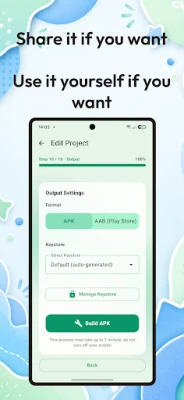
• Two build modes: Simple (build an APK in 10 seconds) and Advanced (fully customizable)
• Keystore manager: create or import RSA 2048 .jks (or auto-create one for test builds), sign your APKs, and manage them
• APK signing schemes: v1, v2, and v3 are supported.
• Android App Bundle (.aab) export for Google Play, plus a PEPK export tool for Play App Signing
• Export the entire Gradle + Kotlin code ZIP for editing in Android Studio at any time.
Your projects:
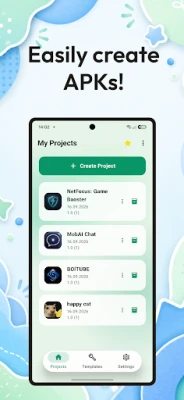
• Organize projects in folders, duplicate them, find old builds and export many at once
• A quality check before building catches missing files; in-app user guide and Google Play publishing guide
App templates:
• All essential templates are included: HTML5 mini-games, device API binders (flashlight, vibration, GPS), and Google AdMob demo app.
• Library templates (React, Vue, Phaser, PyScript and more) and showcase apps, each with an AI prompt for ChatGPT or Claude
• Advanced templates come with Pro
Pro account (optional):
The free version allows you to create and test as you wish. The Pro version is required to export unlimited apps, Google Play AABs, or Android Studio projects. It also includes splash screen support, and no-watermark features and more.
All your data is stored locally on your device. No accounts, analytics, or cloud storage.
• Single HTML file with embedded CSS and JavaScript
• Folders or ZIP archives with HTML, CSS, JS, images, audio, and custom fonts
• Live URLs or web portals
• Built-in code editor for writing and editing HTML with live preview, syntax highlighting, search and undo/redo
• PDF files (turned into an app with its own reader)
PDF reader and editor:
• Read your PDFs in the built-in library with zoom, bookmarks and night mode
• Edit them too: rotate, delete or move pages, merge files, draw or add text
App properties:
• Set the desired app name, package name, version and Min SDK, with an auto-increment version code toggle for Google Play
• Upload an App Icon (with built-in 1:1 cropper) or generate a unique letter/emoji icon
• Set a custom splash screen, choose background color and screen orientation (Portrait, Landscape, or Auto), request fullscreen or hide the top-bar/notch, use the 'keep-screen-on' mode for kiosks/dashboards/games
• Desktop mode toggle and deep links with custom URL schemes (myapp://)
• Pick status/navigation bar colors and light/dark mode
WebView advanced settings:
• Offline support: bundle HTML, CSS, scripts, images, and other content into the APK
• JavaScript, LocalStorage, SessionStorage, IndexedDB are enabled by default
• Native JS Bridge is available to control hardware: vibration, toasts, flashlight, system dialogs, alarms, sensors, audio recording, files, clipboard and more; call window.AndroidAPI from your web code
• A custom download manager is available: save any file, blob URLs, canvas images, or PDFs
• Pull-to-refresh and back-button history navigation (navigate back before closing the app)
• Hardware permissions: Camera, Microphone (WebRTC calls), GPS, Vibration
• Custom cache modes, User-Agent, a 'No internet' dialog and mixed content support
• AndroidAPI only works on your app's own pages, so ads or other sites can't call it
• window.open popups work, so OAuth logins and payment pages open fine. navigator.share works too
Google AdMob monetization (optional):
• Sticky banners at the top/bottom of WebView
• Interstitials shown on timer or page views counter
• Rewarded video for games and apps.
• Test ads mode (Google demo IDs) to avoid account bans.
• Google UMP consent form for GDPR, plus TFCD/TFUA settings
Signing and publishing:
• 1-click direct installation: launch built APK on your device immediately
• Two build modes: Simple (build an APK in 10 seconds) and Advanced (fully customizable)
• Keystore manager: create or import RSA 2048 .jks (or auto-create one for test builds), sign your APKs, and manage them
• APK signing schemes: v1, v2, and v3 are supported.
• Android App Bundle (.aab) export for Google Play, plus a PEPK export tool for Play App Signing
• Export the entire Gradle + Kotlin code ZIP for editing in Android Studio at any time.
Your projects:
• Organize projects in folders, duplicate them, find old builds and export many at once
• A quality check before building catches missing files; in-app user guide and Google Play publishing guide
App templates:
• All essential templates are included: HTML5 mini-games, device API binders (flashlight, vibration, GPS), and Google AdMob demo app.
• Library templates (React, Vue, Phaser, PyScript and more) and showcase apps, each with an AI prompt for ChatGPT or Claude
• Advanced templates come with Pro
Pro account (optional):
The free version allows you to create and test as you wish. The Pro version is required to export unlimited apps, Google Play AABs, or Android Studio projects. It also includes splash screen support, and no-watermark features and more.
All your data is stored locally on your device. No accounts, analytics, or cloud storage.
Rate the App
Add Comment & Review
User Reviews
Based on 0 reviews
No reviews added yet.
Comments will not be approved to be posted if they are SPAM, abusive, off-topic, use profanity, contain a personal attack, or promote hate of any kind.










More »

Popular Apps

phpFoxPHPFOX LLC

Moon Chai StoryOlha Dobel

World War Heroes — WW2 PvP FPSAzur Interactive Games Limited

Govee LiteGovee

AvSeaAvionics Electronics Geeks!

Viking Clan: RagnarokKano Games

Vikings: War of ClansPlarium LLC

Build World AdventureExplore city in cube world

Asphalt 9: LegendsGameloft SE

Dawn of Zombies: Survival GameRoyal Ark
More »
Editor's Choice

Grim Soul: Dark Survival RPGBrickworks Games Ltd

Craft of Survival - Gladiators101XP LIMITED

Last Shelter: SurvivalLong Tech Network Limited
Dawn of Zombies: Survival GameRoyal Ark

Merge Survival : WastelandStickyHands Inc.

AoD Vikings: Valhalla GameRoboBot Studio
Viking Clan: RagnarokKano Games
Vikings: War of ClansPlarium LLC
Asphalt 9: LegendsGameloft SE

Modern Tanks: War Tank GamesXDEVS LTD