




Latest Version
Update
November 12, 2026
November 12, 2026
Developer
HideMate Labs
HideMate Labs
Categories
Tools
Tools
Platforms
Android
Android
Downloads
1
1
License
Free
Free
Package Name
com.hidemate.calculator
com.hidemate.calculator
Report
Report a Problem
Report a Problem
More About HideMate: Calculator Vault
**HideMate: Calculator Vault & App Hider**
HideMate is a privacy-focused Calculator Vault and App Hider that helps you protect and organize private apps, photos, videos, audio and documents behind a calculator-style interface.
Keep your personal apps and media private with secure vault storage, multiple vaults, private browsing, a dedicated Vault Camera, app hiding and additional privacy features — all in one app.
🔐 **HIDE APPS & PRIVATE SPACE**
Keep selected apps private and separate from your regular home screen.
• Hide apps inside your private space
• Access hidden apps through a secure launcher
• Keep private apps separate from regular apps
• Organize hidden apps in one place
• Secure PIN authentication
• Discreet calculator-style access
🧮 **CALCULATOR VAULT**
HideMate looks and works like a calculator while providing access to your private vault through your secure PIN.
• Calculator-style lock screen
• Secure PIN access
• Fake/decoy vault support
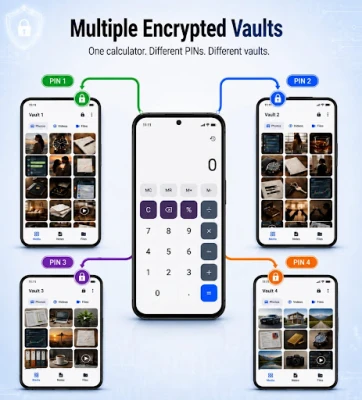
• Multiple vault support
• Emergency PIN recovery using device authentication
• Simple and discreet access to your private space
📸 **HIDE PHOTOS & VIDEOS**
Keep personal photos and videos inside your private calculator vault.
• Private photo vault
• Private video vault
• Encrypted local storage
• Photo zoom and swipe viewing
• Easy media management
• Restore media to your device when needed
📷 **VAULT CAMERA**
Capture private photos directly from HideMate using the built-in Vault Camera. Photos can be stored directly in your vault, keeping private media separate from your normal photo gallery.
🌐 **PRIVATE BROWSER**
Browse privately from inside your secure vault.
• Private browsing mode
• Browsing history is not saved in private mode
• Multiple tab support
• Quick access to popular websites
• Access supported social media websites
• Keep private browsing separate from your regular browser
🛡️ **ADVANCED PRIVACY PROTECTION**
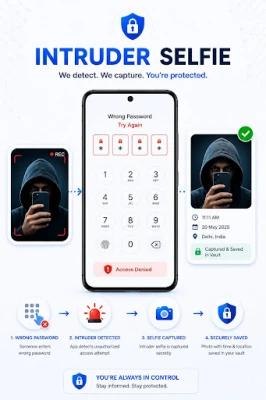
• **Intruder Selfie** – Capture an intruder photo after failed PIN attempts when enabled
• **Shoulder Surfing Protection** – Helps protect your vault when multiple faces are detected
• **Sudden Shake Lock** – Quickly leave or lock your private space by shaking the device
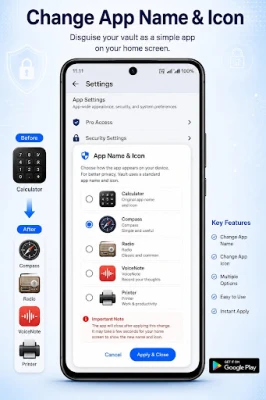
• **App Disguise** – Change the app name and icon for more discreet access
• **Emergency Recovery** – Recover vault access using supported device authentication
☁️ **CLOUD BACKUP & RESTORE**
Protect important vault files with Google Drive backup support.
• Back up supported vault content
• Restore backed-up files
• Uses your connected Google account
• Manage backup directly from HideMate
🎭 **APP DISGUISE**
Make your private vault less noticeable by changing the app name and icon shown on your device.
Available disguise options include:
• Calculator
• Compass
• Radio
• VoiceNote
• Printer
🗂️ **MULTIPLE PRIVATE VAULTS**
Create and manage separate vaults for better organization and privacy. Each vault can keep its own private content separated, making it easier to organize photos, videos and files.
✨ **KEY FEATURES**
• Hide Apps & App Hider
• Private Space & Secure Launcher
• Calculator Vault
• Photo & Video Vault
• Private Browser
• Vault Camera
• Multiple Vaults
• Intruder Selfie
• Encrypted Storage
• Audio & Document Storage
• Google Drive Backup & Restore
• Emergency PIN Recovery
• App Disguise
• Privacy & Security Controls
HideMate combines a familiar calculator interface with privacy tools to help you organize and protect your personal apps and content while keeping access simple and discreet.
Keep your personal apps and media private with secure vault storage, multiple vaults, private browsing, a dedicated Vault Camera, app hiding and additional privacy features — all in one app.
🔐 **HIDE APPS & PRIVATE SPACE**
Keep selected apps private and separate from your regular home screen.
• Hide apps inside your private space
• Access hidden apps through a secure launcher
• Keep private apps separate from regular apps
• Organize hidden apps in one place
• Secure PIN authentication
• Discreet calculator-style access
🧮 **CALCULATOR VAULT**
HideMate looks and works like a calculator while providing access to your private vault through your secure PIN.
• Calculator-style lock screen
• Secure PIN access
• Fake/decoy vault support
• Multiple vault support
• Emergency PIN recovery using device authentication
• Simple and discreet access to your private space
📸 **HIDE PHOTOS & VIDEOS**
Keep personal photos and videos inside your private calculator vault.
• Private photo vault
• Private video vault
• Encrypted local storage
• Photo zoom and swipe viewing
• Easy media management
• Restore media to your device when needed
📷 **VAULT CAMERA**
Capture private photos directly from HideMate using the built-in Vault Camera. Photos can be stored directly in your vault, keeping private media separate from your normal photo gallery.
🌐 **PRIVATE BROWSER**
Browse privately from inside your secure vault.
• Private browsing mode
• Browsing history is not saved in private mode
• Multiple tab support
• Quick access to popular websites
• Access supported social media websites
• Keep private browsing separate from your regular browser
🛡️ **ADVANCED PRIVACY PROTECTION**
• **Intruder Selfie** – Capture an intruder photo after failed PIN attempts when enabled
• **Shoulder Surfing Protection** – Helps protect your vault when multiple faces are detected
• **Sudden Shake Lock** – Quickly leave or lock your private space by shaking the device
• **App Disguise** – Change the app name and icon for more discreet access
• **Emergency Recovery** – Recover vault access using supported device authentication
☁️ **CLOUD BACKUP & RESTORE**
Protect important vault files with Google Drive backup support.
• Back up supported vault content
• Restore backed-up files
• Uses your connected Google account
• Manage backup directly from HideMate
🎭 **APP DISGUISE**
Make your private vault less noticeable by changing the app name and icon shown on your device.
Available disguise options include:
• Calculator
• Compass
• Radio
• VoiceNote
• Printer
🗂️ **MULTIPLE PRIVATE VAULTS**
Create and manage separate vaults for better organization and privacy. Each vault can keep its own private content separated, making it easier to organize photos, videos and files.
✨ **KEY FEATURES**
• Hide Apps & App Hider
• Private Space & Secure Launcher
• Calculator Vault
• Photo & Video Vault
• Private Browser
• Vault Camera
• Multiple Vaults
• Intruder Selfie
• Encrypted Storage
• Audio & Document Storage
• Google Drive Backup & Restore
• Emergency PIN Recovery
• App Disguise
• Privacy & Security Controls
HideMate combines a familiar calculator interface with privacy tools to help you organize and protect your personal apps and content while keeping access simple and discreet.
Rate the App
Add Comment & Review
User Reviews
Based on 0 reviews
No reviews added yet.
Comments will not be approved to be posted if they are SPAM, abusive, off-topic, use profanity, contain a personal attack, or promote hate of any kind.















More »

Popular Apps

phpFoxPHPFOX LLC

Moon Chai StoryOlha Dobel

World War Heroes — WW2 PvP FPSAzur Interactive Games Limited

Govee LiteGovee

AvSeaAvionics Electronics Geeks!

Viking Clan: RagnarokKano Games

Vikings: War of ClansPlarium LLC

Build World AdventureExplore city in cube world

Asphalt 9: LegendsGameloft SE

Dawn of Zombies: Survival GameRoyal Ark
More »
Editor's Choice

Grim Soul: Dark Survival RPGBrickworks Games Ltd

Craft of Survival - Gladiators101XP LIMITED

Last Shelter: SurvivalLong Tech Network Limited
Dawn of Zombies: Survival GameRoyal Ark

Merge Survival : WastelandStickyHands Inc.

AoD Vikings: Valhalla GameRoboBot Studio
Viking Clan: RagnarokKano Games
Vikings: War of ClansPlarium LLC
Asphalt 9: LegendsGameloft SE

Modern Tanks: War Tank GamesXDEVS LTD