

Latest Version
Update
October 27, 2026
October 27, 2026
Developer
Pixel Works Software
Pixel Works Software
Categories
Photography
Photography
Platforms
Android
Android
Downloads
0
0
License
Free
Free
Package Name
com.getlightproof.vault
com.getlightproof.vault
Report
Report a Problem
Report a Problem
More About Hide Photos & Videos - Vault
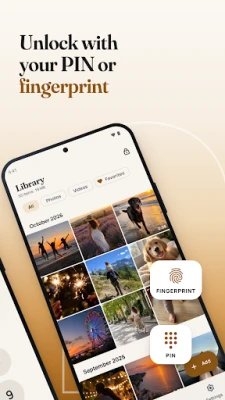
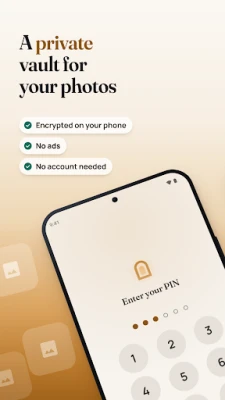
Hide photos and videos in an encrypted photo vault on your device. Lock your private gallery with a PIN, password or optional biometric unlock.
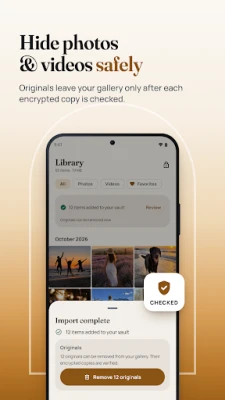
Import only the files you choose. After checking the encrypted copy, the app can ask Android to remove the originals from your gallery.
Keep up to 300 items for free. Encryption, backups, your recovery key and export stay free. Premium adds unlimited items and a separate decoy vault.
Safe import, backups and recovery
• Safe import: every encrypted copy is decrypted and compared with the original before it is added. Duplicates are detected, so nothing is stored twice.
• Move or copy: keep your originals, or remove them from your gallery once every copy has been checked again and each original still matches what was imported. Photo Vault always asks first, and on Android 11 and later Android asks you to confirm too.
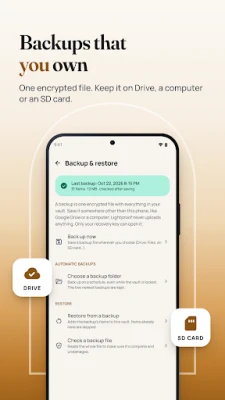
• Backups you own: one encrypted backup file that you save wherever you choose with Android's file picker (for example Google Drive or an SD card), and easy to keep on a computer too. Photo Vault never uploads it. Backups work while the vault is locked, are checked after saving, and can run automatically every day or week.
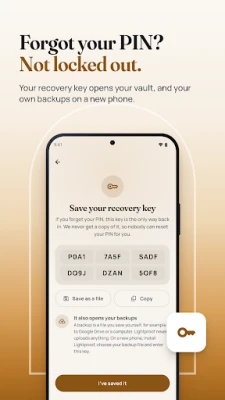
• A recovery key: 24 characters that open your vault if you forget your PIN. The same key opens your backup files, so you can restore everything on a new phone. We never have a copy of the key or of your backups, so there is no reset by email and no fee.
• A 30-day trash for anything you delete.
Encrypted on your device
• Every photo, video and file is encrypted with AES-256-GCM through Google's Tink library. Previews and file names are encrypted too.
• Lock photos and videos behind your PIN or password. Your keys are protected by Argon2id and by Android Keystore, in secure hardware on devices that have it.
• Photos and videos are decrypted in memory while you view them.
• Screenshots are blocked by default, the vault's preview is hidden in recent apps, and it locks when you leave the app or turn off the screen.
• After 5 wrong attempts, unlocking pauses for a while, and you see how many attempts failed the next time you open the vault.
A private gallery that is easy to use
• Use it as a photo locker and video vault for family moments, IDs, documents and anything personal.
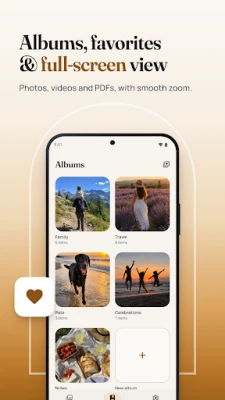
• An encrypted gallery with albums, favorites and a full-screen viewer with smooth zoom.
• Videos play straight from the encrypted file. PDFs and other files are welcome too.
• Photo Vault uses Android's photo picker and file picker, so it only sees the items you choose.
• Save items back to your device or to a folder, or share them. Every saved copy is checked.
• Made for phones and tablets.
Free and Premium
The free plan holds up to 300 items. Premium adds unlimited items and a decoy vault: a second PIN that opens a separate, harmless vault. Premium is available monthly, yearly (with a free trial when Google Play offers one) or as a one-time lifetime purchase.
Encryption, backups, your recovery key, restoring and saving your files out are free forever. If Premium ends, nothing in your vault is hidden, locked or deleted.
Honest about limits
Photo Vault cannot protect you from someone who knows your PIN or recovery key, from a rooted or infected device while the vault is open, or from copies you share or save outside the vault. A decoy vault helps against casual pressure, not against forensic analysis. Uninstalling the app deletes the vault on that device, so keep a backup somewhere else.
Permissions
Notifications (progress of long tasks, never file names), biometrics (only if you turn it on) and a foreground service so long imports, exports and backups can finish. On Android 8 and 9 only, saving items into your device's shared folders asks for storage access.
Optional statistics with Google Firebase: app usage and device information. Never photos, files, PINs or recovery keys.
Keep up to 300 items for free. Encryption, backups, your recovery key and export stay free. Premium adds unlimited items and a separate decoy vault.
Safe import, backups and recovery
• Safe import: every encrypted copy is decrypted and compared with the original before it is added. Duplicates are detected, so nothing is stored twice.
• Move or copy: keep your originals, or remove them from your gallery once every copy has been checked again and each original still matches what was imported. Photo Vault always asks first, and on Android 11 and later Android asks you to confirm too.
• Backups you own: one encrypted backup file that you save wherever you choose with Android's file picker (for example Google Drive or an SD card), and easy to keep on a computer too. Photo Vault never uploads it. Backups work while the vault is locked, are checked after saving, and can run automatically every day or week.
• A recovery key: 24 characters that open your vault if you forget your PIN. The same key opens your backup files, so you can restore everything on a new phone. We never have a copy of the key or of your backups, so there is no reset by email and no fee.
• A 30-day trash for anything you delete.
Encrypted on your device
• Every photo, video and file is encrypted with AES-256-GCM through Google's Tink library. Previews and file names are encrypted too.
• Lock photos and videos behind your PIN or password. Your keys are protected by Argon2id and by Android Keystore, in secure hardware on devices that have it.
• Photos and videos are decrypted in memory while you view them.
• Screenshots are blocked by default, the vault's preview is hidden in recent apps, and it locks when you leave the app or turn off the screen.
• After 5 wrong attempts, unlocking pauses for a while, and you see how many attempts failed the next time you open the vault.
A private gallery that is easy to use
• Use it as a photo locker and video vault for family moments, IDs, documents and anything personal.
• An encrypted gallery with albums, favorites and a full-screen viewer with smooth zoom.
• Videos play straight from the encrypted file. PDFs and other files are welcome too.
• Photo Vault uses Android's photo picker and file picker, so it only sees the items you choose.
• Save items back to your device or to a folder, or share them. Every saved copy is checked.
• Made for phones and tablets.
Free and Premium
The free plan holds up to 300 items. Premium adds unlimited items and a decoy vault: a second PIN that opens a separate, harmless vault. Premium is available monthly, yearly (with a free trial when Google Play offers one) or as a one-time lifetime purchase.
Encryption, backups, your recovery key, restoring and saving your files out are free forever. If Premium ends, nothing in your vault is hidden, locked or deleted.
Honest about limits
Photo Vault cannot protect you from someone who knows your PIN or recovery key, from a rooted or infected device while the vault is open, or from copies you share or save outside the vault. A decoy vault helps against casual pressure, not against forensic analysis. Uninstalling the app deletes the vault on that device, so keep a backup somewhere else.
Permissions
Notifications (progress of long tasks, never file names), biometrics (only if you turn it on) and a foreground service so long imports, exports and backups can finish. On Android 8 and 9 only, saving items into your device's shared folders asks for storage access.
Optional statistics with Google Firebase: app usage and device information. Never photos, files, PINs or recovery keys.
Rate the App
Add Comment & Review
User Reviews
Based on 0 reviews
No reviews added yet.
Comments will not be approved to be posted if they are SPAM, abusive, off-topic, use profanity, contain a personal attack, or promote hate of any kind.












More »

Popular Apps

phpFoxPHPFOX LLC

Moon Chai StoryOlha Dobel

World War Heroes — WW2 PvP FPSAzur Interactive Games Limited

Govee LiteGovee

AvSeaAvionics Electronics Geeks!

Viking Clan: RagnarokKano Games

Build World AdventureExplore city in cube world

Vikings: War of ClansPlarium LLC

Asphalt 9: LegendsGameloft SE

Dawn of Zombies: Survival GameRoyal Ark
More »
Editor's Choice

Grim Soul: Dark Survival RPGBrickworks Games Ltd

Craft of Survival - Gladiators101XP LIMITED

Last Shelter: SurvivalLong Tech Network Limited
Dawn of Zombies: Survival GameRoyal Ark

Merge Survival : WastelandStickyHands Inc.

AoD Vikings: Valhalla GameRoboBot Studio
Viking Clan: RagnarokKano Games
Vikings: War of ClansPlarium LLC
Asphalt 9: LegendsGameloft SE

Modern Tanks: War Tank GamesXDEVS LTD