
Latest Version
Update
June 09, 2026
June 09, 2026
Developer
NARIK DESIGN
NARIK DESIGN
Categories
Personalization
Personalization
Platforms
Android
Android
Downloads
1
1
License
$1.49
$1.49
Package Name
dev.narikdesign.glyph
dev.narikdesign.glyph
Report
Report a Problem
Report a Problem
More About Glyph Icons and Widgets
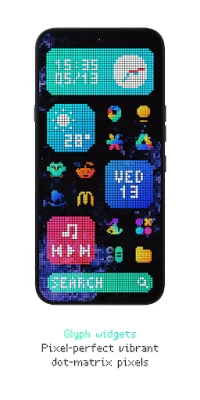
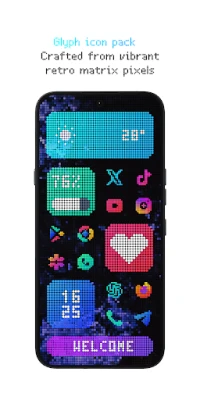
🔥 Glyph Icons and Widgets - Vibrant pixel art icons and perfectly grid-aligned widgets provide a striking, retro-aesthetic visual upgrade, seamlessly integrating with your dark mode interface.
Upgrade your home screen with a meticulously crafted, perfectly symmetrical design. Whether you love retro pixel art or just want a clean, dark-mode optimized setup, Glyph provides over 6300 custom icons and completely native widgets to make your device stand out. Best of all? All of our widgets are 100% native: Absolutely no third-party apps required!
⭐ FEATURES:
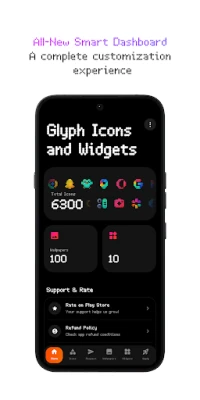
• 6300+ High-Quality Icons: A massive library of meticulously crafted pixel art icons.
• All-New Dashboard: A fresh, modern, fully redesigned UI for the smoothest experience.
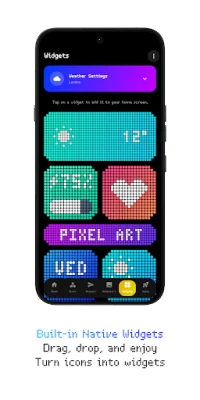
• 10 Custom-Built Native Widgets: KWGT is NO longer required! They work completely standalone.
• Brand New Widgets: Keep track of your day with beautiful Weather, Clock, Calendar, Battery, Marquee, and Music widgets.
• Icon Widgets: Add standalone, perfectly aligned app icons directly to your home screen.
• Live Wallpapers: Exclusive new animated live wallpapers to bring your screen to life.
• Cloud Wallpapers & Effects: High-quality, cloud-based wallpapers with stunning effects, perfectly tailored for dark setups.
• Premium Icon Requests: Want your missing icons themed instantly? Use our Premium Request tool for a 100% guarantee!
• Free Icon Request Tool: Easily request missing icons.
• Regular Updates: Constant improvements, new icons, and fresh widgets.
🛠️ How to use this Icon pack?
• Install a supported Launcher
• Open Glyph Icons and Widgets, go to the Apply section, and Select Launcher to apply. If your launcher is not in the list, make sure you apply it from your launcher settings.
✅ SUPPORTED LAUNCHERS:
• Nothing Launcher
• Nova Launcher
• Lawnchair Launcher
• Niagara Launcher
• Smart Launcher 6
• Octopi Launcher
• Microsoft Launcher
• Shade Launcher
• Lean Launcher
• Hyperion Launcher
• Posidon Launcher
• Action Launcher
• Stario Launcher and more.
⚠️ DISCLAIMER:
• A supported launcher is required to use this icon pack!
• For unsupported launchers, use the in-app Icon Widgets feature.
• In Stock One UI Launcher, use Theme Park.
• All 10 widgets are completely native! They work standalone and DO NOT require KWGT or any other third-party applications to function.
• There is a TUTORIALS section inside the app which answers a lot of questions you may have. Please read it before emailing your question.
📫 CONTACT ME:
X: https://twitter.com/narikdesign
Telegram: https://t.me/narikdesign
Instagram: https://www.instagram.com/narikdesign
⭐ FEATURES:
• 6300+ High-Quality Icons: A massive library of meticulously crafted pixel art icons.
• All-New Dashboard: A fresh, modern, fully redesigned UI for the smoothest experience.
• 10 Custom-Built Native Widgets: KWGT is NO longer required! They work completely standalone.
• Brand New Widgets: Keep track of your day with beautiful Weather, Clock, Calendar, Battery, Marquee, and Music widgets.
• Icon Widgets: Add standalone, perfectly aligned app icons directly to your home screen.
• Live Wallpapers: Exclusive new animated live wallpapers to bring your screen to life.
• Cloud Wallpapers & Effects: High-quality, cloud-based wallpapers with stunning effects, perfectly tailored for dark setups.
• Premium Icon Requests: Want your missing icons themed instantly? Use our Premium Request tool for a 100% guarantee!
• Free Icon Request Tool: Easily request missing icons.
• Regular Updates: Constant improvements, new icons, and fresh widgets.
🛠️ How to use this Icon pack?
• Install a supported Launcher
• Open Glyph Icons and Widgets, go to the Apply section, and Select Launcher to apply. If your launcher is not in the list, make sure you apply it from your launcher settings.
✅ SUPPORTED LAUNCHERS:
• Nothing Launcher
• Nova Launcher
• Lawnchair Launcher
• Niagara Launcher
• Smart Launcher 6
• Octopi Launcher
• Microsoft Launcher
• Shade Launcher
• Lean Launcher
• Hyperion Launcher
• Posidon Launcher
• Action Launcher
• Stario Launcher and more.
⚠️ DISCLAIMER:
• A supported launcher is required to use this icon pack!
• For unsupported launchers, use the in-app Icon Widgets feature.
• In Stock One UI Launcher, use Theme Park.
• All 10 widgets are completely native! They work standalone and DO NOT require KWGT or any other third-party applications to function.
• There is a TUTORIALS section inside the app which answers a lot of questions you may have. Please read it before emailing your question.
📫 CONTACT ME:
X: https://twitter.com/narikdesign
Telegram: https://t.me/narikdesign
Instagram: https://www.instagram.com/narikdesign
Rate the App
Add Comment & Review
User Reviews
Based on 0 reviews
No reviews added yet.
Comments will not be approved to be posted if they are SPAM, abusive, off-topic, use profanity, contain a personal attack, or promote hate of any kind.






More »

Popular Apps

phpFoxPHPFOX LLC

Moon Chai StoryOlha Dobel

World War Heroes — WW2 PvP FPSAzur Interactive Games Limited

Govee LiteGovee

Build World AdventureExplore city in cube world

Viking Clan: RagnarokKano Games

Vikings: War of ClansPlarium LLC

Asphalt 9: LegendsGameloft SE

Submarine Car Diving SimulatorSwim with dolphins & penguins

Dawn of Zombies: Survival GameRoyal Ark
More »
Editor's Choice

Grim Soul: Dark Survival RPGBrickworks Games Ltd

Craft of Survival - Gladiators101XP LIMITED

Last Shelter: SurvivalLong Tech Network Limited
Dawn of Zombies: Survival GameRoyal Ark

Merge Survival : WastelandStickyHands Inc.

AoD Vikings: Valhalla GameRoboBot Studio
Viking Clan: RagnarokKano Games
Vikings: War of ClansPlarium LLC
Asphalt 9: LegendsGameloft SE

Modern Tanks: War Tank GamesXDEVS LTD