


Latest Version
Version
1.7.1
1.7.1
Update
January 23, 2026
January 23, 2026
Developer
zwh.tec
zwh.tec
Categories
Personalization
Personalization
Platforms
Android
Android
Downloads
0
0
License
Free
Free
Package Name
com.photo.widget.zwh.picturewidget.app
com.photo.widget.zwh.picturewidget.app
Report
Report a Problem
Report a Problem
More About Gif Widget & Photo Widget
Transform your Android home screen with our all-in-one widget solution! Personalize your device with animated GIFs, beautiful photo collections, and customizable text notes - all in one powerful app.
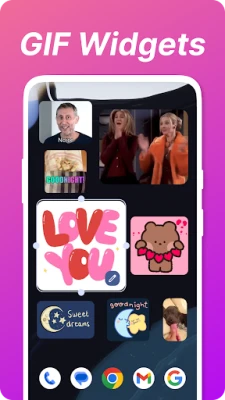
🎬 ANIMATED GIF WIDGETS
Display your favorite animated GIFs directly on your home screen
Choose from your gallery or download new GIFs
Create multiple GIF widgets with different sizes and styles
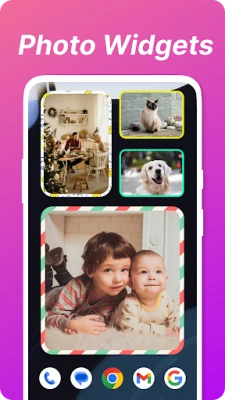
📸 PHOTO WIDGETS & SLIDESHOWS
Create elegant photo frames with your favorite memories
Auto-rotating slideshows showcase your best moments
Choose from stylish frames and layouts for your images
Easily update photos directly from your gallery
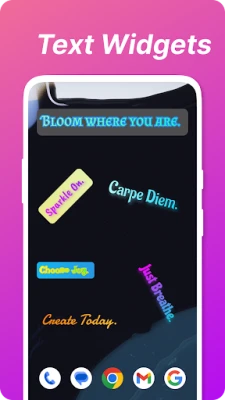
📝 TEXT WIDGETS & NOTES
Add customizable text notes and reminders to your home screen
Choose from multiple fonts, colors, and styles
Create sticky notes for important reminders
Organize your apps with custom text labels
Set rotating text for motivational quotes or language learning
💯 WHY CHOOSE OUR WIDGETS?
Works on all Android devices (Samsung, Xiaomi, OPPO, Vivo, etc.)
Simple and intuitive interface - no technical skills required
Regular updates with new features and improvements
Combine different widget types for a truly personalized experience
Download now and transform your home screen with animated GIFs, beautiful photo collections, and customizable text notes! Express your style and keep important information at your fingertips with our versatile widget collection.
#GifWidget #PhotoWidget #TextWidget #HomeScreenCustomization
【How to use】
After install the app, you must start with a few steps.
(It doesn’t exist in app list.)
Home → Apps → Widget → Gif & Photo Widget → Drag it to home
Or
Pinch or Long press home → Widget → Gif & Photo Widget → Drag it to home
【Why Photo Keeps Loading or empty frame】
Android's power and performance management have become strict, and the background program might be killed. You can browse this page to solve the problem.
https://dontkillmyapp.com/
The general solution is: Add the widget to the whitelist.
Go to Security App → Permissions → Press auto start
or
Go to Security Center > Privacy permission > Auto-run Management
In a nutshell, just change all the power and memory management setting to manual and in the whitelist to prevent system kill widget's process.
Display your favorite animated GIFs directly on your home screen
Choose from your gallery or download new GIFs
Create multiple GIF widgets with different sizes and styles
📸 PHOTO WIDGETS & SLIDESHOWS
Create elegant photo frames with your favorite memories
Auto-rotating slideshows showcase your best moments
Choose from stylish frames and layouts for your images
Easily update photos directly from your gallery
📝 TEXT WIDGETS & NOTES
Add customizable text notes and reminders to your home screen
Choose from multiple fonts, colors, and styles
Create sticky notes for important reminders
Organize your apps with custom text labels
Set rotating text for motivational quotes or language learning
💯 WHY CHOOSE OUR WIDGETS?
Works on all Android devices (Samsung, Xiaomi, OPPO, Vivo, etc.)
Simple and intuitive interface - no technical skills required
Regular updates with new features and improvements
Combine different widget types for a truly personalized experience
Download now and transform your home screen with animated GIFs, beautiful photo collections, and customizable text notes! Express your style and keep important information at your fingertips with our versatile widget collection.
#GifWidget #PhotoWidget #TextWidget #HomeScreenCustomization
【How to use】
After install the app, you must start with a few steps.
(It doesn’t exist in app list.)
Home → Apps → Widget → Gif & Photo Widget → Drag it to home
Or
Pinch or Long press home → Widget → Gif & Photo Widget → Drag it to home
【Why Photo Keeps Loading or empty frame】
Android's power and performance management have become strict, and the background program might be killed. You can browse this page to solve the problem.
https://dontkillmyapp.com/
The general solution is: Add the widget to the whitelist.
Go to Security App → Permissions → Press auto start
or
Go to Security Center > Privacy permission > Auto-run Management
In a nutshell, just change all the power and memory management setting to manual and in the whitelist to prevent system kill widget's process.
Rate the App
Add Comment & Review
User Reviews
Based on 0 reviews
No reviews added yet.
Comments will not be approved to be posted if they are SPAM, abusive, off-topic, use profanity, contain a personal attack, or promote hate of any kind.










More »

Popular Apps

phpFoxPHPFOX LLC

Moon Chai StoryOlha Dobel

World War Heroes — WW2 PvP FPSAzur Interactive Games Limited

Govee LiteGovee

Build World AdventureExplore city in cube world

Viking Clan: RagnarokKano Games

Vikings: War of ClansPlarium LLC

Submarine Car Diving SimulatorSwim with dolphins & penguins

Asphalt 9: LegendsGameloft SE

Dawn of Zombies: Survival GameRoyal Ark
More »
Editor's Choice

Grim Soul: Dark Survival RPGBrickworks Games Ltd

Craft of Survival - Gladiators101XP LIMITED

Last Shelter: SurvivalLong Tech Network Limited
Dawn of Zombies: Survival GameRoyal Ark

Merge Survival : WastelandStickyHands Inc.

AoD Vikings: Valhalla GameRoboBot Studio
Viking Clan: RagnarokKano Games
Vikings: War of ClansPlarium LLC
Asphalt 9: LegendsGameloft SE

Modern Tanks: War Tank GamesXDEVS LTD