
Latest Version
Version
6.5
6.5
Update
October 22, 2026
October 22, 2026
Developer
Keteke LLC
Keteke LLC
Categories
Tools
Tools
Platforms
Android
Android
Downloads
0
0
License
Free
Free
Package Name
com.anansemedia.ghanakey
com.anansemedia.ghanakey
Report
Report a Problem
Report a Problem
More About GhanaKey - Keyboard for Ghana
Version 6.5:
• Bug fixes
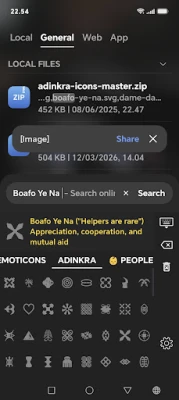
• Made adinkras visible on any background
Advanced features via in app purchase:
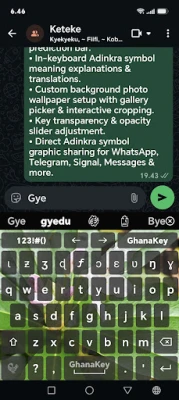
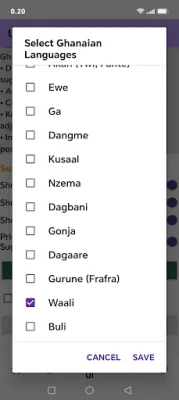
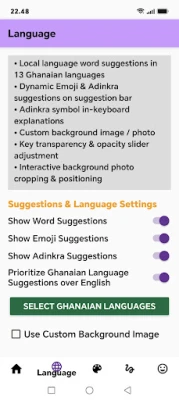
• Built in word suggestions for 13 Ghanaian languages: Akan (Twi, Fante), Ewe, Ga, Dangme, Dagbani, Dagaare, Kasem, Kusaal, Nzema, Gonja, Gurune, Buli, Waalii.
• Adinkra symbol & Emoji suggestions on prediction bar.
• In-keyboard Adinkra symbol meaning explanations & translations
• Custom background photo wallpaper setup with gallery picker & interactive cropping and with transparency adjustment.
• Direct Adinkra symbol graphic sharing
Version 6.3: updated for android 17.
Verson 6.2: added adinkras. Added wali language letter iota (ι).
---------------------------
Version 4.8 and 4.9 update problem:
On some phones the update process of Ghanakey doesn't go to the phone's settings to enable Ghanakey. To overcome this you should go to the phone's settings and find the keyboards' list (on a Samsung phone it's at Settings/General management/Keyboard list and default).
Here enable Ghanakey and this will make it appear as selectable on the keyboards' list. Then you can continue with Ganakey 4.8 setup and set Ghanakey as default.
---------------------------
This is a keyboard for the written languages in Ghana. There are 11 government assisted languages in Ghana.
Features:
You can select different keyboard themes in Ghanakey :
https://www.youtube.com/watch?v=U4xOWIAohuo
You can use different skin color variations of people emoji in Ghanakey· See it here how:
https://youtu.be/Ntig2Uw9efc
You can change the keyboard style to arrange all the keys to one side (left or right) if you often type with one thumb only. See the video how to do it:
https://youtu.be/ohaK-DVGRqk
You can change the keyboard's height in settings. Go to settings/keyboard themes then tap the 3 dots on the upper right and select tweaks. On the following page select keys height factor in portrait mode or landscape mode. Give a smaller number than 1 for example 0.9
- sending images as stickers
- glide typing
- power saving
- Word suggestion
You can adjust the aggressiveness of the suggestions in settings.
- Next word prediction
- Editable abbreviation dictionary
You can add your often used sentences with abbreviations so you don't have to type the whole sentence again.
- Suggestions
It learns your words and will offer it after some time.
- Guided setup
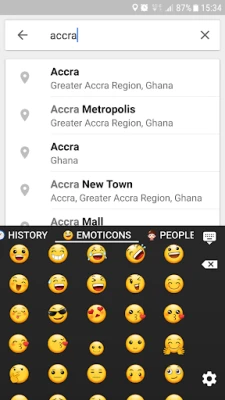
- Smiley keyboard
- Permissions
Read contacts - to suggest the contact names while typing,
Read-write SD card - to save/restore your dictionary
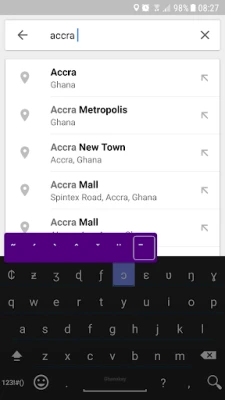
- On the keyboard there are more Ghanaian characters
when you long press a key
- Strech gesture for easier two thumb writing (see the video)
- This app is based on AnySoftKeyboard
Known Issue
==========
- Most of the Ghanaian characters including capital letters are not supported by Android 4.2. It is fixed with the release of Android 4.3 and later.
• Made adinkras visible on any background
Advanced features via in app purchase:
• Built in word suggestions for 13 Ghanaian languages: Akan (Twi, Fante), Ewe, Ga, Dangme, Dagbani, Dagaare, Kasem, Kusaal, Nzema, Gonja, Gurune, Buli, Waalii.
• Adinkra symbol & Emoji suggestions on prediction bar.
• In-keyboard Adinkra symbol meaning explanations & translations
• Custom background photo wallpaper setup with gallery picker & interactive cropping and with transparency adjustment.
• Direct Adinkra symbol graphic sharing
Version 6.3: updated for android 17.
Verson 6.2: added adinkras. Added wali language letter iota (ι).
---------------------------
Version 4.8 and 4.9 update problem:
On some phones the update process of Ghanakey doesn't go to the phone's settings to enable Ghanakey. To overcome this you should go to the phone's settings and find the keyboards' list (on a Samsung phone it's at Settings/General management/Keyboard list and default).
Here enable Ghanakey and this will make it appear as selectable on the keyboards' list. Then you can continue with Ganakey 4.8 setup and set Ghanakey as default.
---------------------------
This is a keyboard for the written languages in Ghana. There are 11 government assisted languages in Ghana.
Features:
You can select different keyboard themes in Ghanakey :
https://www.youtube.com/watch?v=U4xOWIAohuo
You can use different skin color variations of people emoji in Ghanakey· See it here how:
https://youtu.be/Ntig2Uw9efc
You can change the keyboard style to arrange all the keys to one side (left or right) if you often type with one thumb only. See the video how to do it:
https://youtu.be/ohaK-DVGRqk
You can change the keyboard's height in settings. Go to settings/keyboard themes then tap the 3 dots on the upper right and select tweaks. On the following page select keys height factor in portrait mode or landscape mode. Give a smaller number than 1 for example 0.9
- sending images as stickers
- glide typing
- power saving
- Word suggestion
You can adjust the aggressiveness of the suggestions in settings.
- Next word prediction
- Editable abbreviation dictionary
You can add your often used sentences with abbreviations so you don't have to type the whole sentence again.
- Suggestions
It learns your words and will offer it after some time.
- Guided setup
- Smiley keyboard
- Permissions
Read contacts - to suggest the contact names while typing,
Read-write SD card - to save/restore your dictionary
- On the keyboard there are more Ghanaian characters
when you long press a key
- Strech gesture for easier two thumb writing (see the video)
- This app is based on AnySoftKeyboard
Known Issue
==========
- Most of the Ghanaian characters including capital letters are not supported by Android 4.2. It is fixed with the release of Android 4.3 and later.
Rate the App
Add Comment & Review
User Reviews
Based on 0 reviews
No reviews added yet.
Comments will not be approved to be posted if they are SPAM, abusive, off-topic, use profanity, contain a personal attack, or promote hate of any kind.









More »

Popular Apps

phpFoxPHPFOX LLC

Moon Chai StoryOlha Dobel

World War Heroes — WW2 PvP FPSAzur Interactive Games Limited

Govee LiteGovee

AvSeaAvionics Electronics Geeks!

Viking Clan: RagnarokKano Games

Build World AdventureExplore city in cube world

Vikings: War of ClansPlarium LLC

Asphalt 9: LegendsGameloft SE

Dawn of Zombies: Survival GameRoyal Ark
More »
Editor's Choice

Grim Soul: Dark Survival RPGBrickworks Games Ltd

Craft of Survival - Gladiators101XP LIMITED

Last Shelter: SurvivalLong Tech Network Limited
Dawn of Zombies: Survival GameRoyal Ark

Merge Survival : WastelandStickyHands Inc.

AoD Vikings: Valhalla GameRoboBot Studio
Viking Clan: RagnarokKano Games
Vikings: War of ClansPlarium LLC
Asphalt 9: LegendsGameloft SE

Modern Tanks: War Tank GamesXDEVS LTD