

Latest Version
Update
October 21, 2026
October 21, 2026
Developer
Universal Remote Labs
Universal Remote Labs
Categories
Tools
Tools
Platforms
Android
Android
Downloads
0
0
License
Free
Free
Package Name
com.uniremotelabs.gamebooster
com.uniremotelabs.gamebooster
Report
Report a Problem
Report a Problem
More About Game Booster: 4x Faster Turbo
Game Booster – Gaming Mode & Focus Tools
Tired of lag, low memory warnings, and notifications interrupting your matches? Game Booster is a lightweight gaming utility that helps you set up your device environment before every game — organizing your game library, managing notification distractions, and configuring per-game settings so you can focus on smooth gameplay.
🎮 Gaming Profiles for Every Match
Choose the setup that fits your current gaming session:
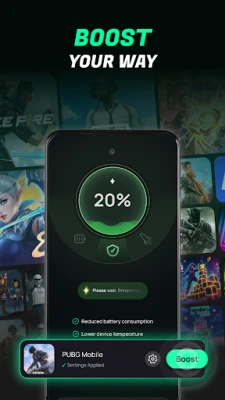
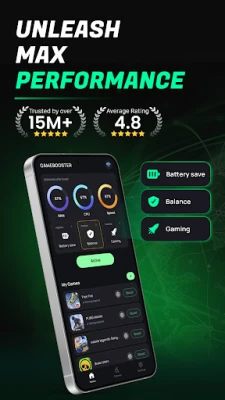
• Game Mode – optimize setting device brightness and volume to keep your screen and audio ready for action.
• Battery Mode– adjusts display settings to help manage battery consumption during long play sessions.
• Balance Mode – fine-tune settings exactly the way you want for different types of games.
🔕 Do Not Disturb & Focus Mode
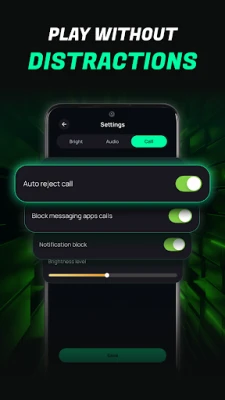
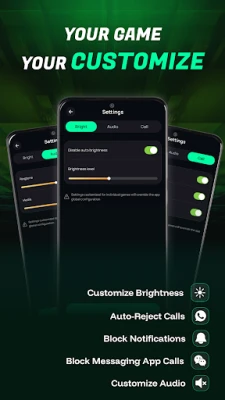
Nothing kills a good run like a phone call or a message popping up mid-match. With Game Booster's Focus Mode, you can easily access system Do Not Disturb settings to block incoming calls and notification pop-ups while gaming, ensuring you stay fully focused on your game without losing your streak.
🚀 One-Tap Game Launcher & Dashboard
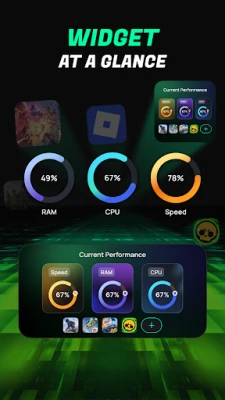
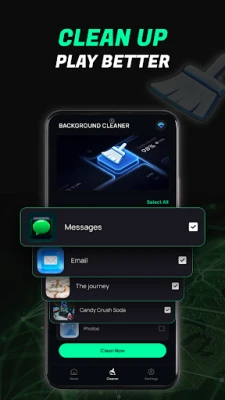
Tired of searching for games across multiple screens? Game Booster acts as a central hub for all your installed games. Launch your favorite titles with a single tap from a clean dashboard designed specifically for mobile gamers.
⚙️ Per-Game Custom Settings
Every game is different, and so are your preferences. Game Booster lets you create and save a custom profile for each individual game, including:
• Auto-brightness or custom screen brightness levels.
• Specific media sound and volume settings.
• Quick shortcuts to system focus and notification settings.
Why gamers choose Game Booster:
✔️ Centralized Game Launcher to organize all your games in one place.
✔️ Quick access to Do Not Disturb / Focus Mode to block calls and alerts during gameplay.
✔️ Tailored display and audio profiles for different gaming scenarios.
✔️ Per-game custom configurations for brightness, sound, and comfort.
✔️ Simple, clean, and lightweight interface — no complicated setup or battery drain.
Whether you play tactical shooters, MOBAs, or casual puzzles, Game Booster provides the tools to set up your phone environment the way you want before every match — helping you eliminate external distractions and keep your focus on winning.
Download Game Booster now and set up your own custom gaming profiles in seconds.
Privacy policy: https://uniremotelabs.com/privacy-policy/
Terms of use: https://uniremotelabs.com/terms-of-use/
🎮 Gaming Profiles for Every Match
Choose the setup that fits your current gaming session:
• Game Mode – optimize setting device brightness and volume to keep your screen and audio ready for action.
• Battery Mode– adjusts display settings to help manage battery consumption during long play sessions.
• Balance Mode – fine-tune settings exactly the way you want for different types of games.
🔕 Do Not Disturb & Focus Mode
Nothing kills a good run like a phone call or a message popping up mid-match. With Game Booster's Focus Mode, you can easily access system Do Not Disturb settings to block incoming calls and notification pop-ups while gaming, ensuring you stay fully focused on your game without losing your streak.
🚀 One-Tap Game Launcher & Dashboard
Tired of searching for games across multiple screens? Game Booster acts as a central hub for all your installed games. Launch your favorite titles with a single tap from a clean dashboard designed specifically for mobile gamers.
⚙️ Per-Game Custom Settings
Every game is different, and so are your preferences. Game Booster lets you create and save a custom profile for each individual game, including:
• Auto-brightness or custom screen brightness levels.
• Specific media sound and volume settings.
• Quick shortcuts to system focus and notification settings.
Why gamers choose Game Booster:
✔️ Centralized Game Launcher to organize all your games in one place.
✔️ Quick access to Do Not Disturb / Focus Mode to block calls and alerts during gameplay.
✔️ Tailored display and audio profiles for different gaming scenarios.
✔️ Per-game custom configurations for brightness, sound, and comfort.
✔️ Simple, clean, and lightweight interface — no complicated setup or battery drain.
Whether you play tactical shooters, MOBAs, or casual puzzles, Game Booster provides the tools to set up your phone environment the way you want before every match — helping you eliminate external distractions and keep your focus on winning.
Download Game Booster now and set up your own custom gaming profiles in seconds.
Privacy policy: https://uniremotelabs.com/privacy-policy/
Terms of use: https://uniremotelabs.com/terms-of-use/
Rate the App
Add Comment & Review
User Reviews
Based on 0 reviews
No reviews added yet.
Comments will not be approved to be posted if they are SPAM, abusive, off-topic, use profanity, contain a personal attack, or promote hate of any kind.














More »

Popular Apps

phpFoxPHPFOX LLC

Moon Chai StoryOlha Dobel

World War Heroes — WW2 PvP FPSAzur Interactive Games Limited

Govee LiteGovee

AvSeaAvionics Electronics Geeks!

Viking Clan: RagnarokKano Games

Build World AdventureExplore city in cube world

Vikings: War of ClansPlarium LLC

Asphalt 9: LegendsGameloft SE

Dawn of Zombies: Survival GameRoyal Ark
More »
Editor's Choice

Grim Soul: Dark Survival RPGBrickworks Games Ltd

Craft of Survival - Gladiators101XP LIMITED

Last Shelter: SurvivalLong Tech Network Limited
Dawn of Zombies: Survival GameRoyal Ark

Merge Survival : WastelandStickyHands Inc.

AoD Vikings: Valhalla GameRoboBot Studio
Viking Clan: RagnarokKano Games
Vikings: War of ClansPlarium LLC
Asphalt 9: LegendsGameloft SE

Modern Tanks: War Tank GamesXDEVS LTD