

Latest Version
Update
November 02, 2026
November 02, 2026
Developer
Codemicros
Codemicros
Categories
Productivity
Productivity
Platforms
Android
Android
Downloads
0
0
License
Free
Free
Package Name
com.codemicros.fontskeyboard
com.codemicros.fontskeyboard
Report
Report a Problem
Report a Problem
More About Fonts Keyboard: Stylish Text
Make every word yours with Fonts Keyboard: Stylish Text. Explore 220+ text styles, create a photo keyboard and add personality to your messages with emojis, symbols and kaomoji.
Whether you are writing a profile bio, creating a caption or sending an everyday message, find a style that feels like you.
220+ FONT STYLES
Turn ordinary text into bold, italic, script, double-struck and other decorative styles. Preview your own words, browse the collection and save your favourites for later.
Use the fonts keyboard while typing, or create stylish text inside the app and copy it wherever supported.
YOUR PHOTO, YOUR KEYBOARD
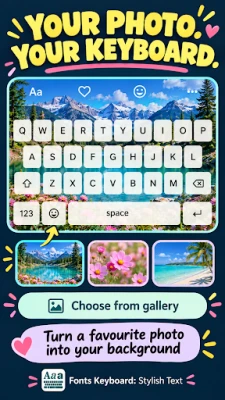
Choose a picture from your gallery and turn it into your keyboard background. Use a favourite memory, a landscape or a photo that matches your mood.
Adjust the crop, blur and background dimming to keep your photo looking good and your keys easy to read.
COLOURFUL KEYBOARD THEMES
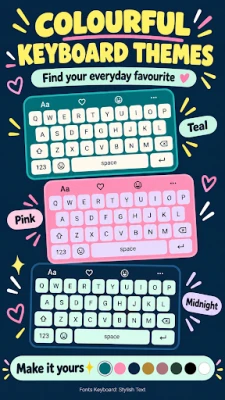
Give your keyboard a fresh look with ready-made themes or customise your own. Change the background, key colours and letter colours to create a combination you enjoy using.
Fine-tune key opacity, corners and borders for a more personal finish.
EMOJIS, SYMBOLS & KAOMOJI
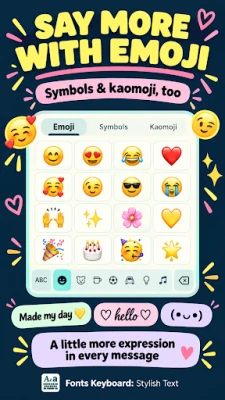
Add expression to your messages with emojis, decorative symbols and text faces. Find hearts, stars, arrows and playful kaomoji for chats, captions and profile bios.
STYLISH BIOS, CAPTIONS & NICKNAMES
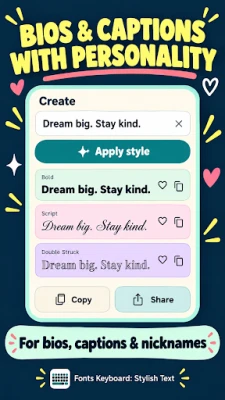
Write your text, choose a style, then copy or share the result. Create a distinctive nickname, refresh your bio or give your next caption a different look.
Start with a template or create something of your own.
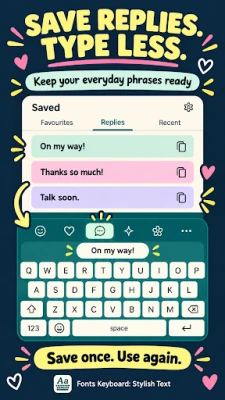
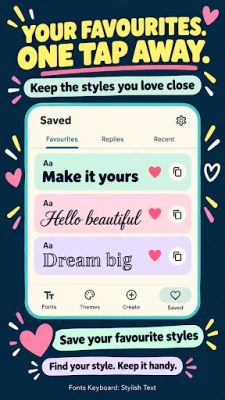
FAVOURITES & SAVED REPLIES
Keep the text styles you love within easy reach. Revisit recently used styles and save everyday phrases so you can reuse them without typing everything again.
Save a quick thank-you, a greeting or an “On my way!” message for later.
MAKE TYPING FEEL RIGHT
Adjust keyboard height, enable a number row and choose your sound and haptic preferences. Use light, dark or system appearance in the companion app.
SIMPLE, OFFLINE PERSONALISATION
Explore styles, create text and personalise your keyboard without creating an account. Core styling and customisation tools work offline, and your saved preferences stay on your device.
GET STARTED
Open the app and follow the setup steps to enable Fonts Keyboard. Choose a text style or keyboard theme, then start typing in a supported text field.
About stylish text: decorative styles use Unicode characters rather than installing system fonts. Their appearance and availability depend on the receiving app, device and supported characters. Some text fields may restrict decorative text.
220+ FONT STYLES
Turn ordinary text into bold, italic, script, double-struck and other decorative styles. Preview your own words, browse the collection and save your favourites for later.
Use the fonts keyboard while typing, or create stylish text inside the app and copy it wherever supported.
YOUR PHOTO, YOUR KEYBOARD
Choose a picture from your gallery and turn it into your keyboard background. Use a favourite memory, a landscape or a photo that matches your mood.
Adjust the crop, blur and background dimming to keep your photo looking good and your keys easy to read.
COLOURFUL KEYBOARD THEMES
Give your keyboard a fresh look with ready-made themes or customise your own. Change the background, key colours and letter colours to create a combination you enjoy using.
Fine-tune key opacity, corners and borders for a more personal finish.
EMOJIS, SYMBOLS & KAOMOJI
Add expression to your messages with emojis, decorative symbols and text faces. Find hearts, stars, arrows and playful kaomoji for chats, captions and profile bios.
STYLISH BIOS, CAPTIONS & NICKNAMES
Write your text, choose a style, then copy or share the result. Create a distinctive nickname, refresh your bio or give your next caption a different look.
Start with a template or create something of your own.
FAVOURITES & SAVED REPLIES
Keep the text styles you love within easy reach. Revisit recently used styles and save everyday phrases so you can reuse them without typing everything again.
Save a quick thank-you, a greeting or an “On my way!” message for later.
MAKE TYPING FEEL RIGHT
Adjust keyboard height, enable a number row and choose your sound and haptic preferences. Use light, dark or system appearance in the companion app.
SIMPLE, OFFLINE PERSONALISATION
Explore styles, create text and personalise your keyboard without creating an account. Core styling and customisation tools work offline, and your saved preferences stay on your device.
GET STARTED
Open the app and follow the setup steps to enable Fonts Keyboard. Choose a text style or keyboard theme, then start typing in a supported text field.
About stylish text: decorative styles use Unicode characters rather than installing system fonts. Their appearance and availability depend on the receiving app, device and supported characters. Some text fields may restrict decorative text.
Rate the App
Add Comment & Review
User Reviews
Based on 0 reviews
No reviews added yet.
Comments will not be approved to be posted if they are SPAM, abusive, off-topic, use profanity, contain a personal attack, or promote hate of any kind.














More »

Popular Apps

phpFoxPHPFOX LLC

Moon Chai StoryOlha Dobel

World War Heroes — WW2 PvP FPSAzur Interactive Games Limited

Govee LiteGovee

AvSeaAvionics Electronics Geeks!

Viking Clan: RagnarokKano Games

Vikings: War of ClansPlarium LLC

Build World AdventureExplore city in cube world

Asphalt 9: LegendsGameloft SE

Dawn of Zombies: Survival GameRoyal Ark
More »
Editor's Choice

Grim Soul: Dark Survival RPGBrickworks Games Ltd

Craft of Survival - Gladiators101XP LIMITED

Last Shelter: SurvivalLong Tech Network Limited
Dawn of Zombies: Survival GameRoyal Ark

Merge Survival : WastelandStickyHands Inc.

AoD Vikings: Valhalla GameRoboBot Studio
Viking Clan: RagnarokKano Games
Vikings: War of ClansPlarium LLC
Asphalt 9: LegendsGameloft SE

Modern Tanks: War Tank GamesXDEVS LTD