

Latest Version
Version
3.0.2
3.0.2
Update
October 26, 2026
October 26, 2026
Developer
Nunninator Apps
Nunninator Apps
Categories
Comics
Comics
Platforms
Android
Android
Downloads
0
0
License
Free
Free
Package Name
uk.co.nunninatorapps.panels
uk.co.nunninatorapps.panels
Report
Report a Problem
Report a Problem
More About Flows - Comic and Manga Reader
Flows is a comic, manga and webtoon reader for Android that reads your own files, one panel at a time or as one long scroll.
PANEL BY PANEL
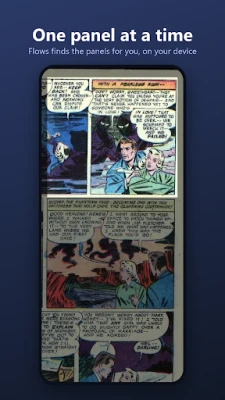
Flows finds the panels on each page for you, then zooms to one at a time and moves through them in reading order. It handles the layouts simple readers get wrong: small panels laid over a full page picture, pictures drawn across two pages, and panels that bleed into each other. Each panel is widened to take in any speech balloon that crosses its edge. Double tap any panel to zoom straight to it. Everything runs on your device, and nothing is uploaded.
YOUR LIBRARY, YOUR WAY
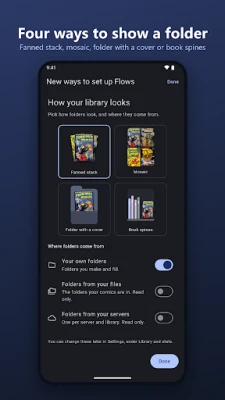
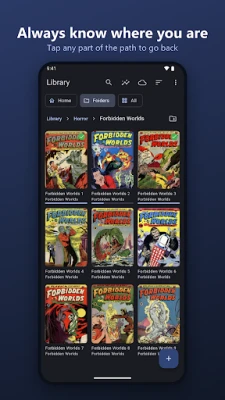
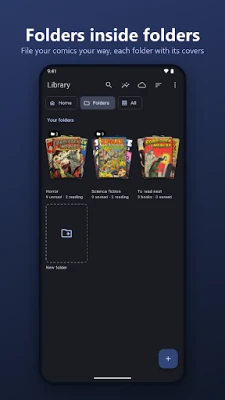
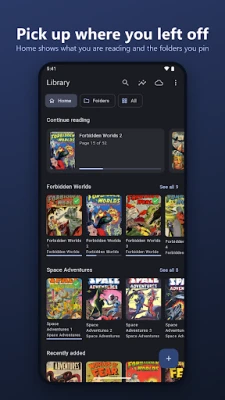
Home shows the books you are reading and the folders you pin. Folders can hold folders, and show as a fanned stack, a mosaic, a folder with a cover or book spines. Flows can also show the folders your comics are in and your servers' libraries. Every book keeps its place, down to the panel.
WEBTOONS AND CONTINUOUS SCROLL
Webtoons and other vertical strips open as one continuous scroll, the way they are drawn, and reopen at the exact spot you stopped. Pinch to zoom in on a detail. Any comic or manga can be read as a scroll too, for one book or for all of them.
READ ALOUD
Flows can read the lettering on the page out loud in your phone's own voice, panel by panel, for readers who find small lettering hard to read. Free, and it runs on your device.
BUILT FOR TABLETS
Held sideways, Flows shows facing pages side by side, the way a printed comic falls open. A picture drawn across both pages is read as one. Held upright, a wide double page can be split in two.
READS YOUR FILES
• CBZ, CBR, CB7 and CBT comic archives
• PDF and EPUB
Open them from your device, or straight from another app with Open with or Share. No account, and no library to upload into someone else's cloud.
TURN PAGES YOUR WAY
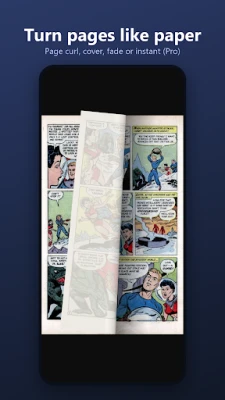
Tap, swipe, use the volume keys, or a keyboard or Bluetooth page turner. Right to left reading is supported properly, panel order included, so manga reads the way it should. Four panel manga can be read down each column instead of across the page.
EVERY SETTING WHERE YOU READ
Brightness, night reading, page layout, page turning and panel mode are all in the reader menu, in the same groups as Settings, and each book can keep its own choices. Settings can be searched, and Flows speaks 13 languages.
FLOWS PRO
One purchase, kept forever. No subscription.
• Your own server: Komga, Kavita, Stump, Audiobookshelf or any OPDS catalogue. Browse, download or read without downloading, and keep your place in sync across devices
• Edit details: fix the title, series, number, writer or publisher of a book, or of a whole series at once, written into the book and sent to Komga or Kavita
• App lock: keep your library behind your fingerprint, face or screen lock
• Sharpness: crisper line art on soft or blurry scans
• Page tints: sepia, newsprint, greyscale or high contrast
• True Black for OLED screens, and an E ink mode for electronic paper
• Read by itself: panels and pages step on at your own pace
• Reading stats, with a daily goal and your reading streak
• A watched folder, and backup and restore of your progress
Local files and folders, the reader, panel mode, continuous scroll, read aloud, two page view, volume keys, bookmarks and right to left manga are free, and always will be.
PRIVACY
Flows has no ads, no tracking and no analytics of its own. Panel and text detection run on your device. Reading stats never leave your phone. Server details you enter are stored on your device and used only to talk to your server.
Free to read your whole collection, with no account and no ads. Open a comic and tap into the first panel.
Flows finds the panels on each page for you, then zooms to one at a time and moves through them in reading order. It handles the layouts simple readers get wrong: small panels laid over a full page picture, pictures drawn across two pages, and panels that bleed into each other. Each panel is widened to take in any speech balloon that crosses its edge. Double tap any panel to zoom straight to it. Everything runs on your device, and nothing is uploaded.
YOUR LIBRARY, YOUR WAY
Home shows the books you are reading and the folders you pin. Folders can hold folders, and show as a fanned stack, a mosaic, a folder with a cover or book spines. Flows can also show the folders your comics are in and your servers' libraries. Every book keeps its place, down to the panel.
WEBTOONS AND CONTINUOUS SCROLL
Webtoons and other vertical strips open as one continuous scroll, the way they are drawn, and reopen at the exact spot you stopped. Pinch to zoom in on a detail. Any comic or manga can be read as a scroll too, for one book or for all of them.
READ ALOUD
Flows can read the lettering on the page out loud in your phone's own voice, panel by panel, for readers who find small lettering hard to read. Free, and it runs on your device.
BUILT FOR TABLETS
Held sideways, Flows shows facing pages side by side, the way a printed comic falls open. A picture drawn across both pages is read as one. Held upright, a wide double page can be split in two.
READS YOUR FILES
• CBZ, CBR, CB7 and CBT comic archives
• PDF and EPUB
Open them from your device, or straight from another app with Open with or Share. No account, and no library to upload into someone else's cloud.
TURN PAGES YOUR WAY
Tap, swipe, use the volume keys, or a keyboard or Bluetooth page turner. Right to left reading is supported properly, panel order included, so manga reads the way it should. Four panel manga can be read down each column instead of across the page.
EVERY SETTING WHERE YOU READ
Brightness, night reading, page layout, page turning and panel mode are all in the reader menu, in the same groups as Settings, and each book can keep its own choices. Settings can be searched, and Flows speaks 13 languages.
FLOWS PRO
One purchase, kept forever. No subscription.
• Your own server: Komga, Kavita, Stump, Audiobookshelf or any OPDS catalogue. Browse, download or read without downloading, and keep your place in sync across devices
• Edit details: fix the title, series, number, writer or publisher of a book, or of a whole series at once, written into the book and sent to Komga or Kavita
• App lock: keep your library behind your fingerprint, face or screen lock
• Sharpness: crisper line art on soft or blurry scans
• Page tints: sepia, newsprint, greyscale or high contrast
• True Black for OLED screens, and an E ink mode for electronic paper
• Read by itself: panels and pages step on at your own pace
• Reading stats, with a daily goal and your reading streak
• A watched folder, and backup and restore of your progress
Local files and folders, the reader, panel mode, continuous scroll, read aloud, two page view, volume keys, bookmarks and right to left manga are free, and always will be.
PRIVACY
Flows has no ads, no tracking and no analytics of its own. Panel and text detection run on your device. Reading stats never leave your phone. Server details you enter are stored on your device and used only to talk to your server.
Free to read your whole collection, with no account and no ads. Open a comic and tap into the first panel.
Rate the App
Add Comment & Review
User Reviews
Based on 0 reviews
No reviews added yet.
Comments will not be approved to be posted if they are SPAM, abusive, off-topic, use profanity, contain a personal attack, or promote hate of any kind.













More »

Popular Apps

phpFoxPHPFOX LLC

Moon Chai StoryOlha Dobel

World War Heroes — WW2 PvP FPSAzur Interactive Games Limited

Govee LiteGovee

AvSeaAvionics Electronics Geeks!

Viking Clan: RagnarokKano Games

Build World AdventureExplore city in cube world

Vikings: War of ClansPlarium LLC

Asphalt 9: LegendsGameloft SE

Dawn of Zombies: Survival GameRoyal Ark
More »
Editor's Choice

Grim Soul: Dark Survival RPGBrickworks Games Ltd

Craft of Survival - Gladiators101XP LIMITED

Last Shelter: SurvivalLong Tech Network Limited
Dawn of Zombies: Survival GameRoyal Ark

Merge Survival : WastelandStickyHands Inc.

AoD Vikings: Valhalla GameRoboBot Studio
Viking Clan: RagnarokKano Games
Vikings: War of ClansPlarium LLC
Asphalt 9: LegendsGameloft SE

Modern Tanks: War Tank GamesXDEVS LTD