Latest Version
Update
October 10, 2026
October 10, 2026
Developer
Hexabyte Lab
Hexabyte Lab
Categories
Tools
Tools
Platforms
Android
Android
Downloads
0
0
License
Free
Free
Package Name
com.firetv.tvcast.remote.control
com.firetv.tvcast.remote.control
Report
Report a Problem
Report a Problem
More About Fire TV Remote for FireStick
Turn Your Phone into a Fire TV Remote
Upgrade your Firestick experience with a simple and easy-to-use remote control app.
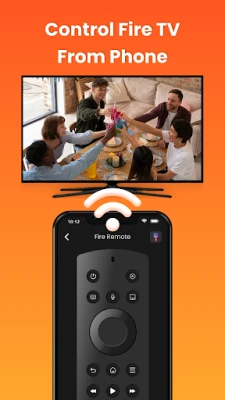
If you have lost your Fire Stick TV remote, you can easily use your smartphone as a Firestick remote control.
Navigate menus smoothly, type faster, control playback, and open apps without relying on a physical remote.
Firestick Remote for Fire TV connects over your home Wi‑Fi network to deliver a smooth, reliable, and responsive remote control experience—perfect for daily TV use.
KEY FEATURES
• Full Fire TV remote control functionality similar to a physical remote
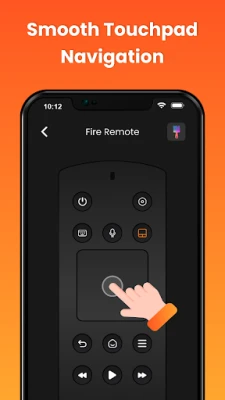
• Touchpad navigation for smooth scrolling and precise control
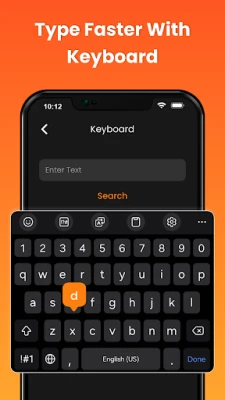
• Built-in keyboard for faster typing in searches and apps
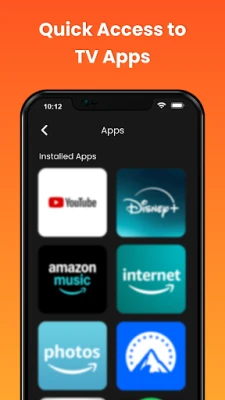
• Quick access to installed Fire TV apps and streaming channels
• One-tap power and media playback controls
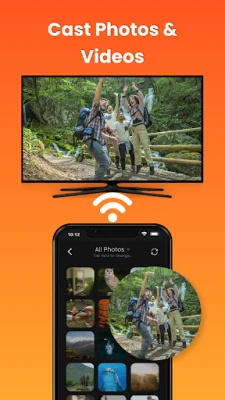
• Cast local photos and videos directly to your TV
• Screen mirroring from Android phone to Fire TV
• Auto-connect option for faster Fire TV pairing
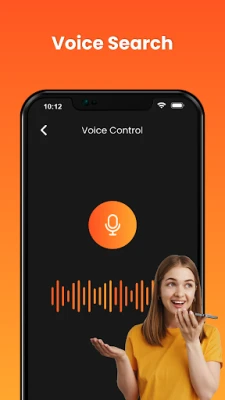
• Voice search support (availability may vary by region)
• Home screen widget for instant remote access
• Customization options: Remote theme, app theme, light/dark mode, key press sound, vibration, and flash
WHY USERS CHOOSE THIS APP
• Works as a Fire Stick remote replacement
• Useful when the original remote is lost or not working
• Faster text input compared to standard TV remotes
• Reliable Wi‑Fi remote for Fire TV devices
• Simple interface designed for everyday use
• Quick access to favorite apps and channels using Firestick remote
HOW TO USE
1. Connect your Android phone and Fire TV to the same Wi‑Fi network
2. Open the app and select your Fire TV device
3. Enter the PIN shown on your TV
4. Start controlling your Fire TV instantly
IMPORTANT NOTES
• This app is a third-party remote control solution and is not affiliated with or endorsed by Amazon or Fire TV.
• Voice search support may vary depending on device model and regional availability.
• Screen mirroring and casting performance may vary based on network strength and connectivity.
• We welcome feedback, suggestions, or improvement ideas to enhance the app experience.
• No sensitive personal data is collected.
• Permissions are used strictly for core app functionality only.
If you have lost your Fire Stick TV remote, you can easily use your smartphone as a Firestick remote control.
Navigate menus smoothly, type faster, control playback, and open apps without relying on a physical remote.
Firestick Remote for Fire TV connects over your home Wi‑Fi network to deliver a smooth, reliable, and responsive remote control experience—perfect for daily TV use.
KEY FEATURES
• Full Fire TV remote control functionality similar to a physical remote
• Touchpad navigation for smooth scrolling and precise control
• Built-in keyboard for faster typing in searches and apps
• Quick access to installed Fire TV apps and streaming channels
• One-tap power and media playback controls
• Cast local photos and videos directly to your TV
• Screen mirroring from Android phone to Fire TV
• Auto-connect option for faster Fire TV pairing
• Voice search support (availability may vary by region)
• Home screen widget for instant remote access
• Customization options: Remote theme, app theme, light/dark mode, key press sound, vibration, and flash
WHY USERS CHOOSE THIS APP
• Works as a Fire Stick remote replacement
• Useful when the original remote is lost or not working
• Faster text input compared to standard TV remotes
• Reliable Wi‑Fi remote for Fire TV devices
• Simple interface designed for everyday use
• Quick access to favorite apps and channels using Firestick remote
HOW TO USE
1. Connect your Android phone and Fire TV to the same Wi‑Fi network
2. Open the app and select your Fire TV device
3. Enter the PIN shown on your TV
4. Start controlling your Fire TV instantly
IMPORTANT NOTES
• This app is a third-party remote control solution and is not affiliated with or endorsed by Amazon or Fire TV.
• Voice search support may vary depending on device model and regional availability.
• Screen mirroring and casting performance may vary based on network strength and connectivity.
• We welcome feedback, suggestions, or improvement ideas to enhance the app experience.
• No sensitive personal data is collected.
• Permissions are used strictly for core app functionality only.
Rate the App
Add Comment & Review
User Reviews
Based on 0 reviews
No reviews added yet.
Comments will not be approved to be posted if they are SPAM, abusive, off-topic, use profanity, contain a personal attack, or promote hate of any kind.





More »

Popular Apps

phpFoxPHPFOX LLC

Moon Chai StoryOlha Dobel

World War Heroes — WW2 PvP FPSAzur Interactive Games Limited

Govee LiteGovee

Viking Clan: RagnarokKano Games

Build World AdventureExplore city in cube world

Vikings: War of ClansPlarium LLC

AvSeaAvionics Electronics Geeks!

Asphalt 9: LegendsGameloft SE

Dawn of Zombies: Survival GameRoyal Ark
More »
Editor's Choice

Grim Soul: Dark Survival RPGBrickworks Games Ltd

Craft of Survival - Gladiators101XP LIMITED

Last Shelter: SurvivalLong Tech Network Limited
Dawn of Zombies: Survival GameRoyal Ark

Merge Survival : WastelandStickyHands Inc.

AoD Vikings: Valhalla GameRoboBot Studio
Viking Clan: RagnarokKano Games
Vikings: War of ClansPlarium LLC
Asphalt 9: LegendsGameloft SE

Modern Tanks: War Tank GamesXDEVS LTD