

Latest Version
Update
August 12, 2026
August 12, 2026
Developer
Keyboard Studio : Crafting Keys
Keyboard Studio : Crafting Keys
Categories
Tools
Tools
Platforms
Android
Android
Downloads
0
0
License
Free
Free
Package Name
com.find.phone.clap.whistle.sound.funny
com.find.phone.clap.whistle.sound.funny
Report
Report a Problem
Report a Problem
More About Find My Phone By Clap
Misplaced your phone? Find it quickly with Find My Phone: Clap & Sound!
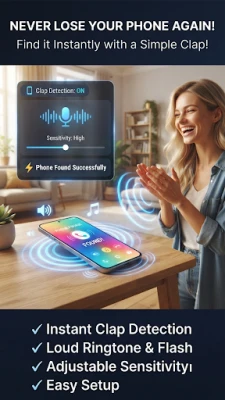
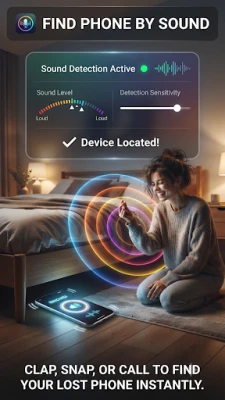
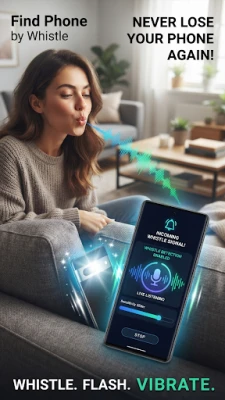
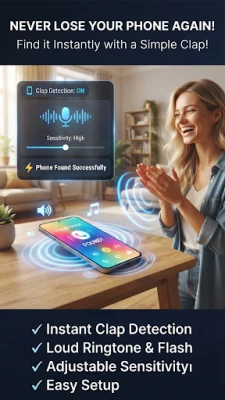
This smart phone finder app listens for your selected trigger, such as a clap, whistle, or other supported sounds. When detected, your phone responds with the alert you choose, making it easier to locate your device at home, in the office, or on the go.
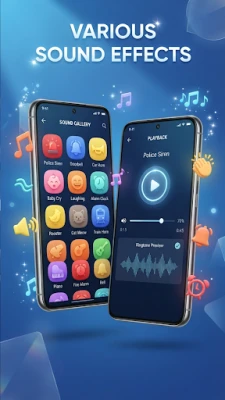
Customize your experience by selecting your favorite ringtone, alarm, or sound effect from multiple categories. You can also enable the flashlight and vibration to make your phone even easier to find.
Main Features
Find your phone by clapping
Find your phone by whistling
Sound detection support
Customizable alert sounds
Flashlight support
Vibration support
Simple and easy-to-use interface
Lightweight and optimized for Android devices
Choose Your Favorite Alert
Select the sound that plays when your phone detects a trigger:
Alarm Sounds
Bell Sounds
Siren Sounds
Animal Sounds
Funny Sounds
Digital Tones
Notification Sounds
Classic Ringtones
How It Works
Open the app and enable the phone finder service.
Select your preferred ringtone or alert sound.
Optionally enable Flashlight and Vibration.
When the selected trigger is detected, your phone will play the chosen sound and activate the flashlight (if enabled).
Why Choose Find My Phone: Clap & Sound?
Quickly locate your misplaced phone.
Personalize alerts with multiple sound categories.
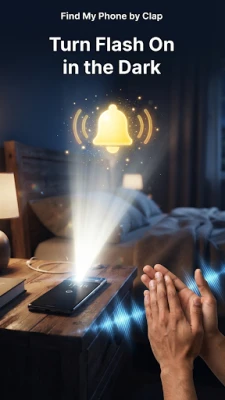
Use flashlight for better visibility in dark places.
Fast setup with a user-friendly design.
Regular updates and performance improvements.
Download Find My Phone: Clap & Sound today and make finding your device easier with customizable sounds, flashlight alerts, and smart sound detection.
Note: Microphone access is used only to detect claps, whistles, and selected sounds. When detected, the app plays your chosen alert and can activate the flashlight and vibration to help you find your phone.
Note: Flashlight access is used to blink your device's LED when a selected sound is detected, helping you locate your phone more easily, especially in low-light environments.
Customize your experience by selecting your favorite ringtone, alarm, or sound effect from multiple categories. You can also enable the flashlight and vibration to make your phone even easier to find.
Main Features
Find your phone by clapping
Find your phone by whistling
Sound detection support
Customizable alert sounds
Flashlight support
Vibration support
Simple and easy-to-use interface
Lightweight and optimized for Android devices
Choose Your Favorite Alert
Select the sound that plays when your phone detects a trigger:
Alarm Sounds
Bell Sounds
Siren Sounds
Animal Sounds
Funny Sounds
Digital Tones
Notification Sounds
Classic Ringtones
How It Works
Open the app and enable the phone finder service.
Select your preferred ringtone or alert sound.
Optionally enable Flashlight and Vibration.
When the selected trigger is detected, your phone will play the chosen sound and activate the flashlight (if enabled).
Why Choose Find My Phone: Clap & Sound?
Quickly locate your misplaced phone.
Personalize alerts with multiple sound categories.
Use flashlight for better visibility in dark places.
Fast setup with a user-friendly design.
Regular updates and performance improvements.
Download Find My Phone: Clap & Sound today and make finding your device easier with customizable sounds, flashlight alerts, and smart sound detection.
Note: Microphone access is used only to detect claps, whistles, and selected sounds. When detected, the app plays your chosen alert and can activate the flashlight and vibration to help you find your phone.
Note: Flashlight access is used to blink your device's LED when a selected sound is detected, helping you locate your phone more easily, especially in low-light environments.
Rate the App
Add Comment & Review
User Reviews
Based on 0 reviews
No reviews added yet.
Comments will not be approved to be posted if they are SPAM, abusive, off-topic, use profanity, contain a personal attack, or promote hate of any kind.














More »

Popular Apps

phpFoxPHPFOX LLC

Moon Chai StoryOlha Dobel

World War Heroes — WW2 PvP FPSAzur Interactive Games Limited

Govee LiteGovee

Build World AdventureExplore city in cube world

Viking Clan: RagnarokKano Games

Vikings: War of ClansPlarium LLC

Asphalt 9: LegendsGameloft SE

Submarine Car Diving SimulatorSwim with dolphins & penguins

Dawn of Zombies: Survival GameRoyal Ark
More »
Editor's Choice

Grim Soul: Dark Survival RPGBrickworks Games Ltd

Craft of Survival - Gladiators101XP LIMITED

Last Shelter: SurvivalLong Tech Network Limited
Dawn of Zombies: Survival GameRoyal Ark

Merge Survival : WastelandStickyHands Inc.

AoD Vikings: Valhalla GameRoboBot Studio
Viking Clan: RagnarokKano Games
Vikings: War of ClansPlarium LLC
Asphalt 9: LegendsGameloft SE

Modern Tanks: War Tank GamesXDEVS LTD