

Latest Version
Update
April 27, 2026
April 27, 2026
Developer
LRLR
LRLR
Categories
Tools
Tools
Platforms
Android
Android
Downloads
0
0
License
Free
Free
Package Name
com.xmap.bluemap
com.xmap.bluemap
Report
Report a Problem
Report a Problem
More About Fake GPS Mock Location Changer
Set your GPS to anywhere in the world — instantly.
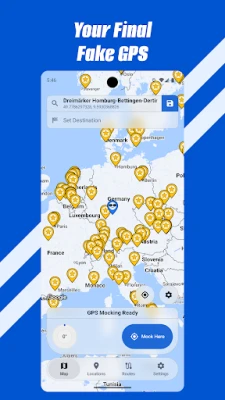
Blue Map lets you place your Android device's GPS at any location on the planet. Simulate movement along routes, control your position with a floating joystick, and manage everything through a polished, distraction-free interface.
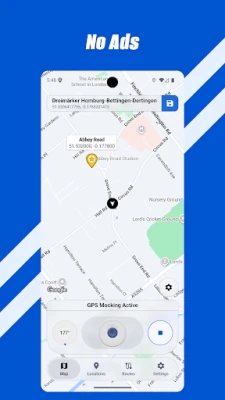
Your time is too valuable to waste on ads. Completely ad-free — no account required, no data collected.
FAKE GPS LOCATION
• Tap anywhere on the map to set your GPS position
• Search for places worldwide with built-in geocoding
• Enter exact coordinates or paste from clipboard
• Adjust altitude, heading, bearing, accuracy, and signal jitter
ROUTE SIMULATION
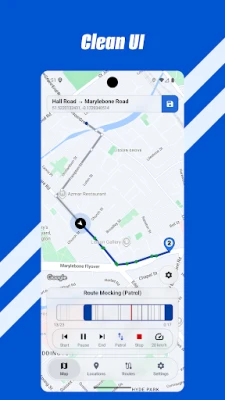
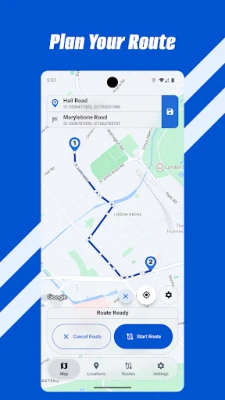
• Create routes by tapping waypoints or with road-following directions
• Import routes from GPX, KML, encoded polyline, or JSON files
• Adjustable speed with multiple playback modes — loop, patrol, or one-way
• GPS Log Replay for jump-and-dwell simulation
NATURAL GPS SIMULATION
• Built-in algorithms for accuracy, signal jitter, corner slowdown, and drift
• Mimics real-world movement patterns for realistic location behavior
• Auto-start mock location on boot or app launch
JOYSTICK & WIDGET
• Floating joystick for real-time position control
• Free, 8-way, and 4-way joystick angle modes
• Hardware keyboard support — move with arrow keys
• Speed slider and heading knob overlays
• Home screen widget — resume any saved position in one tap
LOCATIONS & ROUTES
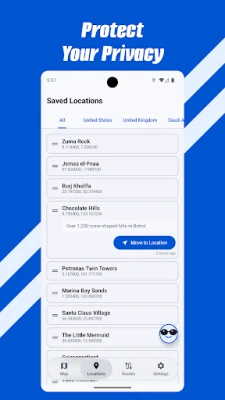
• Save, organize, and group locations and routes
• Bookmark favorites for quick access
• Full mock location history with one-tap restore
AI CONTROL
• Control Blue Map with AI assistants — Claude, Cursor, VS Code, Windsurf
• Teleport, create routes, and manage playback using natural language
• Works via MCP (Model Context Protocol) — easy npx setup
• Remote control via ADB broadcast
PRIVACY — NO ROOT REQUIRED
• No data collection — your location stays on your device
Whether you're a developer testing location features, a QA engineer verifying geofences, or someone who values privacy — Blue Map gives you full control over your GPS. No root, no compromise.
※ To use this app, you must enable Developer Options and select this app as the mock location provider.
Your time is too valuable to waste on ads. Completely ad-free — no account required, no data collected.
FAKE GPS LOCATION
• Tap anywhere on the map to set your GPS position
• Search for places worldwide with built-in geocoding
• Enter exact coordinates or paste from clipboard
• Adjust altitude, heading, bearing, accuracy, and signal jitter
ROUTE SIMULATION
• Create routes by tapping waypoints or with road-following directions
• Import routes from GPX, KML, encoded polyline, or JSON files
• Adjustable speed with multiple playback modes — loop, patrol, or one-way
• GPS Log Replay for jump-and-dwell simulation
NATURAL GPS SIMULATION
• Built-in algorithms for accuracy, signal jitter, corner slowdown, and drift
• Mimics real-world movement patterns for realistic location behavior
• Auto-start mock location on boot or app launch
JOYSTICK & WIDGET
• Floating joystick for real-time position control
• Free, 8-way, and 4-way joystick angle modes
• Hardware keyboard support — move with arrow keys
• Speed slider and heading knob overlays
• Home screen widget — resume any saved position in one tap
LOCATIONS & ROUTES
• Save, organize, and group locations and routes
• Bookmark favorites for quick access
• Full mock location history with one-tap restore
AI CONTROL
• Control Blue Map with AI assistants — Claude, Cursor, VS Code, Windsurf
• Teleport, create routes, and manage playback using natural language
• Works via MCP (Model Context Protocol) — easy npx setup
• Remote control via ADB broadcast
PRIVACY — NO ROOT REQUIRED
• No data collection — your location stays on your device
Whether you're a developer testing location features, a QA engineer verifying geofences, or someone who values privacy — Blue Map gives you full control over your GPS. No root, no compromise.
※ To use this app, you must enable Developer Options and select this app as the mock location provider.
Rate the App
Add Comment & Review
User Reviews
Based on 0 reviews
No reviews added yet.
Comments will not be approved to be posted if they are SPAM, abusive, off-topic, use profanity, contain a personal attack, or promote hate of any kind.






More »

Popular Apps

phpFoxPHPFOX LLC

Moon Chai StoryOlha Dobel

World War Heroes — WW2 PvP FPSAzur Interactive Games Limited

Govee LiteGovee

Build World AdventureExplore city in cube world

Viking Clan: RagnarokKano Games

Vikings: War of ClansPlarium LLC

Submarine Car Diving SimulatorSwim with dolphins & penguins

Asphalt 9: LegendsGameloft SE

Dawn of Zombies: Survival GameRoyal Ark
More »
Editor's Choice

Grim Soul: Dark Survival RPGBrickworks Games Ltd

Craft of Survival - Gladiators101XP LIMITED

Last Shelter: SurvivalLong Tech Network Limited
Dawn of Zombies: Survival GameRoyal Ark

Merge Survival : WastelandStickyHands Inc.

AoD Vikings: Valhalla GameRoboBot Studio
Viking Clan: RagnarokKano Games
Vikings: War of ClansPlarium LLC
Asphalt 9: LegendsGameloft SE

Modern Tanks: War Tank GamesXDEVS LTD