

Latest Version
Update
August 12, 2026
August 12, 2026
Developer
Bin Sultan App
Bin Sultan App
Categories
Entertainment
Entertainment
Platforms
Android
Android
Downloads
1
1
License
Free
Free
Package Name
fake.call.prank.caller.video.idol.fakecallgirlfriendprank
fake.call.prank.caller.video.idol.fakecallgirlfriendprank
Report
Report a Problem
Report a Problem
More About Fake Call Prank: Simulator
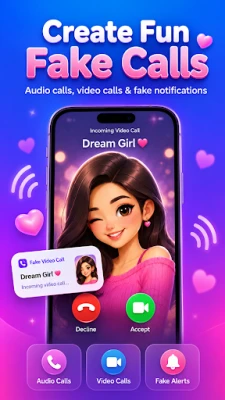
Create realistic simulated incoming calls with Fake Call Prank: Simulator.
Choose a ready-made caller or create your own fake caller profile with a custom name, photo, number, ringtone, voice, video and call-screen style. Start a fake call immediately or schedule it for the perfect moment.
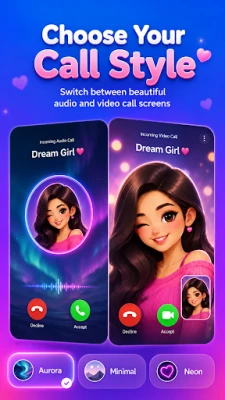
FAKE AUDIO AND VIDEO CALLS
Create a fake incoming audio call or video call directly on your device. Answer, decline or end the simulated call using a clean and realistic call screen.
Customize your prank call with:
• Caller name and profile photo
• Custom caller number or private-number label
• Audio or video call mode
• Ringtone and vibration
• Voice messages and text-to-speech
• Funny sounds and reactions
• Different original call-screen themes
• Immediate or scheduled calls
CREATE A FAKE CALL WITH A CUSTOM NUMBER
Set the caller name and fake number displayed inside the simulated call screen. Add a photo, choose a ringtone and select what should play after the call is answered.
The fake caller number is displayed only inside the app’s simulation.
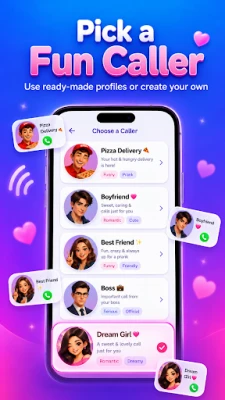
READY-MADE PRANK CALLERS
Start quickly with built-in fictional profiles such as:
• Pizza Delivery
• Food Courier
• Boss
• Friend
• Boyfriend
• Girlfriend
• Doctor
• Taxi Driver
• Landlord
• Fictional Officer
You can use a profile immediately or create an editable copy with your own caller details.
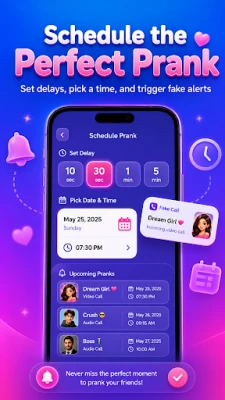
SCHEDULE A CALL PRANK
Choose when your fake call should appear:
• Call now
• After a short delay
• At a custom date and time
View upcoming prank calls and cancel schedules whenever needed.
CALL THEMES
Personalize your fake call with original call-screen styles. Choose from clean, colorful, dark or minimal themes designed specifically for the app.
Themes are original designs and do not represent or copy any phone manufacturer, messaging service or social-media application.
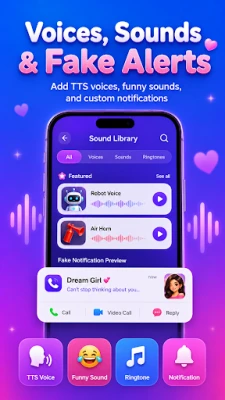
VOICES AND FUNNY SOUNDS
Make the call more entertaining with built-in voices, text-to-speech presets and funny sound effects.
Select sounds such as reactions, robot voices, doorbells, horns, laughs and other playful audio effects. You can also use supported audio from your device.
FAKE VIDEO CALLS
Create a simulated incoming video call using an imported or available video. Once answered, the selected video plays inside the fake active-call screen.
FAKE NOTIFICATIONS
Create customizable simulated notifications for harmless jokes and demonstrations.
Customize:
• Notification title
• Message text
• Generic icon
• Optional image
• Sound and vibration
• Delivery time
SIMPLE AND MINIMAL
Fake Call Prank: Simulator is designed to make every feature quick and easy to use. Create a prank in just a few taps without navigating through complicated screens.
IMPORTANT DISCLAIMER
Fake Call Prank: Simulator is intended for entertainment purposes only.
The app does not make real telephone calls, contact another phone number, spoof caller ID or connect to a mobile network. It cannot call a number from a fake number. Every call is simulated locally on your device.
Unlike prank phone call apps that contact another person, this app creates only an on-device incoming-call simulation.
All ready-made callers are fictional. The app is not affiliated with any phone manufacturer, government agency, delivery company, messaging platform or other third party.
Use the app responsibly. Do not use simulated calls or notifications for fraud, harassment, impersonation, emergencies or misleading proof of payments or official communication.
FAKE AUDIO AND VIDEO CALLS
Create a fake incoming audio call or video call directly on your device. Answer, decline or end the simulated call using a clean and realistic call screen.
Customize your prank call with:
• Caller name and profile photo
• Custom caller number or private-number label
• Audio or video call mode
• Ringtone and vibration
• Voice messages and text-to-speech
• Funny sounds and reactions
• Different original call-screen themes
• Immediate or scheduled calls
CREATE A FAKE CALL WITH A CUSTOM NUMBER
Set the caller name and fake number displayed inside the simulated call screen. Add a photo, choose a ringtone and select what should play after the call is answered.
The fake caller number is displayed only inside the app’s simulation.
READY-MADE PRANK CALLERS
Start quickly with built-in fictional profiles such as:
• Pizza Delivery
• Food Courier
• Boss
• Friend
• Boyfriend
• Girlfriend
• Doctor
• Taxi Driver
• Landlord
• Fictional Officer
You can use a profile immediately or create an editable copy with your own caller details.
SCHEDULE A CALL PRANK
Choose when your fake call should appear:
• Call now
• After a short delay
• At a custom date and time
View upcoming prank calls and cancel schedules whenever needed.
CALL THEMES
Personalize your fake call with original call-screen styles. Choose from clean, colorful, dark or minimal themes designed specifically for the app.
Themes are original designs and do not represent or copy any phone manufacturer, messaging service or social-media application.
VOICES AND FUNNY SOUNDS
Make the call more entertaining with built-in voices, text-to-speech presets and funny sound effects.
Select sounds such as reactions, robot voices, doorbells, horns, laughs and other playful audio effects. You can also use supported audio from your device.
FAKE VIDEO CALLS
Create a simulated incoming video call using an imported or available video. Once answered, the selected video plays inside the fake active-call screen.
FAKE NOTIFICATIONS
Create customizable simulated notifications for harmless jokes and demonstrations.
Customize:
• Notification title
• Message text
• Generic icon
• Optional image
• Sound and vibration
• Delivery time
SIMPLE AND MINIMAL
Fake Call Prank: Simulator is designed to make every feature quick and easy to use. Create a prank in just a few taps without navigating through complicated screens.
IMPORTANT DISCLAIMER
Fake Call Prank: Simulator is intended for entertainment purposes only.
The app does not make real telephone calls, contact another phone number, spoof caller ID or connect to a mobile network. It cannot call a number from a fake number. Every call is simulated locally on your device.
Unlike prank phone call apps that contact another person, this app creates only an on-device incoming-call simulation.
All ready-made callers are fictional. The app is not affiliated with any phone manufacturer, government agency, delivery company, messaging platform or other third party.
Use the app responsibly. Do not use simulated calls or notifications for fraud, harassment, impersonation, emergencies or misleading proof of payments or official communication.
Rate the App
Add Comment & Review
User Reviews
Based on 0 reviews
No reviews added yet.
Comments will not be approved to be posted if they are SPAM, abusive, off-topic, use profanity, contain a personal attack, or promote hate of any kind.















More »

Popular Apps

phpFoxPHPFOX LLC

Moon Chai StoryOlha Dobel

World War Heroes — WW2 PvP FPSAzur Interactive Games Limited

Govee LiteGovee

Viking Clan: RagnarokKano Games

Build World AdventureExplore city in cube world

Vikings: War of ClansPlarium LLC

AvSeaAvionics Electronics Geeks!

Asphalt 9: LegendsGameloft SE

Dawn of Zombies: Survival GameRoyal Ark
More »
Editor's Choice

Grim Soul: Dark Survival RPGBrickworks Games Ltd

Craft of Survival - Gladiators101XP LIMITED

Last Shelter: SurvivalLong Tech Network Limited
Dawn of Zombies: Survival GameRoyal Ark

Merge Survival : WastelandStickyHands Inc.

AoD Vikings: Valhalla GameRoboBot Studio
Viking Clan: RagnarokKano Games
Vikings: War of ClansPlarium LLC
Asphalt 9: LegendsGameloft SE

Modern Tanks: War Tank GamesXDEVS LTD