

Latest Version
Update
November 01, 2026
November 01, 2026
Developer
EonByte Labs
EonByte Labs
Categories
Communication
Communication
Platforms
Android
Android
Downloads
0
0
License
Free
Free
Package Name
com.eonbrowser.privatebrowser
com.eonbrowser.privatebrowser
Report
Report a Problem
Report a Problem
More About Eon Private Browser
Eon Private Browser - Simple Incognito Browsing
Eon Private Browser is a clean, lightweight and flexible private browser for Android designed around one simple idea: browsing starts in incognito mode.
Instead of switching between normal and private browsing, Eon Private Browser keeps the browsing experience focused on private sessions while giving you the everyday browser tools you need.
Search the web, open websites, manage tabs, scan QR codes, download files, block supported ads, save useful pages and customize your browser from one straightforward app.
INCOGNITO-ONLY BROWSING
Eon Private Browser is designed as an incognito browser. Your browsing sessions open in private mode, making it convenient when you prefer not to use a traditional browsing window.
Browse websites, search for information and open links without having to manually activate an incognito tab every time.
PRIVATE BROWSING MADE SIMPLE
Get a familiar browser experience with privacy-focused browsing at its core.
Use Eon Private Browser for:
• Private web browsing
• Incognito searches
• Opening website links
• Multiple private tabs
• Quick access to favorite websites
• Downloading supported files
• Managing browsing data
SMART AD BLOCKER
Enable the built-in Smart Ad Blocker to reduce supported advertisements and unwanted page elements while browsing.
A cleaner webpage can make reading and navigating websites more comfortable.
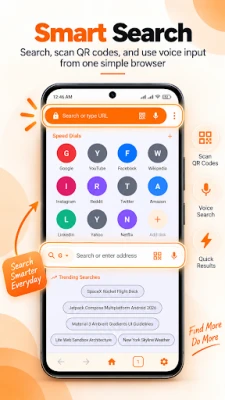
SEARCH YOUR WAY
Search directly from the browser using text or voice search.
Choose your preferred search engine from the available options and change it whenever you want from browser settings.
SCAN AND OPEN QR LINKS
Eon Private Browser includes a built-in QR code scanner for website links.
Scan supported QR codes and open their URLs directly inside the private browser without needing a separate QR scanning app for basic web links.
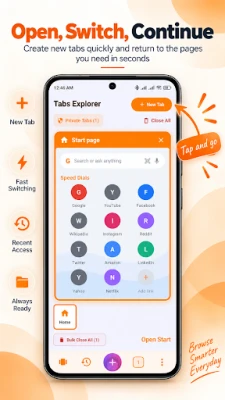
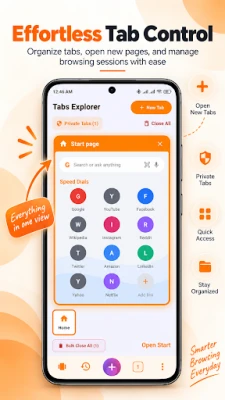
MULTIPLE TAB OPTIONS
Organize private browsing sessions using different tab layouts.
Eon Private Browser includes three tab systems, allowing you to choose the browsing style that feels most comfortable for you.
Open multiple webpages, move between tabs and keep your current browsing session organized.
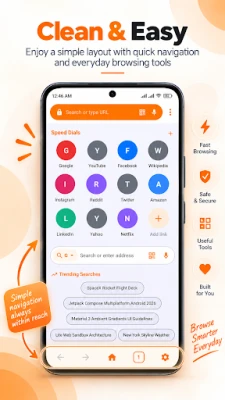
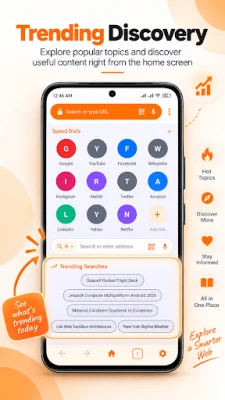
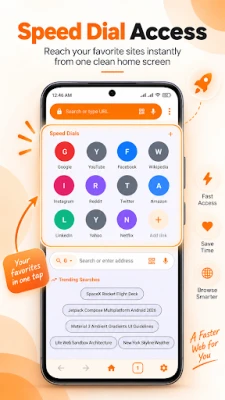
SPEED DIAL
Keep frequently visited websites close with Speed Dial.
Add the websites you access regularly and open them quickly whenever you start browsing.
BOOKMARK YOUR FAVORITE PAGES
Found something useful?
Save webpages as bookmarks so you can easily return to your favorite sites later.
DATA SAVER
Use the built-in Data Saver option when you want additional control over browser data usage.
It gives you another useful setting for managing how you browse, especially when using mobile data.
PERSONALIZE YOUR BROWSER
Make Eon Private Browser feel more personal by choosing from four available theme colors.
Select your preferred look while keeping the interface clean and easy to navigate.
DOWNLOAD FILES
Download supported files directly while browsing and access your downloaded content when needed.
BROWSING DATA CONTROLS
Eon Private Browser provides controls for locally stored browsing information.
Manage available browsing data such as:
• History
• Cache
• Cookies
• Other supported browsing information
You remain in control of the browser data available through the app's settings.
KEY FEATURES
• Incognito-only browsing experience
• Private browser for Android
• Multiple private tabs
• Three tab management styles
• Smart Ad Blocker
• Data Saver
• Voice search
• Built-in QR code scanner
• Changeable search engine
• Speed Dial
• Website bookmarks
• File downloads
• Browsing data controls
• Four theme colors
• Clean and simple browser interface
A PRIVATE BROWSER FOR EVERYDAY USE
Whether you want to search privately, visit websites, scan a QR link, organize multiple tabs, save a bookmark, download a file or reduce supported ads, the tools you need are close at hand.
No need to switch into a separate private browsing mode. Simply open Eon Private Browser and start browsing.
Instead of switching between normal and private browsing, Eon Private Browser keeps the browsing experience focused on private sessions while giving you the everyday browser tools you need.
Search the web, open websites, manage tabs, scan QR codes, download files, block supported ads, save useful pages and customize your browser from one straightforward app.
INCOGNITO-ONLY BROWSING
Eon Private Browser is designed as an incognito browser. Your browsing sessions open in private mode, making it convenient when you prefer not to use a traditional browsing window.
Browse websites, search for information and open links without having to manually activate an incognito tab every time.
PRIVATE BROWSING MADE SIMPLE
Get a familiar browser experience with privacy-focused browsing at its core.
Use Eon Private Browser for:
• Private web browsing
• Incognito searches
• Opening website links
• Multiple private tabs
• Quick access to favorite websites
• Downloading supported files
• Managing browsing data
SMART AD BLOCKER
Enable the built-in Smart Ad Blocker to reduce supported advertisements and unwanted page elements while browsing.
A cleaner webpage can make reading and navigating websites more comfortable.
SEARCH YOUR WAY
Search directly from the browser using text or voice search.
Choose your preferred search engine from the available options and change it whenever you want from browser settings.
SCAN AND OPEN QR LINKS
Eon Private Browser includes a built-in QR code scanner for website links.
Scan supported QR codes and open their URLs directly inside the private browser without needing a separate QR scanning app for basic web links.
MULTIPLE TAB OPTIONS
Organize private browsing sessions using different tab layouts.
Eon Private Browser includes three tab systems, allowing you to choose the browsing style that feels most comfortable for you.
Open multiple webpages, move between tabs and keep your current browsing session organized.
SPEED DIAL
Keep frequently visited websites close with Speed Dial.
Add the websites you access regularly and open them quickly whenever you start browsing.
BOOKMARK YOUR FAVORITE PAGES
Found something useful?
Save webpages as bookmarks so you can easily return to your favorite sites later.
DATA SAVER
Use the built-in Data Saver option when you want additional control over browser data usage.
It gives you another useful setting for managing how you browse, especially when using mobile data.
PERSONALIZE YOUR BROWSER
Make Eon Private Browser feel more personal by choosing from four available theme colors.
Select your preferred look while keeping the interface clean and easy to navigate.
DOWNLOAD FILES
Download supported files directly while browsing and access your downloaded content when needed.
BROWSING DATA CONTROLS
Eon Private Browser provides controls for locally stored browsing information.
Manage available browsing data such as:
• History
• Cache
• Cookies
• Other supported browsing information
You remain in control of the browser data available through the app's settings.
KEY FEATURES
• Incognito-only browsing experience
• Private browser for Android
• Multiple private tabs
• Three tab management styles
• Smart Ad Blocker
• Data Saver
• Voice search
• Built-in QR code scanner
• Changeable search engine
• Speed Dial
• Website bookmarks
• File downloads
• Browsing data controls
• Four theme colors
• Clean and simple browser interface
A PRIVATE BROWSER FOR EVERYDAY USE
Whether you want to search privately, visit websites, scan a QR link, organize multiple tabs, save a bookmark, download a file or reduce supported ads, the tools you need are close at hand.
No need to switch into a separate private browsing mode. Simply open Eon Private Browser and start browsing.
Rate the App
Add Comment & Review
User Reviews
Based on 0 reviews
No reviews added yet.
Comments will not be approved to be posted if they are SPAM, abusive, off-topic, use profanity, contain a personal attack, or promote hate of any kind.













More »

Popular Apps

phpFoxPHPFOX LLC

Moon Chai StoryOlha Dobel

World War Heroes — WW2 PvP FPSAzur Interactive Games Limited

Govee LiteGovee

AvSeaAvionics Electronics Geeks!

Viking Clan: RagnarokKano Games

Vikings: War of ClansPlarium LLC

Build World AdventureExplore city in cube world

Asphalt 9: LegendsGameloft SE

Dawn of Zombies: Survival GameRoyal Ark
More »
Editor's Choice

Grim Soul: Dark Survival RPGBrickworks Games Ltd

Craft of Survival - Gladiators101XP LIMITED

Last Shelter: SurvivalLong Tech Network Limited
Dawn of Zombies: Survival GameRoyal Ark

Merge Survival : WastelandStickyHands Inc.

AoD Vikings: Valhalla GameRoboBot Studio
Viking Clan: RagnarokKano Games
Vikings: War of ClansPlarium LLC
Asphalt 9: LegendsGameloft SE

Modern Tanks: War Tank GamesXDEVS LTD